InMoment (formerly Wootric)
5 minute read
InMoment (formerly Wootric) is a cloud-based customer feedback management platform that helps product, customer success, and marketing leaders to improve the customer experience.
RudderStack supports InMoment as a destination where you can seamlessly send your event data.
Connection compatibility
| Destination Information | |||
|---|---|---|---|
| |||


Get started
Once you have confirmed that the source platform supports sending events to InMoment, follow these steps:
- From your RudderStack dashboard, add a source. Then, from the list of destinations, select Wootric.
- Assign a name to the destination and click Continue.
Connection settings
To successfully configure InMoment as a destination, you will need to configure the following settings:
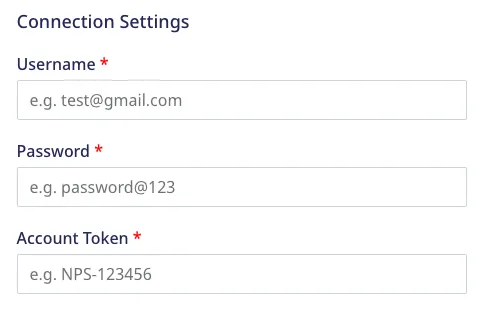
- Username: Enter the email you use to log in to your InMoment account.
- Password: Enter the password you use to log in to InMoment.
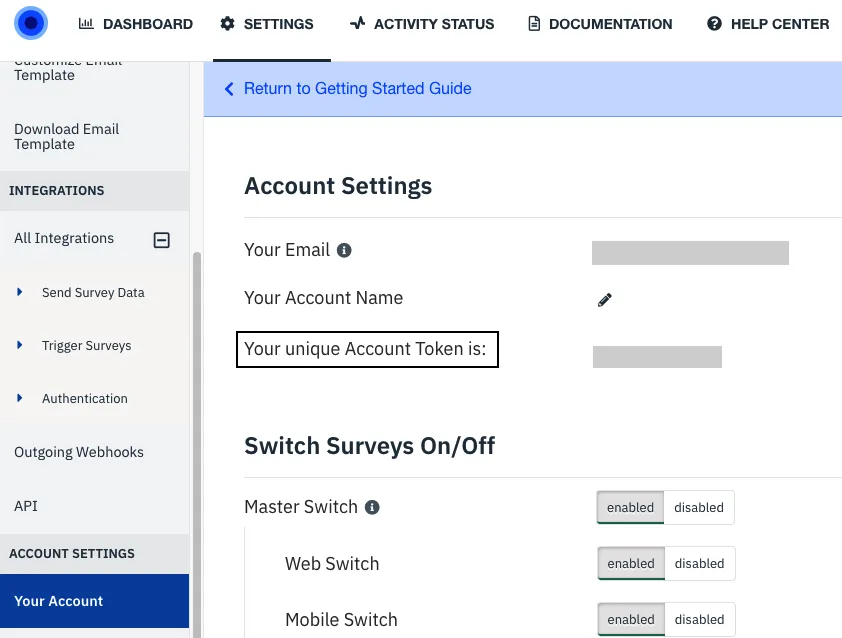
- Account Token: Enter the unique account token from the InMoment dashboard by navigating to Settings > Your Account.
Refer to the FAQ section below for more information on getting the InMoment account token.
Identify
You can use the identify call to create or update a user in InMoment.
RudderStack follows the below approach to look up a user and update their details:
- If your event contains
context.externalId.0.id(the Wootric user ID), RudderStack updates the user details against this ID. A sample snippet containingcontext.externalId.0.idis as shown:
{
  "context": {
    "externalId": [{
      "type": "wootricEndUserId",
      "id": "12345"
    }]
  }
}- If
context.externalId.0.idis absent, RudderStack then looks for theexternal_id(RudderStack’suserId) field. If it exists, RudderStack updates the user against this ID.
RudderStack uses InMoment’s End user lookup API to retrieve user viacontext.externalId.0.idand the External ID lookup API to retrieve a user viaexternal_id. For more information, refer to the Property mappings section below.
- If none of
context.externalId.0.idorexternal_idare present, RudderStack creates a new user in Wootric.
A sample identify call is shown below:
rudderanalytics.identify("1hKOmRA4GRlm", {
    email: "alex@example.com",
    phone: "+12025550146",
    name: "Alex Keener",
    city: "New Orleans",
    gender: "male",
    createdAt: "2021-01-20T13:39:21.032Z",
    timestamp: "2021-01-20T13:39:21.032Z"
});
Property mappings
The following tables list the mappings between RudderStack and InMoment events/properties based on the operation being performed:
Retrieve a user by external ID
RudderStack property InMoment property Presence Data type userId/traits.userId/traits.id/context.traits.userId/context.traits.idexternal_idRequired String Retrieve a user by end user ID
RudderStack property InMoment property Presence Data type context.externalId.0.ididRequired String RudderStack property InMoment property Presence Data type userId/traits.userId/traits.id/context.traits.userId/context.traits.idexternal_idRequired String context.traits.email/traits.email/properties.emailemailOptional, if phoneis present.String context.traits.phone/traits.phone/properties.phonephone_numberOptional, if emailis present.String (Phone number with country code, for example, +12025550146)context.traits/traitspropertiesOptional Hash (key-value pair) originalTimestamp/timestamplast_surveyedOptional String (UNIX timestamp) context.traits.createdAt/traits.createdAtexternal_created_atOptional String (UNIX timestamp)
At least one parameter out ofphoneis required to create a user.
- Update a user
RudderStack property InMoment property Presence Data type Retrieved ID from context.externalId.0.idif present, else fromexternal_idend_user_idRequired String context.traits.email/traits.email/properties.emailemailOptional String context.traits.phone/traits.phone/properties.phonephone_numberOptional String (Phone number with country code, for example, +12025550146)context.traits/traitspropertiesOptional Hash (key-value pair) originalTimestamp/timestamplast_surveyedOptional String (UNIX timestamp) context.traits.createdAt/traits.createdAtexternal_created_atOptional String (UNIX timestamp)
Track
You can use the track call to:
- Create a survey response by the end user
- Create a survey decline by the end user
RudderStack also updates the user properties if they are present in the event.
You can use thetrackevents only for the existing Wootric users.
RudderStack checks the message.integrations.Wootric.eventType field to determine whether to create a response or a decline.
A sample track call is shown below:
rudderanalytics.track(
    "Submit", {
        feedbackScore: 9,
        feedbackText: "Great Product!",
        ip: "127.0.0.0",
        url: "https://www.google.com/",
        createdAt: "2022-01-20T13:39:21.032Z"
    }, {
        integrations: {
            Wootric: {
                eventType: "create response",
            },
        },
    }
);
You will get an error if theeventTypeis set to any value other thancreate responseorcreate decline.
Property mappings
The following tables list the mappings between RudderStack and InMoment properties based on the end user’s survey response/decline:
- Create a survey response
RudderStack property InMoment property Presence Data type Retrieved ID from context.externalId.0.idif present, else fromexternal_idend_user_idRequired String properties.feedbackScorescoreRequired Integer context.ip/request_ipip_addressRequired Text context.page.url/properties.urlorigin_urlRequired Text properties.feedbackTexttextOptional Text context.traits.createdAt/traits.createdAtcreated_atOptional String (UNIX timestamp) context.traits/traitsend_user.propertiesOptional Hash (key-value pair)
If Wootric receives a new survey response request for the same user within a 24-hour window, it updates the last response. Otherwise, it creates a new survey response for the user.
- Create a survey decline
RudderStack property InMoment property Presence Data type Retrieved ID from context.externalId.0.idif present, else fromexternal_idend_user_idRequired Integer context.page.url/properties.urlorigin_urlOptional String context.traits.createdAt/traits.createdAtcreated_atOptional String (UNIX timestamp) context.traits/traitsend_user.propertiesOptional Hash (key-value pair)
If Wootric receives a new survey decline request for the same user within a 24-hour window, it updates the last decline. Otherwise, it creates a new survey decline for the user.
FAQ
Where can I find the InMoment account token?
To find the InMoment account token:
- Log into your InMoment account.
- Click the Settings icon in the top navigation bar: