impact.com
5 minute read
impact.com is a global partnership management platform that helps in managing and scaling different partnerships, such as affiliates, influencers, strategic business partners, mobile apps, commerce content publishers, B2B, and more.
Find the open source transformer code for this destination in the GitHub repository.
Connection compatibility
| Destination Information | |||
|---|---|---|---|
| |||


Get started
Once you have confirmed that the source platform supports sending events to impact.com, follow these steps:
- From your RudderStack dashboard, add a source. Then, from the list of destinations, select Impact Radius.
- Assign a name to the destination and click Continue.
Connection settings
To successfully configure impact.com as a destination, you will need to configure the following settings:
- Account SID: Enter the account SID present in the Settings > API option in the impact.com dashboard.
- API Key: Enter the auth token present in the Settings > API option in the impact.com dashboard.
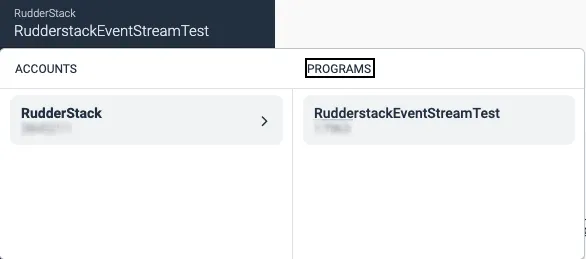
- Campaign Id: Enter the campaign ID present in the Account > Programs option in your the impact.com dashboard:
- Impact App Id: Enter the system app ID present in the Settings > Mobile Apps option in the impact.com dashboard.
- Event Type Id: Enter the ID present in the Settings > Event Type option in the impact.com dashboard.
- Enable to hash email: Enable this setting to hash the
emailfield in SHA1 format. Keep it disabled in case it is already hashed.
impact.com expects the
- Additional parameters mapping: Enter the property mappings from RudderStack to impact.com for any additional parameters (other than the default ones mentioned in the sections below).
- Custom mapping for Products: Enter the custom property mappings for the
productsarray. - Enable Identify Events: Enable this setting to send the
identifyevents. - Enable Page Events: Enable this setting to send the
pageevents. - Enable Screen Events: Enable this setting to send the
screenevents. - Action Event Names: Enter the list of event names you want to track as user actions.
- Install Event Names: Enter the list of event names corresponding to the app install events.
Identify
You can send an identify call to impact.com via the PageLoad endpoint. It allows impact.com to update the user identifiers for an accurate correlation.
A sample identify call is shown below:
rudderanalytics.identify("1hKOmRA4el9Zt1WSfVJIVo4GRlm", {
  email: "alex@example.com",
});
Property mappings
The following table lists the mappings between RudderStack and impact.com properties:
| RudderStack property | impact.com property |
|---|---|
context.device.id | AppleIfv |
context.app.name | AppName |
context.app.build | AppPackage |
context.app.version | AppVer |
settings.campaignId | CampaignId |
context.traits.emailproperties.email | CustomerEmail |
userId | CustomerId |
anonymousId | CustomProfileId |
context.network.carrier | DeviceCarrier |
context.locale | DeviceLocale |
context.device.manufacturer | DeviceMfr |
context.device.model | DeviceModel |
context.device.typecontext.os.name | DeviceOs |
context.os.version | DeviceOsVer |
timestamporiginalTimestamp | EventDate |
context.device.id | GoogAId |
context.ip | IpAddress |
context.page.urlproperties.urlcontext.page.referrercontext.referrer.url | PageUrl |
context.referrer.urlcontext.page.referrer | ReferringUrl |
context.userAgent | UserAgent |
context.device.advertisingId | AppleIfa |
At least one of theuserId,anonymousId,context.device.id, orcontext.device.advertisingIdparameters is required to make anidentifycall successfully.
Track
The track call lets you capture user events along with the properties associated with them.
RudderStack sends the track events listed in the Action Event Names and Install Event Names dashboard settings to impact.com using the Conversions endpoint. All the other track events are sent using the PageLoad endpoint.
A sample track call is shown below:
rudderanalytics.track("Order Completed", {
  order_id: "1234",
  shipping: 22,
  tax: 1,
  discount: 1.5,
  coupon: "ImagePro",
  currency: "USD",
  products: [{
      sku: "G-32",
      name: "Monopoly",
      price: 14,
      quantity: 1,
      category: "Games",
      brand: "top"
    },
    {
      sku: "G-34",
      name: "Monopoly",
      price: 16,
      quantity: 3,
      category: "Games",
      brand: "top"
    },
  ],
})
Property mappings
The following table lists the mappings between RudderStack and impact.com properties:
| RudderStack property | impact.com property |
|---|---|
properties.orderIdproperties.order_idproperties.transactionIDproperties.checkout_idRequired | OrderId |
timestamporiginalTimestampRequired | EventDate |
eventRequired, if settings.eventTypeId is absent. | EventTypeCode |
settings.eventTypeIdRequired, if event is absent. | EventTypeId |
context.device.adTrackingEnabled | TrackingConsent |
context.device.advertisingId | AppleIfa |
context.device.id | AppleIfv |
context.app.name | AppName |
context.app.build | AppPackage |
context.device.id | AndroidId |
context.app.version | AppVer |
settings.campaignId | CampaignId |
context.referrer.idproperties.clickId | ClickId |
properties.currency | CurrencyCode |
context.traits.emailproperties.email | CustomerEmail |
userId | CustomerId |
context.traits.status | CustomerStatus |
anonymousId | CustomProfileId |
context.network.carrier | DeviceCarrier |
context.locale | DeviceLocale |
context.device.manufacturer | DeviceMfr |
context.device.model | DeviceModel |
context.device.typecontext.os.name | DeviceOs |
context.os.version | DeviceOsVer |
context.device.advertisingId | GoogAId |
context.iprequest_ip | IpAddress |
properties.products[i].brand | ItemBrand{i} |
properties.products[i].category | ItemCategory{i} |
properties.products[i].name | ItemName{i} |
properties.products[i].price | ItemPrice{i} |
properties.products[i].coupon | ItemPromoCode{i} |
properties.products[i].quantity | ItemQuantity{i} |
properties.products[i].sku | ItemSku{i} |
context.location.latitude | Latitude |
context.location.longitude | Longitude |
properties.discount | OrderDiscount |
properties.couponproperties.coupon_id | OrderPromoCode |
properties.shipping | OrderShipping |
properties.tax | OrderTax |
context.referrer.urlcontext.page.referrer | ReferringUrl |
context.page.urlproperties.urlcontext.page.referrercontext.referrer.url | PageUrl |
context.userAgent | UserAgent |
Apart from the required properties mentioned above, at least one of thecontext.referrer.id/properties.clickId,userId,anonymousId,properties.coupon/properties.coupon_id,context.device.id,context.device.advertisingId, orcontext.device.idis required to make atrackcall successfully.
Page
The page method lets you record your website’s page views with any additional relevant information about the viewed page. You can send a page call to impact.com via the PageLoad endpoint.
A sample page call is as shown:
rudderanalytics.page("category", "name", {
      path: "path",
      url: "url",
      title: "title"
    }
The property mappings forpagecall are exactly the same asidentifycall. Refer to the property mappings section for more details.
Screen
The screen call lets you record whenever your user views their mobile screen, with any additional relevant information about the screen. You can send a screen call to impact.com via the PageLoad endpoint.
A sample screen call is as shown:
[
  [RSClient sharedInstance] screen: @ "Sample Screen Name"
  properties: @ {
    @ "prop_key": @ "prop_value"
  }
];
The property mappings forscreencall are exactly the same asidentifycall. Refer to the property mappings section for more details.
FAQ
How can I debug the impact.com errors?
Any errors may arise due to the failed pathing, invalid parameters, authentication errors, and network unavailability. Refer to the impact.com Errors documentation for more information. Additionally, you can also refer to their Rate Limits documentation for more information on the API call limits.
