Set up HubSpot Destination in RudderStack
4 minute read
This guide will help you set up HubSpot as a destination in RudderStack.
Connection compatibility
| Destination Information | |||
|---|---|---|---|
| |||


In the web device mode integration, that is, using JavaScript SDK as a source, RudderStack loads the HubSpot native SDK from the
https://js.hs-scripts.com/domain.Based on your website’s content security policy, you might need to allowlist this domain to load the HubSpot SDK successfully.
Setup
- In your RudderStack dashboard, set up a source.
- Go to the Overview tab of your source and select Add Destination > Create new destination.
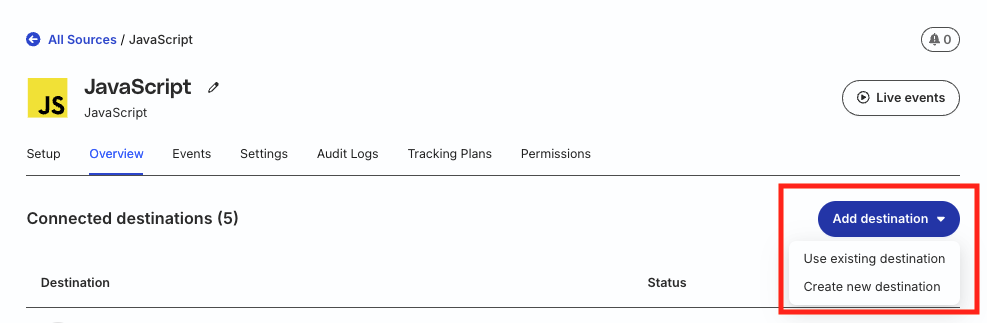
- Select HubSpot from the list of destinations. Then, click Continue.
Connection settings
| Setting | Description |
|---|---|
| Name | Assign a name to uniquely identify the destination in your RudderStack dashboard. |
| API Version | Select the HubSpot API version from the dropdown. RudderStack supports both the New API (v3) and Legacy API (v1) (deprecated). |
HubSpot has deprecated the legacy API (v1). RudderStack recommends using the New API (v3) instead.
Authentication settings
HubSpot API key authentication is no longer supported. Use a HubSpot private app access token to authenticate your HubSpot destination.
| Setting | Description |
|---|---|
| Access Token | Specify the HubSpot private app access token. This setting applies to both the New API (v3) and Legacy API (v1). |
New API settings
These settings are only applicable if you selected New API (v3) as the API version:
| Setting | Description |
|---|---|
| HubSpot property to be used for upsert | Enter the contact property that RudderStack uses as a lookup field to match contacts in HubSpot, for example, uniqueId. Make sure to then pass the same property in the identify event’s traits object with the value to upsert.For best performance, use a property that is unique in HubSpot — unique properties enable batch upsert and higher throughput, whereas non-unique properties use a slower search-based flow. For more information, see HubSpot’s Create or update a batch of contacts API reference.
See the identify section for more information. |
| Create association between object records | Toggle on this setting to create associations between the object records while using a Reverse ETL source. See Creating associations between object records section for more information. |
Configuration settings
| Setting | Description |
|---|---|
| Hub ID | Specify your HubSpot Hub ID. See the HubSpot documentation for more information on obtaining this ID. |
Consent settings
| Setting | Description |
|---|---|
| Consent settings | Configure the consent management settings for the specified sources by choosing the Consent management provider from the dropdown and entering the relevant consent category IDs. See Consent Management in RudderStack for more information on this feature. |
Web device mode settings
The below setting is applicable only if you want to send events to HubSpot in the web device mode:
| Setting | Description |
|---|---|
| Client-side Events Filtering | This setting lets you specify which events should be blocked or allowed to flow through to HubSpot. See Client-side Events Filtering for more information on this feature. |
Event mapping settings
These settings are applicable only for the New HubSpot API.
Click Set up mapping and map RudderStack events to your HubSpot custom behavioral events.
Although HubSpot provides some default properties with custom behavioral events, you can create additional custom properties and map them to specific RudderStack properties using these settings.
You can also specify multiple properties for a single event.
FAQ
Where can I find the HubSpot access token?
- Log in to your HubSpot account.
- Go to Integrations > Private Apps from the left sidebar.
- Click your app to get the access token:
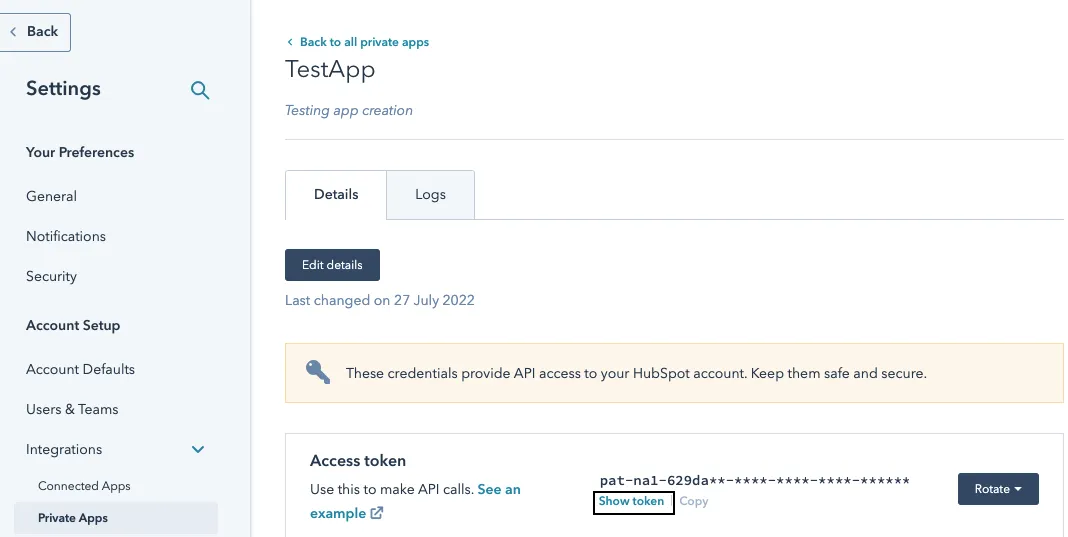
If you’re connecting a Reverse ETL source to HubSpot that uses private app access token for authentication, make sure your access token has the required scopes.
See the HubSpot documentation for more information on adding the above scopes.
