Google Pub/Sub
5 minute read
Google Pub/Sub is an asynchronous messaging service that allows you to decouple the services that produce events from the services that process events. With Pub/Sub, you get durable message storage as well as a real-time message delivery system. The Google Pub/Sub servers run reliably with a consistent performance in all Google Cloud regions over the world.
RudderStack allows you to configure Google Pub/Sub as a destination and send your event data to it directly.
Find the open source transformer code for this destination in the GitHub repository.
Connection compatibility
| Destination Information | |||
|---|---|---|---|
| |||


Get started
Once you have confirmed that the platform supports sending events to Google Pub/Sub, perform the steps below:
- From your RudderStack dashboard, add the source. From the list of destinations, select Google Pub/Sub.
- Give a name to the destination and click Next. You should then see the following screen:
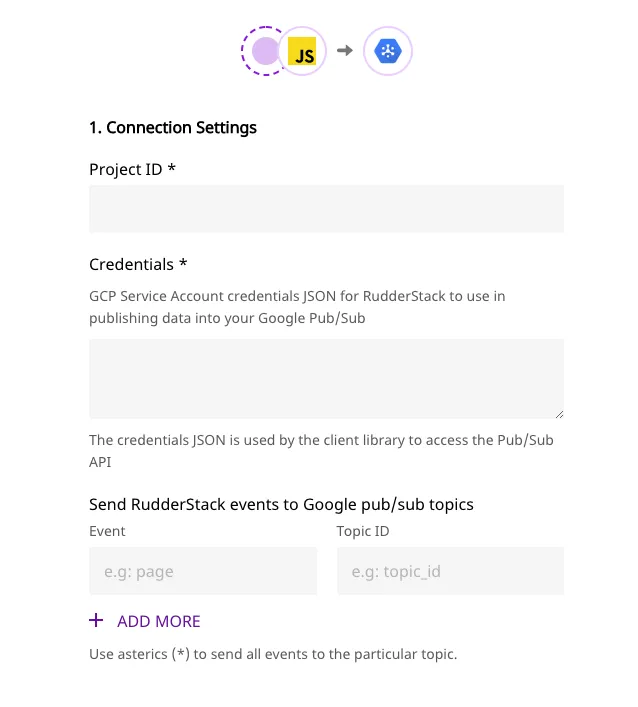
- Enter the following details:
- Connection Settings
- Project ID and the Credentials: Follow these steps to obtain the project ID as well as the required credentials:
- Create a service account from Google Cloud Console.
- You can get the Project ID when you log in to your Google Cloud Console.
- Use the Select a role dropdown to add the Pub/Sub Publisher role.
- Create a key as JSON and download it.
- Paste this downloaded JSON in the Credentials field
- Enter the Event Name as well as the corresponding Topic ID. You can get the topic id from your topics page:
- Project ID and the Credentials: Follow these steps to obtain the project ID as well as the required credentials:
- Connection Settings

You can send an event
typelikepage,identify,track. For thetrackevents you can specify the event name based on theeventname in the payload.For example:
- If the event name is
pageit will send all calls with thetypepage.- If the event name is
product added, it will send all track events with theeventasproduct added.
If you want to send all events to a particular stream irrespective of the type or name, you can use*as the event name.
The topic ID is case-sensitive and has to be exactly as seen in Google Pub/Sub. On the other hand, the event name is case insensitive, and thusPageorpagewill both be considered as valid.
- Finally, click Next to complete the configuration. Pub/Sub should now be added and enabled as a destination in RudderStack.
Attributes
You can send attributes to Google Pub/Sub along with the message. In order to send the attributes, enter the required attribute mapping in the RudderStack dashboard as seen below:
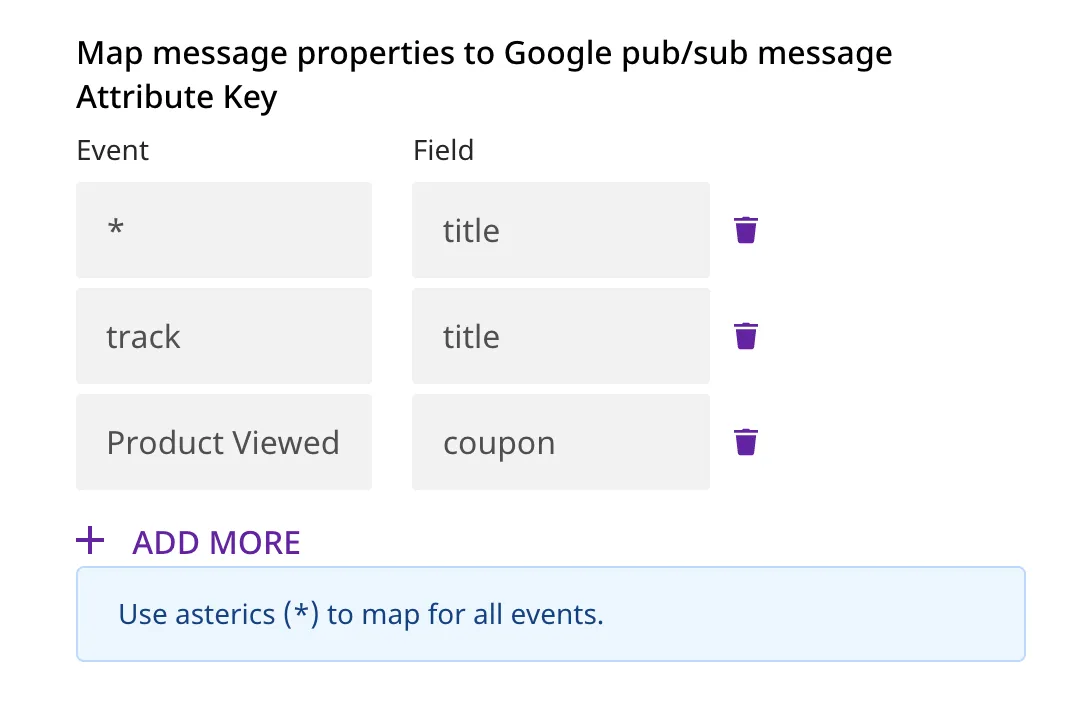
The following are some examples:
- If the
eventisProduct Viewedand thekeyiscoupon, RudderStack will add thecouponkey-value pair from the message to the attributes’ metadata object. - If multiple mappings are provided for
Product Viewed, all such key-value pairs from the message body will be added to attributes’ metadata object. - If the event name is
pageit will send all calls with thetypepage.
For thekeyfields provided in the attributes map, thekeyis searched in the message body inroot,properties,traitsandcontext.traits- in that specific order.
Note: You can also specify the key path in the payload using the dot notation.
For example:
rudderanalytics.track("Track me", {
  category: "category",
  label: "label",
  value: "value",
  metadata: {
    metadataId: "sample-id"
  }
});
For the above track call, you can specify an attribute mapping for metadataID as shown below:
| Event | Field |
|---|---|
| Track me | metadata.metadataId |
This will create the below attribute metadata object:
{
   metadataId: "sample-id"
}
Page
The page call contains information related to the page, such as the URL of the web page visited by the user.
A sample page payload is as shown in the snippet below:
rudderanalytics.page({
  path: "path",
  url: "url",
  title: "title",
  search: "search",
  referrer: "referrer",
})
Identify
The identify call captures the relevant details about the visiting user.
A sample identify payload is as shown in the snippet below:
rudderanalytics.identify("abc123", {
  name: "FirstName LastName",
  email: "example@gmail.com",
})
Track
The track call captures the information related to the actions performed by the user, along with their properties, or traits.
A sample track payload is as shown in the snippet below:
rudderanalytics.track("Track me", {
  category: "category",
  label: "label",
  value: "value",
})
FAQ
How does event mapping work with the topic ID?
- If there is no topic ID set for an event, it will not be sent.
- If an event is set with a topic id, the payload will be sent to Pub/Sub to that particular topic id.
If you have set all event type, event and*for mapping the priority will be given toevent, thentype, followed by*.
For example, let the type of event be track, the event name be product added. The mapping is done as:
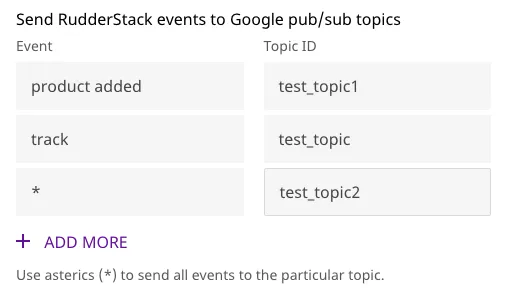
Now all events should go to the topic mapped with product added.
How do I provide multiple Attribute mapping for a particular event?
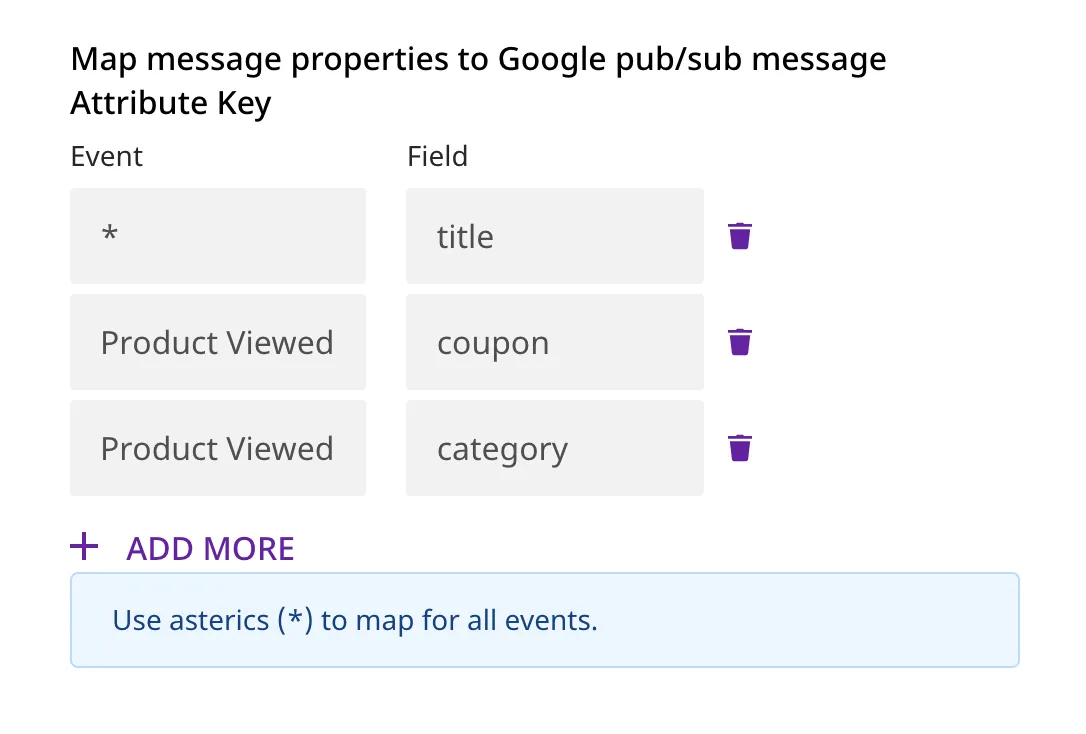
In order to send multiple attribute keys for a particular event, enter the required mappings in the RudderStack dashboard as seen below: