Google Analytics 4 Hybrid Mode Integration
2 minute read
RudderStack’s hybrid mode lets you send your event data to Google Analytics 4 via both the native SDK (device mode) and the Google Analytics 4 Measurement Protocol (cloud mode).
To use GA4 connection in hybrid mode, select Hybrid mode while setting up the connection modes.
This option is available only for thegtag.jsweb SDK.
Why use hybrid mode?
GA4’s server-side tracking (cloud mode) is less independent and may require support from client-side tracking (device mode). As noted in Google’s documentation, Measurement Protocol is meant to augment automatic collection via gtag, Tag Manager, and Google Analytics, not replace them.
Through a single hybrid mode deployment, you can have access to a fuller, more unified and accurate set of attribution data with the least impact on performance (resulting from a combination of client-side and server-side tracking).
Specifically, a hybrid instrumentation may make sense for those who prefer to maintain the benefits of cloud mode - including a faster site, more reliable data collection, and first-party data capture, while also capturing data required for attribution, sessionization, geolocation, and conversions for Google Ads Remarketing.
How does hybrid mode work?
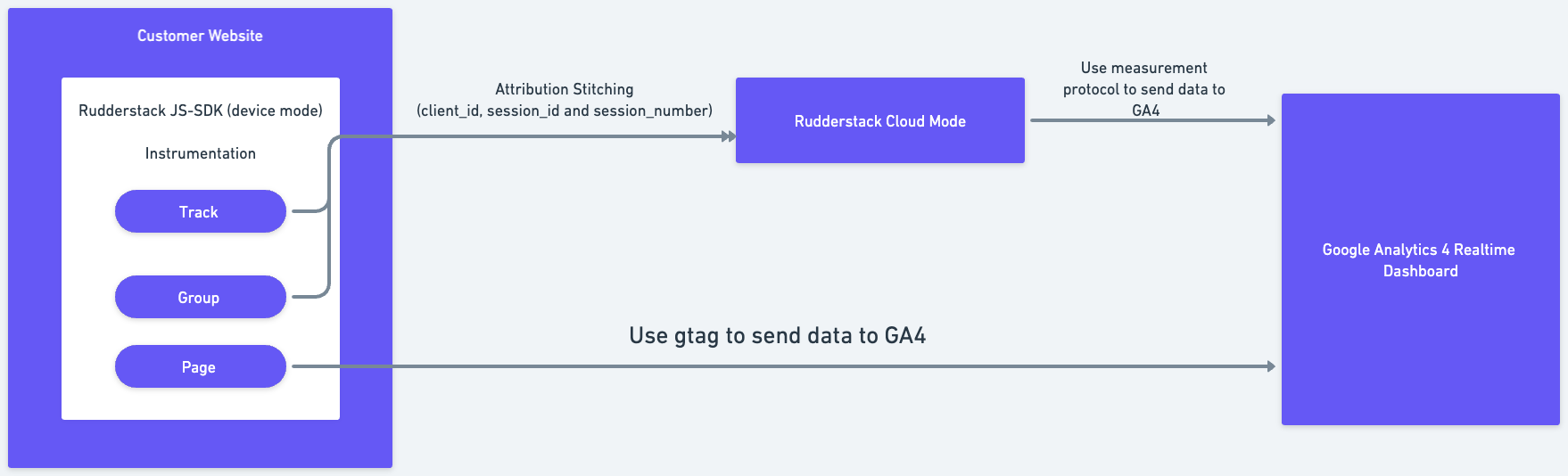
RudderStack sends page calls via device mode and all the other calls via cloud mode. The purpose of sending page calls via device mode is to capture attribution information (such as UTM parameters) that is only available in device mode.
Also, RudderStack stitches the page call information with the rest of the cloud mode events using Google’s clientID and sessionID.