Gladly Beta
2 minute read
Gladly is a customer service platform that leverages AI to deliver personalized agent-assisted customer service and enhance customer relationships.
Find the open source code for this destination in the GitHub repository.
Connection compatibility
| Destination Information | |||
|---|---|---|---|
| |||


Setup
- In your RudderStack dashboard, go to Directory > Destinations > Cloud Destinations and search for Gladly.
- Connect your source and click Continue.
Connection settings
Configure the following settings to set up Gladly as a destination in RudderStack:
- Name: Assign a name to uniquely identify the destination.
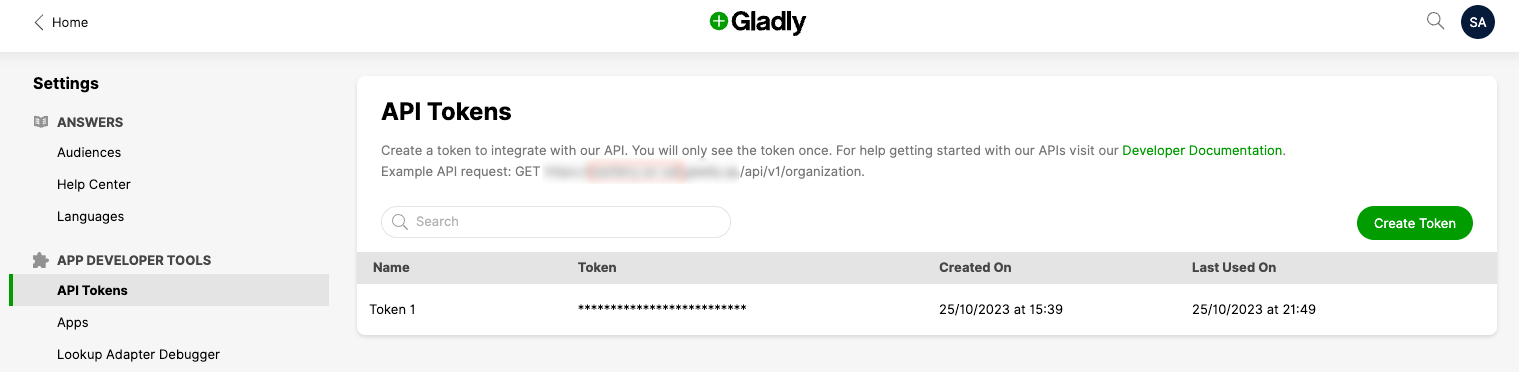
- API Token: Enter your Gladly API token by going to Settings > API Tokens in your Gladly dashboard.
- Domain: Enter your Gladly domain.
- User Name: Enter your Gladly agent email. You can find it in your Gladly dashboard under Settings > Users > Email.
Identify
You can use the identify call to send user details like profile and contact information, notes, and transactions to Gladly.
RudderStack sends this information to Gladly using their Customers REST API endpoint.
A sample identify call is shown:
rudderanalytics.identify("1hKOmRA4GRlm", {
  name: "Alex Keener",
  email: "alex@example.com",
  createdAt: "Mon May 19 2019 18:34:24 GMT+0000 (UTC)",
})
Traits mapping
RudderStack maps the following identify traits to the Gladly attributes:
| RudderStack property | Gladly property | Data type |
|---|---|---|
userIdRequired | id | String |
traits.namecontext.traits.name | name | String |
traits.emailcontext.traits.email | emails[0].original | String |
traits.phonecontext.traits.phone | phones[0].original | String |
traits.image_urlcontext.traits.image_url | image | String |
traits.addresscontext.traits.address | address | String |
externalId | externalCustomerId | String |
RudderStack sends any other user information apart from the above-mentioned traits ascustomAttributes.
Note that RudderStack currently does not support additional email properties. However, you can send this information to Gladly by sending an emailProperties object in your event as follows:
{
  "emailProperties": [{
      "<traits.email1>": {
        "normalised": "",
        "primary": true,
        "newKey": ""
      }
    },
    {
      "<traits.email2>": {
        "normalised": "",
        "primary": false,
        "newKey": ""
      }
    }
  ]
}
FAQ
Where can I find the Gladly API token?
- Log in to your Gladly dashboard.
Each organization has its own unique Gladly login URL. Make sure to log in using the correct URL. Contact your Gladly customer success team for more information.
- Go to Settings. Under APP DEVELOPER TOOLS, click API Tokens.