Gainsight PX Cloud Mode Integration
3 minute read
After you have successfully instrumented Gainsight PX as a destination in RudderStack, follow this guide to correctly send your events to Gainsight PX in cloud mode.
Find the open source transformer code for this destination in the GitHub repository.
RudderStack requires theuserIdfield for theidentify,group, andtrackcalls. IfuserIdis absent, it usesanonymousIdinstead.
Identify
RudderStack creates a User object in Gainsight PX when you make an identify call. It maps the userId from the event to Gainsight’s identifyId (unique identifier for the User object). If userId is absent, RudderStack uses anonymousId instead.
RudderStack supports all default attributes for the User object. You can map the custom atrributes in the RudderStack event to the Gainsight PX custom attributes using User Attribute Mapping dashboard setting:
RudderStack drops any undefined custom attributes from the event and sends the rest of the attributes to Gainsight PX.
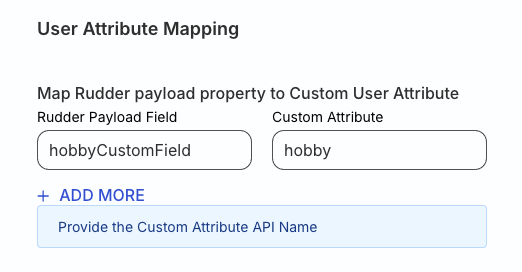
A sample identify call is shown:
rudderanalytics.identify("1hKOmRA4el9Z", {
  email: "alex@example.com",
  name: "Alex Keener",
  gender: "Male",
  countryName: "USA",
  countryCode: "US",
  city: "New Orleans",
  score: 100,
  hobbyCustomField: "Painting",
  title: "Doctor",
})
In the above example, hobbyCustomField is a custom field. You need to provide the mapping for hobbyCustomField to the corresponding custom attribute hobby created in Gainsight PX. If you do not provide this mapping, RudderStack drops the hobbyCustomField attribute and sends the other attributes to Gainsight PX.
Track
RudderStack uses the Gainsight PX’s Custom Event API for sending the track events.
A sample track call is shown:
rudderanalytics.track("User Tracked", {
  description: "Sample user tracking event",
  status: "Demo",
})
RudderStack maps the event name to the eventName field in Gainsight PX.
Specify global context metadata
You can provide the Global Context metadata by specifying the globalContext object in the track event as shown:
rudderanalytics.track("User Tracked", {
  description: "Sample user tracking event",
  status: "Demo",
  globalContext: {
    projectId: "p-123",
  },
})
Alternatively, you can set the global context for the track events by specifying the key-value pairs under the Global Context Mapping dashboard setting, as shown:
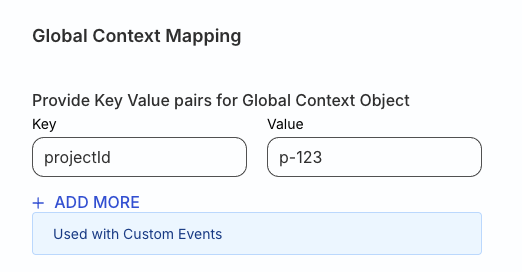
RudderStack gives higher precedence to the global context metadata specified in the event over the key-value pairs specified in the Global Context Mapping setting.
Group
RudderStack associates the user with an account in Gainsight PX when you send a group event. It automatically maps the groupId to the accountId in Gainsight PX.
RudderStack supports all the default fields for Account object. In addition, you can map the custom RudderStack event attributes to Gainsight custom attributes in the Account Attribute Mapping dashboard setting:
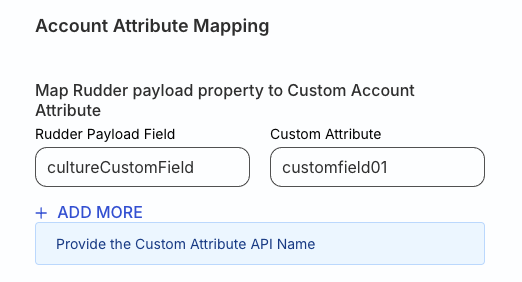
A sample group call is shown:
rudderanalytics.group("group18", {
  name: "Sample Group",
  industry: "Online Streaming",
  numberOfEmployees: 10000,
  website: "www.example-group.com",
  cultureCustomField: "customfield01",
})
In the above example, cultureCustomField is a custom field. You need to provide the mapping for cultureCustomField to the corresponding custom attribute customfield01 created in Gainsight PX. If you do not provide this mapping, RudderStack drops the cultureCustomField attribute and sends the other attributes to Gainsight PX.
To update the group details with fewer API calls to Gainsight PX, make sure to set limitAPIForGroup to true in the event’s context, as shown:
rudderanalytics.group(
  'group18', {
    name: 'New Group Name',
    industry: 'Online Streaming',
    numberOfEmployees: 5000,
    website: 'www.new-group.com',
    cultureCustomField: 'customfield01',
  }, {
    integrations: {
      All: true,
      GAINSIGHT_PX: {
        limitAPIForGroup: true
      }
    }
  },
);
Note that the if the groupId is invalid, then RudderStack creates a new group in Gainsight PX with the provided ID.
Location attribute mapping
RudderStack maps the below event properties to the corresponding location properties of the Gainsight PX User and Account objects:
| RudderStack property | Gainsight PX property |
|---|---|
countryName | location.countryName |
countryCode | location.countryCode |
stateName | location.stateName |
stateCode | location.stateCode |
city | location.city |
street | location.street |
postalCode | location.postalCode |
continent | location.continent |
regionName | location.regionName |
timeZone | location.timeZone |
latitude | location.coordinates.latitude |
longitude | location.coordinates.longitude |
