Freshsales
6 minute read
Freshsales is a CRM tool that lets you discover the best leads, drive them to closure, and nurture them to boost contextual engagement.
RudderStack supports Freshsales as a destination where you can seamlessly send your event data.
Connection compatibility
| Destination Information | |||
|---|---|---|---|
| |||


Get started
Once you have confirmed that the source platform supports sending events to Freshsales, follow these steps:
- From your RudderStack dashboard, add a source. Then, from the list of destinations, select Freshsales.
- Assign a name to the destination and click Continue.
Connection settings
To successfully configure Freshsales as a destination, you will need to configure the following settings:
- API Key: Enter your Freshsales API key.
For more information on obtaining your Freshsales API key, refer to the FAQ section below.
- Domain: Enter the full organization URL associated with your Freshsales account. For example,
testcompany.myfreshworks.com.
For more information on your organization URL and how to change it, refer to this Freshsales support guide.
- Map your events with Freshsales Standard Events: Use this setting to map the standard Freshsales events with the custom event names.
Identify
You can use the identify call to create or update your Freshsales contact.
RudderStack uses the Freshsales Upsert a Contact API to pass the relevant user information via the following parameters:
| Attribute | Type | Description |
|---|---|---|
unique_identifier | String | RudderStack passes the user’s email. |
contact | Hashed Object | RudderStack passes the other relevant user details required to create or update the user in Freshsales. |
If
A sample identify call is shown below:
rudderanalytics.identify("1hKOmRA4GRlm", {
  email: "alex@example.com",
  firstName: "Alex",
  lastName: "Keener",
  state: "Louisiana",
  country: "USA",
  postalCode: "90009",
});
Supported mappings
The following table lists the mappings between the RudderStack and Freshsales properties:
| RudderStack property | Freshmarketer property |
|---|---|
traits.emailcontext.traits.emailRequired | emails |
traits.firstnametraits.first_nametraits.firstNamecontext.traits.firstnamecontext.traits.first_namecontext.traits.firstName | first_name |
traits.lastnametraits.last_nametraits.lastNamecontext.traits.lastnamecontext.traits.last_namecontext.traits.lastName | last_name |
traits.subscriptionStatuscontext.traits.subscriptionStatus | subscription_status |
traits.job_titletraits.jobTitlecontext.traits.job_titlecontext.traits.jobTitle | job_title |
traits.phonecontext.traits.phone | work_number |
userId | external_id |
traits.mobileNumbercontext.traits.mobileNumber | mobile_number |
traits.addresscontext.traits.address | address |
traits.address.citytraits.citycontext.traits.address.citycontext.traits.city | city |
traits.address.statetraits.statecontext.traits.address.statecontext.traits.state | state |
traits.address.postalCodetraits.ziptraits.zipcodecontext.traits.zipcontext.traits.zipcodecontext.traits.address.postalCode | zipcode |
traits.address.countrytraits.countrycontext.traits.address.countrycontext.traits.country | country |
traits.salesAccountscontext.traits.salesAccounts | sales_accounts |
traits.territoryIdcontext.traits.territoryId | territory_id |
traits.leadSourceIdcontext.traits.leadSourceId | lead_source_id |
traits.ownerIdcontext.traits.ownerId | owner_id |
traits.subscriptionTypescontext.traits.subscriptionTypes | subscription_types |
traits.mediumcontext.traits.medium | medium |
traits.campaignIdtraits.campaign_idcontext.traits.campaignIdcontext.traits.campaign_idcontext.campaign.name | campaign_id |
traits.keywordcontext.traits.keywordcontext.campaign.term | keyword |
traits.timeZonecontext.traits.timeZone | time_zone |
traits.facebookUserNamecontext.traits.facebookUserName | facebook |
traits.twitterUserNamecontext.traits.twitterUserName | twitter |
traits.linkedinUserNamecontext.traits.linkedinUserName | linkedin |
createdAt | created_at |
timestamp | updated_at |
traits.contactStatusIdcontext.traits.contactStatusId | contact_status_id |
traits.salesAccountIdcontext.traits.salesAccountId | sales_account_id |
traits.lifecycleStageIdcontext.traits.lifecycleStageId | lifecycle_stage_id |
Track
The track call can be used to track the user activities in Freshsales.
To make atrackcall successfully, you must map the event to be sent in thetrackcall in the Map your events with Freshsales Standard Events dashboard setting.
RudderStack supports the following track events:
Lifecycle stage
Lifecycle stage events capture the decision journey of a customer. Refer to the Freshsales documentation to create lifecycle stages in Freshsales.
RudderStack lets you update the status of a contact in their lifecycle stage by using either the lifecycleStageId or lifecycleStageName.
lifecycleStageNameis a case-sensitive field and throws an error if not used in the intended manner.
A sample track call for a lifecycle stage event is shown below:
rudderanalytics.track("eventName", {
  email: "alex@example.com",
  lifecycleStageId: 71010794467,
  phone: "+1-202-555-0146",
  owner_id: "70000090119",
});
The following table lists the property mappings betweeen RudderStack and Freshsales for lifecycle stage events:
| RudderStack property | Freshsales property |
|---|---|
emailRequired | email |
lifecycleStageNameRequired, if lifecycleStageId is absent. | lifecycleStageName |
lifecycleStageIdRequired, if lifecycleStageName is absent. | lifecycle_stage_id |
Sales activities
Sales activities events can be used to track any activity related to a contact/deal/account. Refer to the Freshsales documentation to create sales activities in Freshsales.
RudderStack lets you create the status of a contact by using either the salesActivityTypeId or salesActivityName.
A sample track call for a sales activity event is shown below:
rudderanalytics.track("eventName", {
  salesActivityTypeId: "70000663932",
  title: "new contact",
  startDate: "2021-05-04T17:00:00+05:30",
  endDate: "2022-06-04T17:30:00+05:30",
  ownerId: "70054866612",
});
The following table lists the property mappings betweeen RudderStack and Freshsales for sales activity events:
| RudderStack property | Freshsales property |
|---|---|
properties.titleRequired | title |
properties.salesActivityNameRequired, if properties.salesActivityTypeId is absent. | sales_activity_name |
properties.salesActivityTypeIdRequired, if properties.salesActivityName is absent. | sales_activity_type_id |
properties.startDateRequired | start_date |
properties.endDateRequired | end_date |
context.externalId.typeRequired | targetable_type |
properties.ownerIdRequired | owner_id |
salesActivityOutcomeId | sales_activity_outcome_id |
properties.notes | notes |
context.externalId.id | targetable_id |
properties.createrId | creater_id |
originalTimestamp | created_at |
timestamp | updated_at |
properties.location | location |
latitudecontext.address.latitudecontext.location.latitude | latitude |
longitudecontext.address.longitudecontext.location.longitude | longitude |
properties.checkedinAt | checkedin_at |
Thetargetable_typefield denotes the entity for which the sales activity has been created and can takeContact/SalesAccount/Dealas its value. However, if its value is set tocontact, then either thetargetable_idor
Group
The group call lets you link an identified Freshsales contact with a company, organization, or an account. You can also record any custom group traits like the company name, number of employees, etc.
RudderStack uses the Upsert an Account API to create or update a sales account via the following parameters:
| Attribute | Type | Description |
|---|---|---|
unique_identifier | String | RudderStack passes the account name. |
sales_account | Hashed Object | RudderStack passes the other relevant details associated with the Freshsales account. |
Note that:
- If
namealready exists, the Freshsales account details are updated. Otherwise, a new account is created.- RudderStack also checks if the contact’s
context.traitsobject. If yes, RudderStack links the contact to the Freshsales account.
A sample group call is shown below:
rudderanalytics.group(
  "group01", {
    name: "Alex Keener",
    phone: "1234567890",
    numberOfEmployees: 51,
    annualRevenue: 10000,
    zipcode: 90009,
    street: "6649 N Blue Gum Street",
    city: "New Orleans",
    state: "Louisiana",
    country: "USA"
  }, {
    context: {
      traits: {
        email: "alex@example.com"
      }
    }
  }
);
Supported mappings
The following table lists the mappings between the RudderStack and Freshsales properties:
| RudderStack property | Freshsales property |
|---|---|
nameRequired | name |
traits.industryTypeIdcontext.traits.industryTypeId | industry_type_id |
traits.businessTypeIdcontext.traits.businessTypeIdtraits.business_type_idcontext.traits.business_type_id | business_type_id |
phone | phone |
traits.numberOfEmployeescontext.traits.numberOfEmployees | number_of_employees |
traits.annualRevenuecontext.traits.annualRevenue | annual_revenue |
traits.addresscontext.traits.address | address |
traits.citytraits.address.citycontext.traits.citycontext.traits.address.city | city |
traits.statetraits.address.statecontext.traits.statecontext.traits.address.state | state |
traits.countrytraits.address.countrycontext.traits.countrycontext.traits.address.country | country |
zipcode | zipcode |
traits.websitecontext.traits.website | website |
traits.territoryIdcontext.traits.territoryId | territory_id |
traits.parentSalesAccountidcontext.traits.parentSalesAccountid | parent_sales_account_id |
traits.ownerIdcontext.traits.ownerId | ownerId |
traits.facebookUserNamecontext.traits.facebookUserName | facebook |
traits.twitterUserNamecontext.traits.twitterUserName | twitter |
traits.linkedinUserNamecontext.traits.linkedinUserName | linkedin |
createdAt | created_at |
timestamp | updated_at |
FAQ
Where can I find the Freshsales API key?
To obtain your Freshsales API key, follow these steps:
- Log into your Freshsales dashboard.
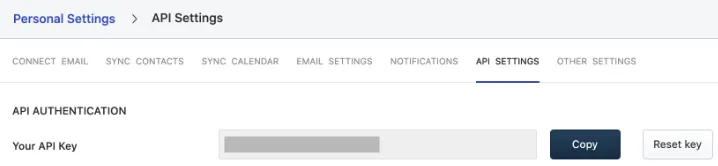
- Go to Personal Settings > API Settings.
- Enable the captcha to complete the authentication process.
- You will find your Freshsales API key listed under the API Authentication section:
For more information, refer to this Freshsales support guide.
