Confluent Cloud
2 minute read
Confluent Cloud is a cloud-native, fully-managed event streaming platform. Powered by Apache Kafka, it is simple, secure, and simplifies data ingestion and processing on all major clouds. With Confluent Cloud, you can easily handle large-scale data workloads without compromising on performance.
RudderStack allows you to seamlessly configure Confluent Cloud as a destination to send your event data.
Find the open source transformer code for this destination in the GitHub repository.
Connection compatibility
| Destination Information | |||
|---|---|---|---|
| |||


Get started
Once you have confirmed that the platform supports sending events to Confluent Cloud, perform the steps mentioned below:
- Choose a source to which you would like to add Confluent Cloud as a destination.
- Select the destination as Confluent Cloud. Give your destination a name, and then click Next.
- In the Connection Settings, fill the required fields with the relevant information and click Next.
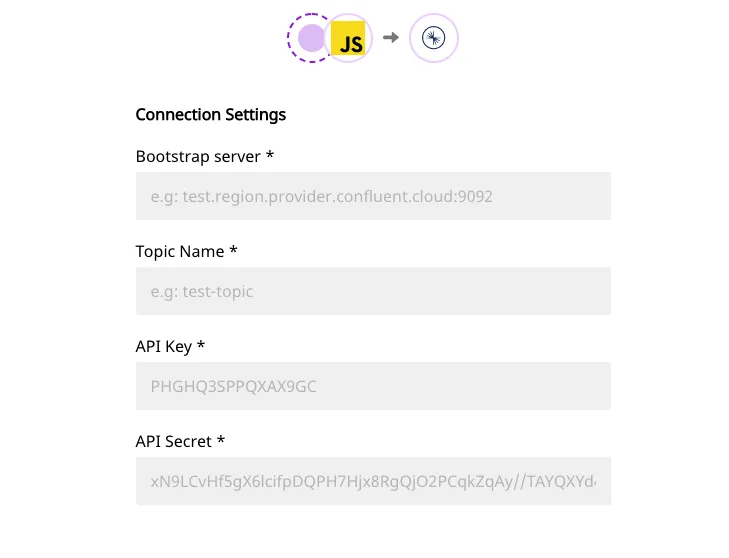
The required fields are as follows:
- Bootstrap server: Enter your bootstrap server information here. This is in the format
hostname::port. You will get this information in your cluster settings. - Topic Name: Enter the name of the Kafka topic in this field.
- API Key: This is the key you need to generate in the Confluent Cloud UI to give RudderStack the required API access. Enter the key in this field.
- API Secret: Enter the API Secret in this field - you can generate this in the Confluent Cloud UI.
Partition Key
RudderStack uses userId as the partition key of a given message.
IfuserIdis not present in the payload, thenanonymousIdis used.
If you have a multi-partitioned topic, then the records of the same userId (or anonymousId in the absence of userId) will always go to the same partition.
