Blueshift
5 minute read
Blueshift’s SmartHub customer data platform helps consumer brands scale customer engagement intelligently on every channel. It enables marketers to unify their siloed data and use real-time customer insights and interactions to shape customer experiences.
RudderStack supports Blueshift as a destination to which you can seamlessly send your event data.
Find the open source transformer code for this destination in the GitHub repository.
Connection compatibility
| Destination Information | |||
|---|---|---|---|
| |||


Get started
Once you have confirmed that the source platform supports sending events to Blueshift, follow these steps:
- From your RudderStack dashboard, add the source. Then, from the list of destinations, select Blueshift.
Connection settings
To successfully configure Blueshift as a destination, you will need to configure the following settings:
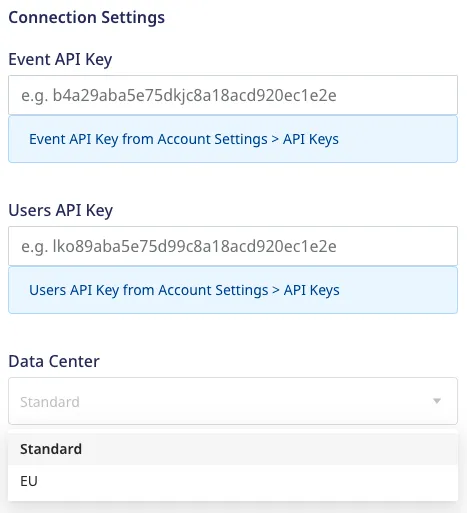
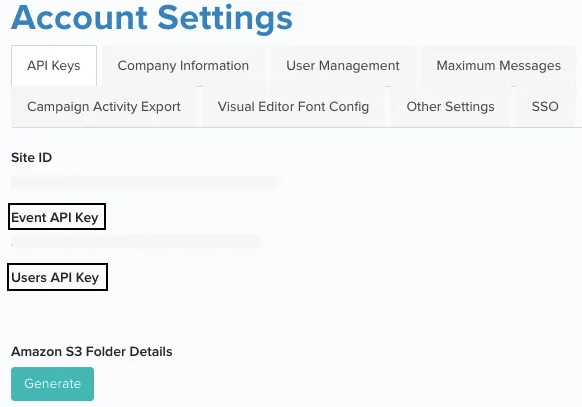
- Event API Key: Enter the Event API Key generated for your Blueshift account. You can find it in your Blueshift dashboard by going to Account Settings > API Keys.
- Users API Key: Enter the Users API Key generated for your Blueshift account. You can find it in your Blueshift dashboard by going to Account Settings > API Keys.
For more information on obtaining the Event and Users API Key, refer to the FAQ section below.
- Data Center: Select the data center where you want to send the data:
- Standard (default): The base URL is
https://api.getblueshift.com. - EU: The base URL is
https://api.eu.getblueshift.com.
- Standard (default): The base URL is
Identify
The identify call lets you create new or update existing customers and record the traits about them like their name, email address, etc.
A sample identify call is shown below:
rudderanalytics.identify("1hKOmRA4el9Zt1WSfVJIVo4GRlm", {
  email: "alex@example.com",
  phone: "+1-202-555-0146",
  firstName: "Alex",
  lastName: "Keener",
});
It is recommended to limit theidentifycalls to 50 per second.
Supported mappings
The following table details the mapping between RudderStack and Blueshift fields:
| RudderStack field | Blueshift field | Presence |
|---|---|---|
email | email | Required |
userId | customer_id | Required |
event | event | Optional |
phone | phone_number | Optional |
firstName | firstname | Optional |
lastName | lastname | Optional |
gender | gender | Optional |
Blueshift supports custom attributes from your site’s customers. For more information on these attributes, refer to Blueshift Custom Attributes.
Track
The track call lets you capture user events along with the associated properties.
A sample track call is shown below:
rudderanalytics.track(
  "Product Viewed", {
    cookie: "1234abcd-efghijkj-1234kfjadslk-34iu123",
    checkout_id: "C324532",
    order_id: "T1230",
    value: 15.98,
    revenue: 16.98,
    shipping: 3.0,
    coupon: "FY21",
    currency: "USD",
    products: [{
      product_id: "product-mixedfruit-jam",
      sku: "sku-1",
      category: "Food",
      name: "Food/Drink",
      brand: "Sample",
      variant: "None",
      price: 10.0,
      quantity: 2,
      currency: "USD",
      position: 1,
      value: 6.0,
      typeOfProduct: "Food",
      url: "https://www.example.com/product/mixedfruit-jam",
      image_url: "https://www.example.com/product/mixedfruit-jam.jpg",
    }, ],
  },
);
Supported mappings
RudderStack maps the following ecommerce events to the Blueshift events in the track call before sending them over Blueshift’s HTTP API.
| RudderStack event | Blueshift event |
|---|---|
Product Viewed | view |
Product Added | add_to_cart |
Order Completed | purchase |
Products Searched | search |
Checkout Step Viewed | checkout |
Product Removed | remove_from_cart |
The other generic event mappings are listed below:
| RudderStack event | Blueshift event |
|---|---|
Subscribe Interest | subscribe_interest |
Unsubscribe Interest | unsubscribe_interest |
Identify | identify |
Blueshift supports custom events to track any custom user action on your site or app. For more information, refer to the Blueshift Custom Event guide.
The following table details the mapping between RudderStack and Blueshift fields:
| RudderStack field | Blueshift field | Presence |
|---|---|---|
event | event | Required |
userId | customer_id | Optional |
email | email | Optional |
context.device.type | device_type | Optional |
context.device.token | device_token | Optional |
context.device.id | device_id | Optional |
context.idfa/context.device.advertisingId | device_idfa | Optional |
context.idfv/context.device.id | device_idfv | Optional |
context.device.manufacturer | device_manufacturer | Optional |
context.os.name | os_name | Optional |
context.network.carrier | network_carrier | Optional |
context.ip/request_ip | ip | Optional |
context.address.latitude/context.location.latitude | latitude | Optional |
context.address.longitude/context.location.longitude | longitude | Optional |
messageId | event_uuid | Optional |
properties.cookie | cookie | Optional |
The
eventname is a required field and should not contain a period (.), a numeric value, or be more than 64 characters. Otherwise, RudderStack will reject the event and throw an error.Also, RudderStack automatically converts a space in the event name to an underscore (_). So, an event name like
custom eventswill be converted tocustom_eventsbefore sending it to Blueshift.
Blueshift supports receiving custom attributes about your site’s customers. For more information on these attributes, refer to the Blueshift Custom Attributes.
Group
The group call lets you associate a user with a group. For each group call, RudderStack triggers Blueshift’s event API and sends an identify event along with the groupId. Blueshift then creates a group and adds the user to it.
A sample group call is shown below:
rudderanalytics.group("ruddersample", {
  name: "Alex Keener",
  email: "alex@example.com",
  userId: "1hKOmRA4el9Zt1WSfVJIVo4GRlm",
  phone: "+1-202-555-0146",
});
Supported mappings
The following table details the mapping between RudderStack and Blueshift fields:
| RudderStack field | Blueshift field | Presence |
|---|---|---|
groupId | group_id | Required |
userId | customer_id | Required |
email | email | Optional |
context.device.type | device_type | Optional |
context.device.token | device_token | Optional |
context.device.id | device_id | Optional |
context.idfa/context.device.advertisingId | device_idfa | Optional |
context.idfv/context.device.id | device_idfv | Optional |
context.device.manufacturer | device_manufacturer | Optional |
context.os.name | os_name | Optional |
context.network.carrier | network_carrier | Optional |
context.ip, request_ip | ip | Optional |
context.address.latitude, context.location.latitude | latitude | Optional |
context.address.longitude, context.location.longitude | longitude | Optional |
messageId | event_uuid | Optional |
Blueshift supports receiving custom attributes about your site’s customers. For more information on these attributes, refer to the Blueshift Custom Attributes.
FAQ
How do I obtain the Blueshift API keys?
To obtain the API keys, log into the Blueshift app, go to Account Settings and then to the API keys tab. You can obtain the following API keys, based on your role:
- Event API key (EVENT_API_KEY)
- Users API key (USER_API_KEY) (visible only to admin users)