Bluecore
5 minute read
Bluecore is an AI-powered retail marketing platform that helps brands personalize their campaigns by analyzing customer data. It enables targeted email and messaging campaigns, aiming to enhance engagement, boost sales, and improve marketing efficiency.
Find the open source code for this destination in the GitHub repository.
Setup
- In your RudderStack dashboard, go to Directory > Destinations > Cloud Destinations and search for Bluecore.
- Connect your source and click Continue.
Connection settings
Configure the following settings to set up Bluecore as a destination in RudderStack:
- Name: Assign a name to uniquely identify the destination.
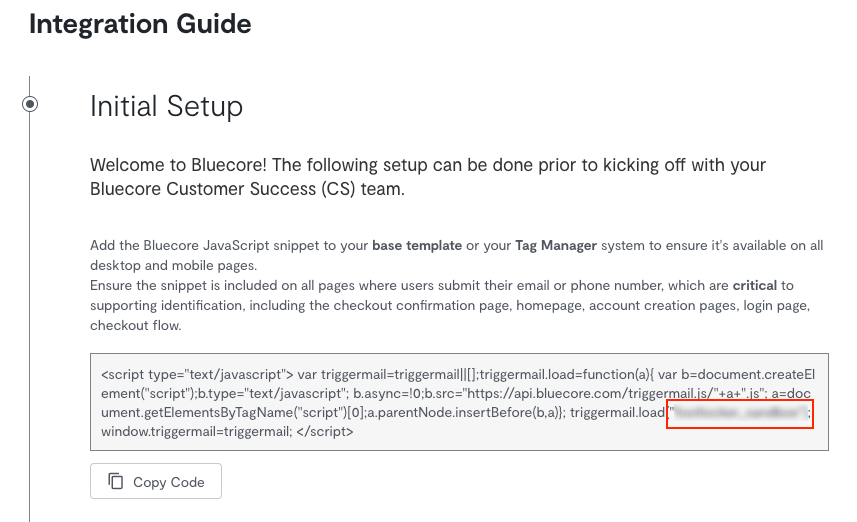
- Bluecore namespace: Enter your Bluecore token from the Bluecore dashboard.
Connection mode
| Destination Information | |||
|---|---|---|---|
| |||


Configuration settings
After completing the initial setup, configure the following settings to receive your data in Bluecore correctly:
- Consent management settings: Configure the consent management settings for the specified source by choosing the Consent management provider from the dropdown and entering the relevant consent category IDs. See Consent Management in RudderStack for more information on this feature.
Mappings
Event mappings: Click Set-up mapping to map the RudderStack events to Bluecore standard ecommerce events. RudderStack also provides the JSON mapper to set these mappings.
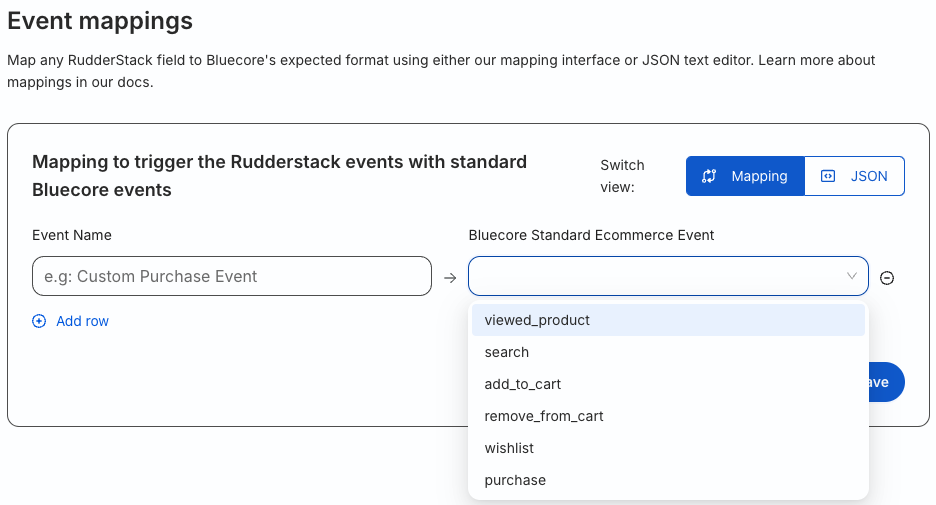
RudderStack maps the following events to the Bluecore standard ecommerce events by default:
| RudderStack event | Bluecore event |
|---|---|
| Product Viewed | viewed_product |
| Products Searched | search |
| Product Added | add_to_cart |
| Product Removed | remove_from_cart |
| Product Added to WIshlist | wishlist |
| Order Completed | purchase |
Identify
You can use the identify call to create a new customer or link an email ID to an existing customer in Bluecore.
RudderStack sends this information to Bluecore by leveraging their REST API endpoint.
A sample identify call to create a new customer in Bluecore:
rudderanalytics.identify("27340af5c8819", {
  firstName: "Alex Keener",
  logins: 2
})
You can link an email ID with an existing customer by sending the following attributes for the customer’s distinct_id (unique identifier for the customer):
email- custom field
message.traits.actionwithidentifyvalue
rudderanalytics.identify("27340af5c8819", {
  firstName: "Alex Keener",
  logins: 2,
  action: 'identify',
  email: 'alex@example.com'
})
You can also send the distinct_id for a customer in the externalId object as shown:
context: {
  externalId: [{
    type: 'bluecoreExternalId',
    id: '54321'
  }],
}
Note that any customer attributes or product properties you send in the RudderStackidentifyortrackcalls (for example,first_name) are permanently created in Bluecore if they do not exist already. To avoid excess or redundant attributes, only send the attributes critical to your campaigns and ensure their syntax remains the same throughout.
Property mappings
RudderStack maps the following properties to the Bluecore properties:
| RudderStack property | Bluecore property |
|---|---|
externalIdemailuserIdanonymousIdRequired | distinct_id |
name | customer.name |
age | customer.age |
sex | customer.sex |
address | customer.address |
email | customer.email |
context.app.version | client |
context.device.model | device |
destination.Config.token | token |
Track
You can use the RudderStack track call to track the user behavior along with any associated properties.
A sample track call is shown below:
rudderanalytics.track("Product Viewed", {
  product_id: "622c6f5d5cf86a4c77358033",
  sku: "8472-998-0112",
  category: "Games",
  name: "Cones of Dunshire",
  brand: "Wyatt Games",
  variant: "exapansion pack",
  price: 49.99,
  quantity: 5,
  coupon: "PREORDER15",
  currency: "USD",
  position: 1,
  url: "https://www.website.com/product/path",
  image_url: "https://www.website.com/product/path.webp",
})
Note that any customer attributes or product properties you send in the RudderStackidentifyortrackcalls (for example,first_name) are permanently created in Bluecore if they do not exist already. To avoid excess or redundant attributes, only send the attributes critical to your campaigns and ensure their syntax remains the same throughout.
Opt-in and unsubscribe users
You can also send track events to opt-in or unsubscribe users in Bluecore.
- For opting-in a customer email, send a
subscription_eventevent with thechannelConsentsobject, whereemailis set totrue:
rudderanalytics.track("subscription_event", {
  channelConsents: {
    email: true
  }
})- For unsubscribing a customer email, set the
emailfield tofalse:
It may take up to 24 hours for the user to be included in the unsubscribe list. See the Bluecore documentation for more information.
rudderanalytics.track("subscription_event", {
  channelConsents: {
    email: false
  }
})
Other custom events
If you have created any custom events in the Bluecore dashboard, you can send them as track calls via RudderStack without mapping them in the RudderStack dashboard. RudderStack sends the custom events as is.
Property mappings
RudderStack maps the following properties to the Bluecore fields:
| RudderStack property | Bluecore property |
|---|---|
userIdanonymousIdemail | distinct_id |
name | customer.name |
age | customer.age |
sex | customer.sex |
address | customer.address |
email | customer.email |
properties.queryRequired for Search events. | search_term |
properties.order_idRequired for Purchase events. | order_id |
properties.totalRequired for Purchase events. | total |
context.app.version | client |
context.device.model | device |
properties.products[#idx].id/product_id/sku | products[#idx].id |
properties.products[#idx].name | products[#idx].name |
properties.products[#idx].price | products[#idx].price |
The following property mappings are applicable for the subscription_event event:
| RudderStack property | Bluecore property |
|---|---|
userIdanonymousIdemail | distinct_id |
email | email |
context.app.version | client |
context.device.model | device |
Note that:
- All the standard RudderStack Ecommerce Events require
productsarray except the Products Searched event or any custom event mapped to Bluecore’s standardsearchecommerce event. - Any custom event mapped to Bluecore’s standard
purchaseecommerce event also requiresproductsarray, along with theorder_id,total, and customer information (which RudderStack maps from thetraitsorcontext.traitsobject). - RudderStack maps the
idfor theproductsarray either from theproduct_id,sku, orid. Further, RudderStack eliminates theproduct_id,sku, oridfields after computing theidof theproductsobject before sending it to Bluecore.
FAQ
Where can I find the Bluecore namespace?
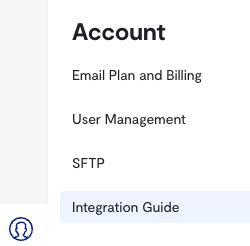
- Log in to the Bluecore dashboard.
- From the left sidebar, go to Account > Integration Guide.
You can find the Bluecore namespace in the JavaScript code snippet: