Amazon Kinesis Firehose
4 minute read
Amazon Kinesis Firehose gives you an easy and reliable way to load your streaming data into data lakes, data stores, and a host of other analytics tools. It is a fully-managed service that can be scaled automatically to match the load and throughput of your data, without requiring any additional administration.
RudderStack supports Amazon Kinesis Firehose as a destination where you can seamlessly send your event data.
Find the open source code for this destination in the GitHub repository.
Connection compatibility
| Destination Information | |||
|---|---|---|---|
| |||


Get started
Once you have confirmed that the source platform supports sending events to Kinesis Firehose, follow these steps:
- From your RudderStack dashboard, add the source. Then, from the list of destinations, select Amazon Kinesis Firehose.
- Assign a name to your destination and click Continue.
Connection settings
To successfully set up Kinesis Firehose as a destination, you need to configure the following settings:
- AWS Region: Enter the AWS region in which you have created the Kinesis Firehose stream. This is a required field.
- Role-based Authentication: Enable this setting to use the RudderStack IAM role for authentication. For more information on creating an AWS IAM role for RudderStack, refer to this guide.
- IAM Role ARN: Enter the ARN of the IAM role.
It is highly recommended to enable this setting as the access keys-based authentication method is now deprecated.
- If Role-based Authentication is disabled, you need to enter the AWS Access Key ID and AWS Secret Access Key to authorize RudderStack in order to write to the configured stream.
In both the role-based and access key-based authentication methods, you need to set a policy specifying the required permissions for RudderStack to write to your Kinesis Firehose stream. Refer to the Policy permissions section below for more information.
- Mapping event to delivery streams: Use this setting to map the RudderStack Event Name to a Kinesis Firehose Delivery Stream.
Sending events to Kinesis Firehose
RudderStack supports sending the identify, page, and track events to specific Kinesis Firehose streams by configuring them in the dashboard.
You can also send an event type as page, identify, or track. For the track events, you can specify the event name based on the event name in the payload. For example:
- If the event name is
page, RudderStack sends all events with thetypeset topage. - If event name is
Product Added, RudderStack sends all track events with theeventasProduct Added.
To send all events to a particular stream irrespective of the type or name, you can use*as the event name in the dashboard settings.
Note that the field Delivery Stream Name is case sensitive and has to be specified exactly as named in AWS. On the other hand, the Event Name field is not case sensitive, and thus RudderStack does not differentiate betweenPageorpagebefore sending it to the Firehose stream.
Policy permissions
To use the Firehose destination with RudderStack correctly, you must have a Firehose stream created in AWS. For more information on creating a Kinesis Firehose data delivery stream, refer to this AWS documentation.
You also need to create an IAM role and attach the policy containing the necessary permissions (PutRecord) for RudderStack to write to the stream.
- To create an IAM role, follow the instructions on Creating an IAM role.
- For more information on creating an IAM policy, refer to this AWS documentation.
A sample permissions policy that allows a user to send event data into Kinesis Firehose is shown below:
{
  "Version": "2012-10-17",
  "Statement": [
    {
      "Effect": "Allow",
      "Action": [
        "firehose:PutRecord"
      ],
      "Resource": [
        "arn:aws:firehose:{region}:{account-id}:stream/{stream-name}"
      ]
    }
  ]
}
FAQ
How does event mapping work with the delivery stream?
- If there is no delivery stream set for an event in the dashboard settings, RudderStack will not send the event to the Firehose stream.
- If an event is set with a delivery stream, RudderStack sends the payload to the configured delivery stream.
- If you have set the event
type, Event Name, and*for mapping purposes, RudderStack gives the topmost priority to the event name, followed bytype, and then*. For example, if the type of event istrackand Event Name isProduct Added, RudderStack does the mapping as shown:
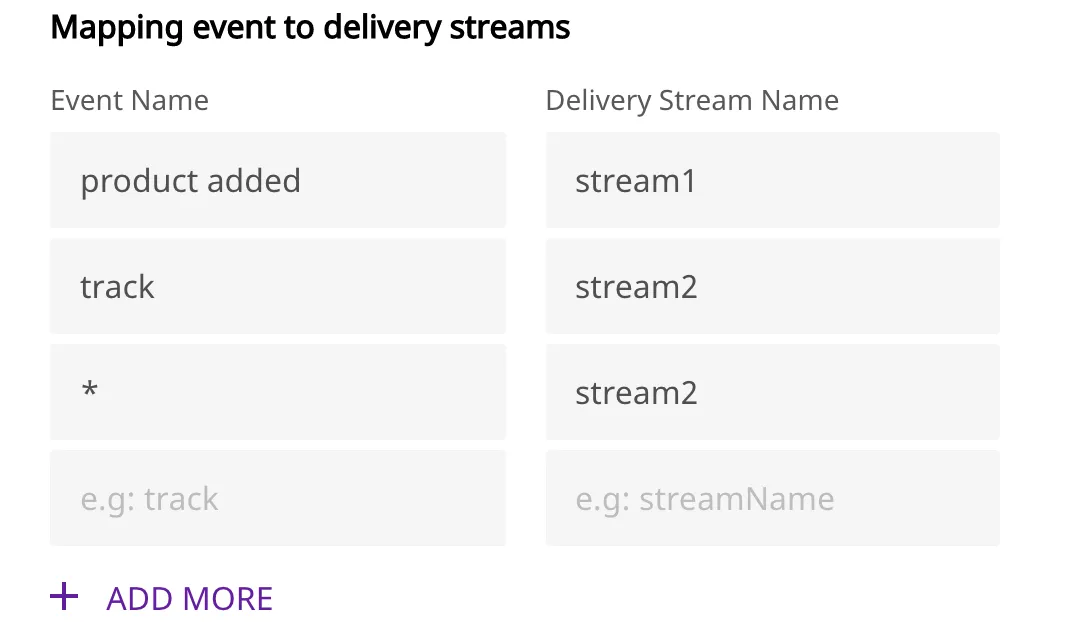
Then all events go to the stream mapped with Product Added.
