Connection Modes: Cloud, Device, and Hybrid
4 minute read
This guide explains the RudderStack connection modes — cloud mode and device mode — and gives an overview of hybrid mode, which lets you send events through both connection modes.
What are connection modes in RudderStack?
Connection modes determine how event data is tracked, transformed, and routed from sources to destinations.
You can send event data from your source apps to destinations in two primary connection modes:
- Cloud mode
- Device mode
For select destinations, you can use hybrid mode to route events through both cloud and device mode.
Cloud mode
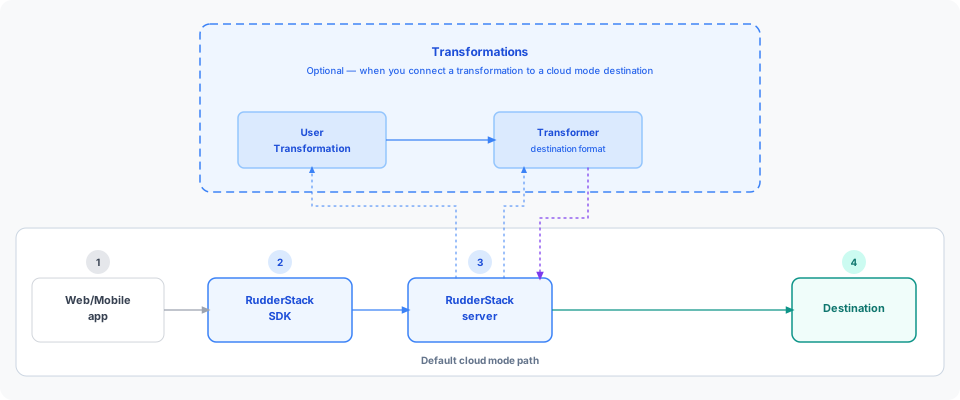
In cloud mode, the SDK sends event data directly to the RudderStack server. The server transforms the data into a destination-specific format using the Transformer module and routes it to the destination.
Cloud mode also supports Transformations, so you can apply custom logic to events before they reach the destination.
How cloud mode works
Note that:
- Warehouse destinations support cloud mode only.
- Server-side SDKs support cloud mode only — they run in the backend and cannot load destination-specific SDKs on the client.
- The SDK sends the event to the RudderStack server.
- The Transformer module converts the event to a destination-specific format.
- The server forwards the transformed event to the destination.
Events must follow the RudderStack event spec. When they do, RudderStack handles destination-specific formatting for you.
Cloud mode transformations
You can connect a transformation to a cloud mode destination to filter, enrich, or mask PII before the event is converted to the destination-specific format.
See Use transformations in cloud mode for detailed setup instructions.
When a transformation is connected, custom logic runs before destination format conversion:
- The RudderStack server receives the event from the SDK.
- Your transformation logic is applied to the event.
- The Transformer module converts the event to the destination-specific format and returns it to the server.
- RudderStack forwards the event to the destination.
Device mode
In device mode, events are sent to destinations directly from your client (web or mobile app).
Live Events are not supported in device mode.
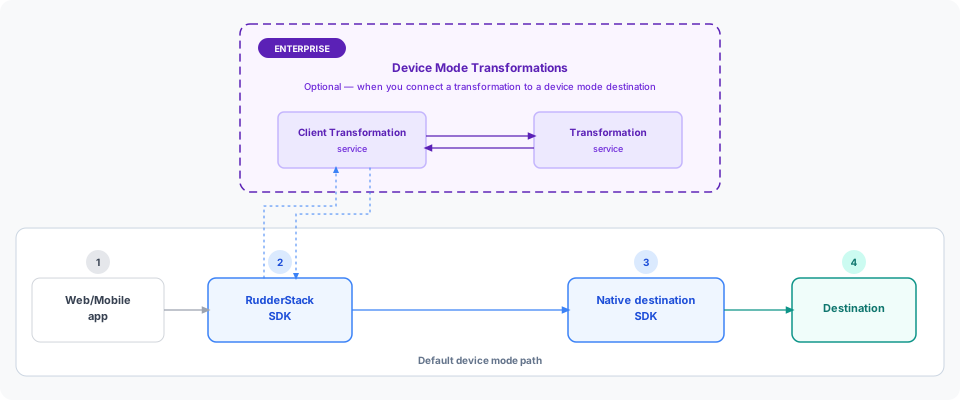
RudderStack SDKs load the destination’s native client libraries on your website or mobile app. These libraries call destination APIs directly from the device — without routing events through the data plane (backend) for ingestion.
How device mode works
- The SDK loads the destination’s native client library.
- The SDK formats the event for the destination.
- The SDK sends the event to the destination via the native SDK.
Suppose you want to send event data from your mobile app to Firebase via the RudderStack Android (Java) SDKAndroid (Java) refers to the legacy RudderStack Android SDK. Note that it will be deprecated soon.
For new implementations, use the Android (Kotlin) SDK instead.
(or any other mobile SDK). Add an Android (Java) source and connect it to the Firebase destination in the dashboard.
The SDK downloads the Firebase SDK, formats events for Firebase, and sends them directly to Firebase.
Device mode transformations
On the Enterprise plan, you can connect a transformation to device mode destinations. The transformation logic runs before the native SDK delivers events to the destination.
See Use transformations in device mode for detailed setup instructions.
When a device mode transformation is connected:
- The SDK sends the event to the Client Transformation service.
- The Client Transformation service applies the connected transformation and returns the transformed event to the SDK.
- The SDK forwards the transformed event to the destination via the native SDK.
Hybrid mode
In hybrid mode, some events are sent to the destination directly from your client while others are routed through the RudderStack server.
Hybrid mode gives you:
- A single connection that captures critical event data from native SDKs
- Cloud mode benefits like faster page loads, reliable data collection, and first-party data capture
Hybrid mode is currently available for the following destinations:
FAQ
Which connection mode should I choose?
- Choose cloud mode for faster page loads, reliable data collection, and first-party data capture.
- Choose device mode when destinations must load directly on the user’s device to function correctly — for example, tools that write identifiers or session data locally.
How to check which connection mode is supported by the destination?
See the destination-specific documentation — supported connection modes are listed in the Connection compatibility section.
What are the benefits of using cloud mode to send events to the destination?
In cloud mode, events are sent from the source to the RudderStack server. The server handles transformation and format conversion, so your page size and load times are unaffected.
Can I use an event forwarding or data plane proxy in the device mode?
Yes. You can use an event forwarding or data plane proxy with device mode destinations — the default vendor API endpoint continues to work as expected.
Can I use transformations in device mode?
Device Mode Transformations is a beta feature available on the Enterprise plan only.
Yes. Device mode transformations apply custom logic to events before they reach the destination via the native SDK.
See Use transformations in device mode for detailed setup instructions.
