Setup Guide
Send your event data from RudderStack to Customer.io Audience.
2 minute read
This guide will help you set up Customer.io Audience as a destination in the RudderStack dashboard. It also lists the configuration settings required to correctly send data from the supported sources to Customer.io.
Connection compatibility
| Destination Information | |||
|---|---|---|---|
| |||


Setup
- Set up a Reverse ETL source in the RudderStack dashboard.
- In the Overview tab, click Add destination > Create new destination.
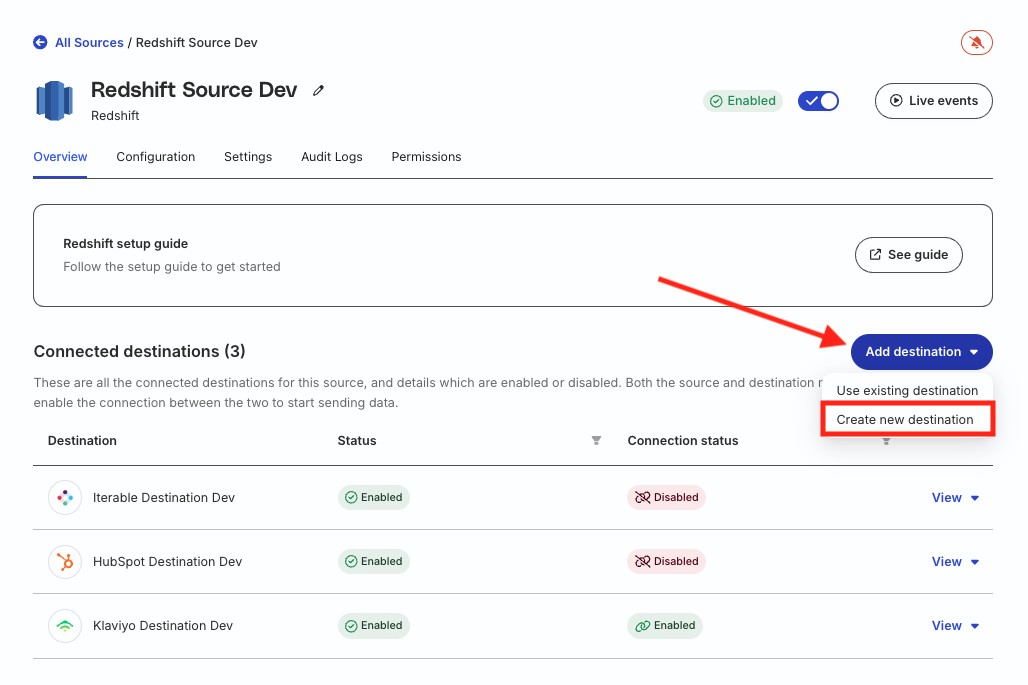
- From the list of destinations, search for Customer.io Audience and click Continue.
Connection settings
Configure the following settings to set up Customer.io Audience as a destination in RudderStack:
| Setting | Description |
|---|---|
| Name | Specify a unique name to identify the destination in RudderStack. |
| Site ID | Specify your Customer.io site ID by going to Settings > Account Settings > API Credentials > Track App Keys> Site ID in your Customer.io dashboard. |
| API Key | Specify the API key corresponding to the site ID specified above. |
| App API Key | Specify your Customer.io app API key by going to Settings > Account Settings > API Credentials > App API Keys> API Key in your Customer.io dashboard. |
| Region | Choose your Customer.io data center from US or EU.
|
