Custom Audience Destination
3 minute read
RudderStack’s Custom Audience destination lets you sync warehouse data to any HTTPS endpoint — internal APIs, regional ad platforms, partner systems, or niche marketing tools — without waiting for a native RudderStack integration.
Overview
With the Custom Audience destination, you can define how membership changes are delivered to your API by configuring the HTTP method, endpoint path, batch size, and a JSON request body template for each record action. During connection setup, you map warehouse columns to the fields your destination expects.
Some key features of this integration are:
- Per-action endpoints: Separate configuration for add, update, and remove operations
- Request body templates: Build the exact JSON payload your API expects, with access to batched records and connection metadata
- Configurable batching: Send up to 5,000 records per request (per action)
- Field-level hashing: Apply SHA256, SHA512, or MD5 per field when your API expects hashed identifiers
- Preview before save: Validate templates and inspect sample requests without delivering data to your API
- Mirror sync only: Membership changes are mirrored to the destination
How it works
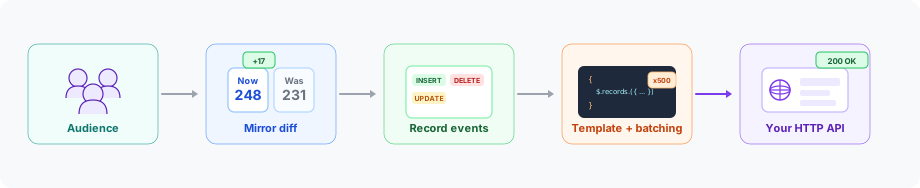
Custom Audience follows the same pipeline as native audience destinations (Facebook, Google Ads, LinkedIn, TikTok):
- Membership is computed from your warehouse source.
- Mirror sync compares the current membership to the previous snapshot and emits
recordevents with anINSERT,UPDATE, orDELETEaction. - RudderStack resolves your per-action endpoint and template, applies field hashing (when configured), batches records, and builds HTTP requests.
- RudderStack sends those requests to your API — success or failure is determined by the HTTP status code.
Use cases
| Scenario | Description |
|---|---|
| Internal activation | Sync a high-value segment to a recommendation or personalization API |
| Unsupported ad platforms | Reach regional or industry-specific platforms that accept audience lists over HTTP |
| Partner data sharing | Send qualified leads to a partner CRM |
Limitations
| Limitation | Details |
|---|---|
| Event Stream sources | Only warehouse-backed sources are supported. |
| OAuth authentication | Not supported currently and may be added in a future release. Use API key, Bearer token, Basic Auth, or no auth. |
| Non-JSON payloads | Request bodies are JSON only (no XML or form-encoded bodies). |
| Audience creation at the destination | Create and manage audience lists on your platform first, then provide the audience ID and name when configuring the connection. |
| Automatic data normalization | The transformer does not trim, lowercase, or otherwise normalize values. |
| Partial batch success | An HTTP success status marks all records in the request as successful; a failure status marks all as failed. Response bodies are not parsed for per-record outcomes. |
| Combined-action APIs | Each action type sends separate HTTP requests. APIs that accept inserts, updates, and deletes in a single payload are not supported. |
| Multiple object types per destination | Create a separate destination instance for each object type (for example, user vs. company). |
| Changes in field definitions | If you change field definitions in the destination configuration after a sync is created, you must update existing syncs manually. Connection mappings are not updated automatically when destination fields are renamed or removed. |
Links
You can use the Custom Audience destination in two ways:
- Connect a Reverse ETL source to Custom Audience
- Sync from Audience Builder to Custom Audience (Private Beta)
Syncing from Audience Builder to Custom Audience is possible only if Audience Builder is enabled for your workspace.
