Connect Reverse ETL Source to Bing Ads Offline Conversions
3 minute read
This guide takes you through the steps to connect a Reverse ETL source to the Bing Ads Offline Conversions destination.
Set up connection
The Reverse ETL feature supports only source-driven pipeline configuration.
Make sure you have set up a RETL source and connected it to your Bing Ads Offline Conversions destination before following the below steps.
- Confirm the connection settings for Bing Ads Offline Conversions destination and click Continue.
- In the Data Mapping section, select the Object.
- Specify the Sync mode to specify how RudderStack should sync the data to Bing Ads.
- In Choose identifier, specify the warehouse column that RudderStack uses to identify your records.
You can map this warehouse column to any of the following Bing Ads fields:
MICROSOFT_CLICK_IDPHONE
- Map the other warehouse columns to specific Bing Ads fields using the Map fields setting.
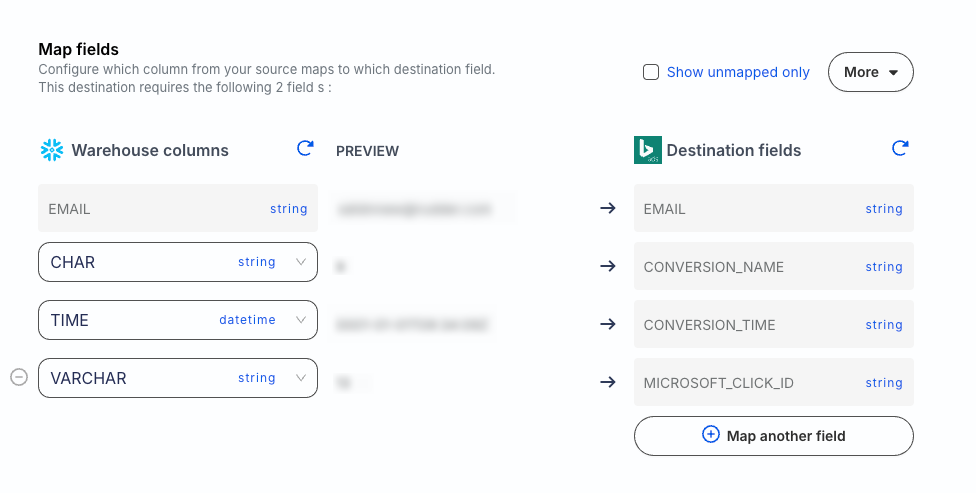
Supported mappings
RudderStack automatically maps the following schema fields to the corresponding Bing Ads properties depending on the type of operation:
Create
For any field x of type record:
| RudderStack property | Bing Ads property |
|---|---|
x.conversionCurrencyCode | Conversion Currency Code |
x.conversionName | Conversion Name |
x.conversionTimeShould be in ISO 8601 or Bing Ads-supported format Examples:
| Conversion Time |
x.conversionValue | Conversion Value |
x.clickId | Microsoft Click ID |
x.userId or x.customerId | Client ID |
x.externalAttributionCredit | External Attribution Credit |
x.externalAttributionModel | External Attribution Model |
SHA256(x.email)Required for enhanced conversions. | Hashed Email Address |
SHA256(x.phone)Required for enhanced conversions. | Hashed Phone Number |
Update
For any field x of type record:
| RudderStack property | Bing Ads property |
|---|---|
restate | Adjustment Type |
x.conversionCurrencyCode | Adjustment Currency Code |
x.conversionName | Conversion Name |
x.conversionTimeShould be in ISO 8601 or Bing Ads-supported format Examples:
| Conversion Time |
x.adjustmentTimeShould be in ISO 8601 or Bing Ads-supported format Examples:
| Adjustment Time |
x.conversionValue | Adjustment Value |
x.clickId | Microsoft Click ID |
SHA256(x.email)Required for enhanced conversions. | Hashed Email Address |
SHA256(x.phone)Required for enhanced conversions. | Hashed Phone Number |
Delete
For any field x of type record:
| RudderStack property | Bing Ads property |
|---|---|
retract | Adjustment Type |
x.conversionName | Conversion Name |
x.conversionTime | Conversion Time |
x.clickId | Microsoft Click ID |
Mapping considerations
conversionNamemust exactly match the goal’s Name in Microsoft Advertising. The payload does not include a goal ID — linkage is by name only, so a mismatch silently drops the conversion.conversionTimemust fall within the goal’s conversion window measured from the click time, and you should express it in the ad account’s timezone (not UTC).conversionTimemust be later than the recorded click time.
record event structure
The Bing Ads Offline Conversions destination supports only record events.
A sample record event that RudderStack sends to Bing Ads Offline Conversions is shown:
{
  "action": "insert",
  "context": {
    "sources": {
      "job_run_id": "<job_run_id>",
      "task_run_id": "<task_run_id>",
      "job_id": "<job_id>",
      "version": "<version>"
    }
  },
  "recordId": "2",
  "rudderId": "2",
  "fields": {
    "microsoftClickId": "<microsoft_clickid>",
    "conversionTime": "2006-01-02T15:04:05Z",
    "conversionName": "<conversion_name>",
    "conversionValue": 100,
    "externalAttributionCredit": "0.5",
    "externalAttributionModel": "<goal_name>",
    "email": "<email>",
    "phone": "<phone>"
  },
  "identifiers": {
    "Email": "alex@example.com"
  },
  "type": "record"
}
FAQ
Why can’t I add a Reverse ETL source from the destination page?
The Reverse ETL feature supports only source-driven pipeline configuration. It means that you must configure a Reverse ETL source in RudderStack and then connect it to a new or existing destination. Note that this destination should not be connected to any other source.
See Reverse ETL FAQ for more information.
