Bing Ads Destination
5 minute read
Bing Ads is an advertising platform that lets you track and monitor ad campaigns, clicks, CTRs, etc. You can also implement efficient ad retargeting for your customers.
Find the open source JavaScript SDK code for this destination in our Github repository.
Connection compatibility
| Destination Information | |||
|---|---|---|---|
| |||


RudderStack loads the Bing Ads native SDK from thehttps://bat.bing.com/domain in the web device mode integration. Based on your website’s content security policy, you might need to allowlist this domain to load the Bing Ads SDK successfully.
Setup
- In your RudderStack dashboard, set up a source.
- Go to the Overview tab of your source and select Add Destination > Create new destination.
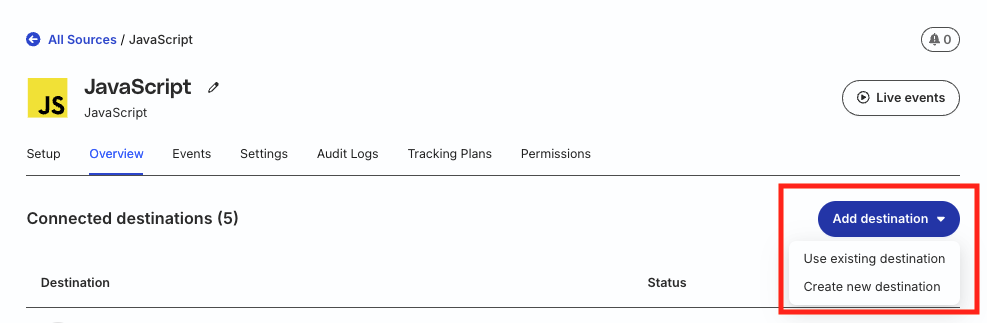
- Select Bing Ads from the list of destinations. Then, click Continue.
Connection settings
| Setting | Description |
|---|---|
| Tag ID | Enter the UET tag ID associated with your Bing Ads account. You can create a UET tag by logging in to your Bing Ads account and navigating to Tools > Conversion Tracking > UET tag > Create UET tag. See Bing Ads documentation for detailed instructions. |
| Enable enhanced conversions | Turn on this toggle to send enhanced conversions to Bing Ads. |
Other settings
| Setting | Description |
|---|---|
| Client-side Events Filtering | This setting lets you specify which events should be blocked or allowed to flow through to Bing Ads. See Client-side Events Filtering for more information on this setting. |
| Consent management settings | Configure the consent management settings for the specified source by choosing the Consent management provider from the dropdown and entering the relevant consent category IDs. See Consent Management in RudderStack for more information on this feature. |
| Use device mode to send events | This setting is enabled by default as Bing Ads is a web device mode-only destination. |
Page
You can make a page call to Bing Ads to record a page view. The web SDK will send this data to Bing Ads with the event type as pageLoad.
The following snippet highlights a sample page call:
rudderanalytics.page("Cart", "Cart Viewed", {
  path: "/cart",
  referrer: "test.com",
  search: "term",
  title: "test_item",
  url: "http://test.in",
})
Track
You can use the track call to capture user events and their associated properties.
A sample track call is shown below:
rudderanalytics.track("Item Purchased", {
  category: "MyCategory",
  currency: "INR",
  total: 5,
  revenue: 125,
  value: 100,
})
Supported mappings
The following table details the mappings between RudderStack and Bing Ads properties:
| RudderStack property | Bing Ads property | Description |
|---|---|---|
properties.event_actionmessage.type | event | Event action. |
properties.ecomm_pagetypeproperties.pagetype | ecomm_pagetype | Viewed page type. |
properties.products.$.product_idproperties.products.$.skuIf products array is absent, then:properties.product_idproperties.sku | ecomm_prodid | Product identifier. |
properties.query | search_termecomm_query | Search query. |
properties.ecomm_categoryproperties.category_id | ecomm_category | Category ID for the category browse page. |
properties.totalproperties.value | ecomm_totalvalue | Total value of all items in the transaction. |
properties.transaction_idproperties.order_idproperties.checkout_id | transaction_id | Unique ID for the transaction. |
properties.products.$.product_idproperties.products.$.skuproperties.products.$.quantityproperties.products.$.priceIf products array is absent, then:properties.product_idproperties.skuproperties.quantityproperties.price | items(id, quantity, price) | Product details like product ID, quantity, price. |
Note that:
RudderStack prioritizes
properties.totaloverproperties.revenuefollowed byproperties.value, before mapping it to the Bing Adsrevenueproperty.Bing Ads accepts the following values for
properties.ecomm_pagetype/properties.pagetype(mapped toecomm_pagetype):other(default value)homecategorysearchresultsproductcartpurchase
Bing Ads allows a maximum of 50 characters for the
product_id/skuproperties (mapped toecomm_prodid).You can override the default RudderStack mappings with the Bing Ads UET parameters by passing them directly in the event payload. For example, passing
ecomm_totalvaluein the payload overrides the RudderStack propertiesproperties.total/properties.value(mapped toecomm_totalvalue). However, note that this functionality is not applicable for theitemsparameter.
See the Bing Ads documentation for more information on the UET parameters.
Send enhanced conversions
With enhanced conversions, you can safely use first-party information like email address or phone number instead of using a third-party cookie. RudderStack includes this information in a pid object and sends it to Bing Ads.
To use this feature while sending events via RudderStack, make sure to toggle on the Enable enhanced conversions dashboard setting. Then, include the email and phone properties in your events.
RudderStack maps the email and phone properties in your event to the below enhanced conversions parameters by default:
emfor email addressphfor phone
If you have configured different parameters for email and phone, make sure to provide them in yourpidobject.
Consent management
If you configure the consent settings for the Bing Ads destination in the RudderStack dashboard, then:
- The core SDK prevents the Bing integration from loading unless the user grants the required consent.
- If the user changes the consent status mid-session, then a page reload is required for the changes to take effect. This ensures that the SDK re-evaluates the consent settings and does not load the Bing Ads integration if the consent is revoked.
When consent is not configured
If you do not configure the consent settings in the RudderStack dashboard, then the Bing Ads SDK is already loaded and active. In this case, you must inform the Bing SDK explicitly if the user revokes or updates consent mid-session.
An example of a mid-session consent update is shown below:
window.uetq = window.uetq || [];
window.uetq.push('consent', 'update', { 'ad_storage': 'denied' });
The above snippet instructs the Bing SDK to stop any data collection. In this scenario:
- No page reload is required
- Any new requests made by the Bing SDK will include the updated consent values.
