Trigger Reverse ETL syncs when dbt Cloud jobs complete by implementing webhooks with the RudderStack RETL Connections API.
9 minute read
This guide shows you how to automatically trigger RudderStack Reverse ETL syncs when your dbt Cloud jobs complete.
Overview
You can automatically trigger RudderStack Reverse ETL syncs whenever your dbt Cloud jobs complete, ensuring your downstream destinations always get fresh, transformed data without manual intervention or arbitrary CRON schedules.
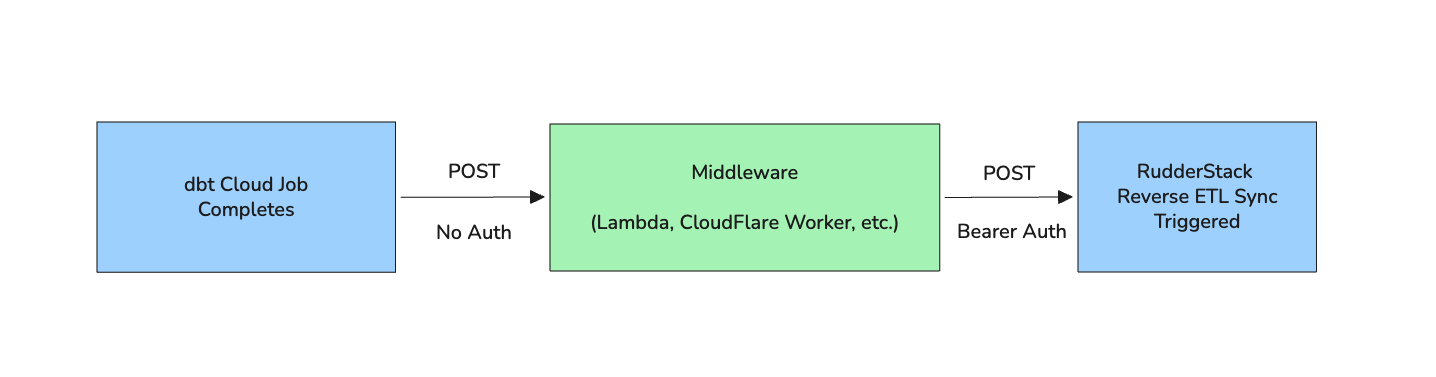
This integration uses dbt Cloud webhooks to notify a middleware endpoint when jobs complete. Your middleware then calls the RudderStack RETL Connections API to start a sync.
Integration architecture
The following steps summarize the integration flow:
dbt Cloud job completes successfully.
dbt Cloud sends a POST request (without authentication) with a fixed payload to your middleware endpoint.
Your middleware receives the webhook and checks for runStatus === "Success".
Use this to map specific dbt jobs to specific Reverse ETL connections
Important consideration
dbt Cloud sends a simple POST request with a fixed JSON payload. You cannot add custom headers, authentication, or modify the payload structure. This is why you need middleware — your middleware receives this POST request, then makes an authenticated call to RudderStack’s Reverse ETL Connections API with the required Authorization: Bearer <TOKEN> header.
3. Create the webhook handler
Choose a platform that best fits your infrastructure. The following examples show implementations for common serverless platforms.
AWS Lambda (Node.js)
// index.js
consthttps=require('https');// Configuration - use environment variables
constRUDDERSTACK_API_TOKEN=process.env.RUDDERSTACK_API_TOKEN;constRETL_CONNECTION_ID=process.env.RETL_CONNECTION_ID;// RudderStack API base URL (use api.eu.rudderstack.com for EU)
constRS_API_BASE='api.rudderstack.com';exports.handler=async(event)=>{try{// Parse the dbt Cloud webhook payload
constbody=JSON.parse(event.body);console.log('Received dbt Cloud webhook:',JSON.stringify(body,null,2));// Check if the job completed successfully
construnStatus=body.data?.runStatus;if(runStatus!=='Success'){console.log(`Job did not succeed (status: ${runStatus}). Skipping sync.`);return{statusCode:200,body:JSON.stringify({message:'Skipped - job not successful',status:runStatus})};}// Trigger RudderStack RETL sync
constsyncResult=awaittriggerRETLSync();return{statusCode:200,body:JSON.stringify({message:'RETL sync triggered successfully',syncId:syncResult.syncId})};}catch(error){console.error('Error processing webhook:',error);return{statusCode:500,body:JSON.stringify({error:error.message})};}};functiontriggerRETLSync(){returnnewPromise((resolve,reject)=>{constpostData=JSON.stringify({syncType:'incremental'// or 'full' for full sync
});constoptions={hostname:RS_API_BASE,port:443,path:`/v2/retl-connections/${RETL_CONNECTION_ID}/start`,method:'POST',headers:{'Content-Type':'application/json','Authorization':`Bearer ${RUDDERSTACK_API_TOKEN}`,'Content-Length':Buffer.byteLength(postData)}};constreq=https.request(options,(res)=>{letdata='';res.on('data',chunk=>data+=chunk);res.on('end',()=>{if(res.statusCode===200){resolve(JSON.parse(data));}else{reject(newError(`API returned ${res.statusCode}: ${data}`));}});});req.on('error',reject);req.write(postData);req.end();});}
Set the following environment variables — replace the placeholders with the actual values obtained in Step 1:
Copy the ngrok HTTPS URL, for example, https://ed94845ef6e0.ngrok-free.app.
In dbt Cloud, go to Settings > Webhooks.
Set the Endpoint to https://ed94845ef6e0.ngrok-free.app/webhook.
Click Test Endpoint to verify connectivity.
Run a dbt job and watch your local terminal for the webhook payload.
6. Verify the flow
In your local terminal, you should see the incoming dbt Cloud webhook payload and the RudderStack API response confirming the sync was triggered successfully.
Check the RudderStack dashboard to confirm the sync started.
Tip:
ngrok free tier URLs change each time you restart. For persistent URLs, use ngrok’s paid plan or deploy to a cloud function for final testing.
Troubleshooting
Problem
Solution
Webhook not firing
Check the dbt Cloud webhook configuration and ensure the correct job is selected
401 Unauthorized from RudderStack
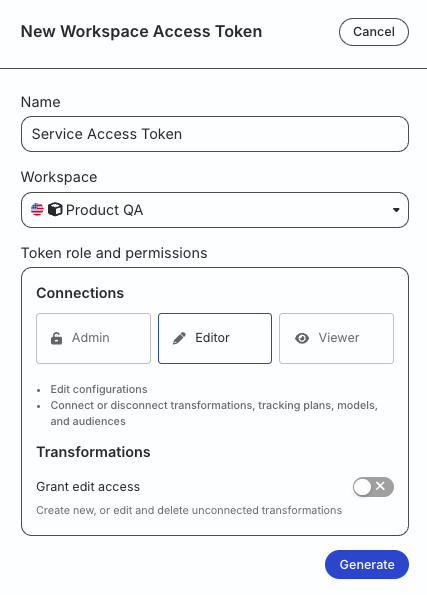
Verify the Service Access Token has the correct permissions and is not expired
404 Not Found
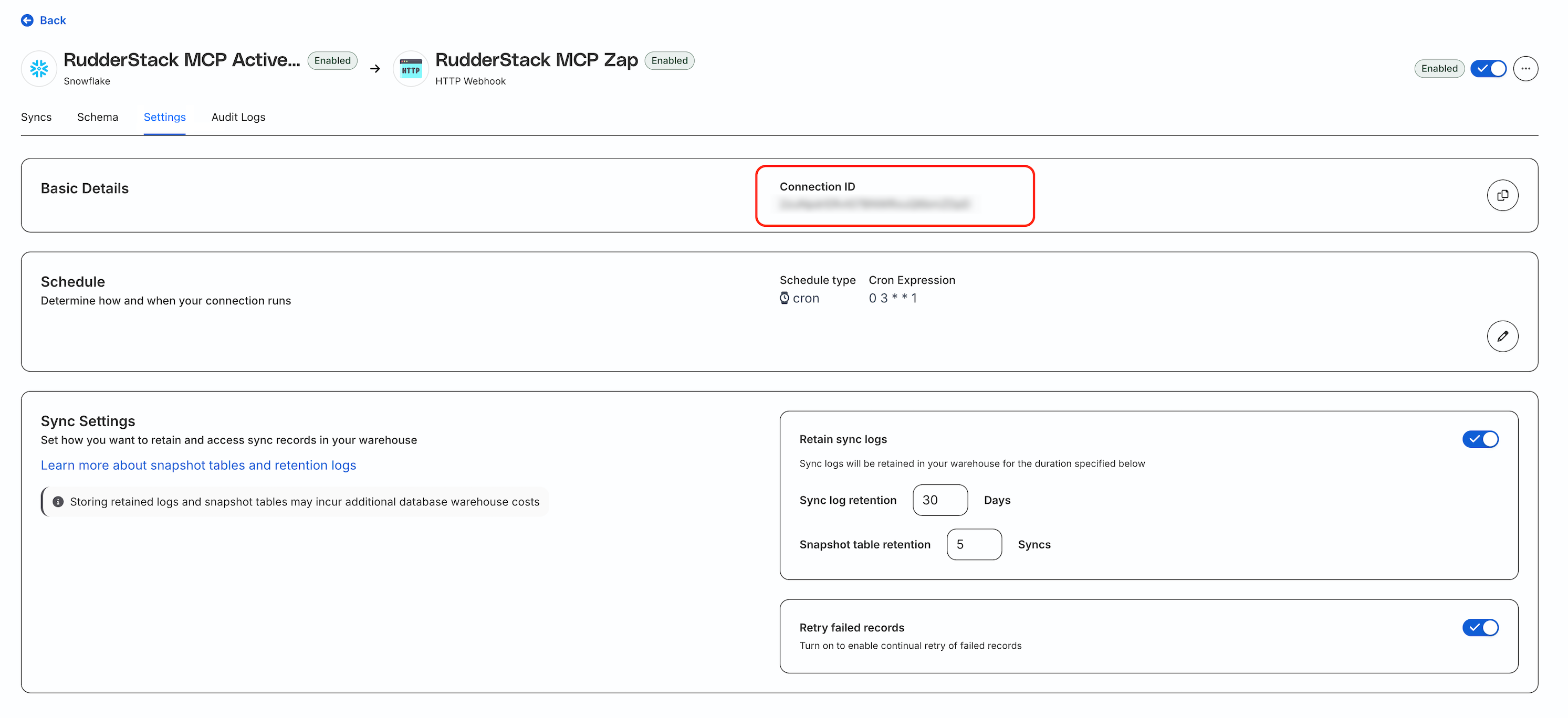
Check the Connection ID is correct and the connection exists in your workspace
409 Conflict
A sync is already running — wait for it to complete before triggering another sync
Sync triggers but no data flows
Check your Reverse ETL source query and field mappings in the connection configuration
API endpoints for debugging
Check sync status
curl -X GET "https://api.rudderstack.com/v2/retl-connections/{connectionId}/syncs"\
-H "Authorization: Bearer {TOKEN}"
Stop a running sync
curl -X POST "https://api.rudderstack.com/v2/retl-connections/{connectionId}/stop"\
-H "Authorization: Bearer {TOKEN}"
This site uses cookies to improve your experience while you navigate through the website. Out of
these
cookies, the cookies that are categorized as necessary are stored on your browser as they are as
essential
for the working of basic functionalities of the website. We also use third-party cookies that
help
us
analyze and understand how you use this website. These cookies will be stored in your browser
only
with
your
consent. You also have the option to opt-out of these cookies. But opting out of some of these
cookies
may
have an effect on your browsing experience.
Necessary
Always Enabled
Necessary cookies are absolutely essential for the website to function properly. This
category only includes cookies that ensures basic functionalities and security
features of the website. These cookies do not store any personal information.
This site uses cookies to improve your experience. If you want to
learn more about cookies and why we use them, visit our cookie
policy. We'll assume you're ok with this, but you can opt-out if you wish Cookie Settings.