Orchestrate your Profiles and Reverse ETL jobs programmatically with RudderStack’s Dagster integration.
4 minute read
Dagster is a popular orchestrator designed for data pipeline and management.
RudderStack’s Dagster library lets you integrate your Profiles runs and Reverse ETL syncs programmatically, enabling automated scheduling and orchestration of the jobs.
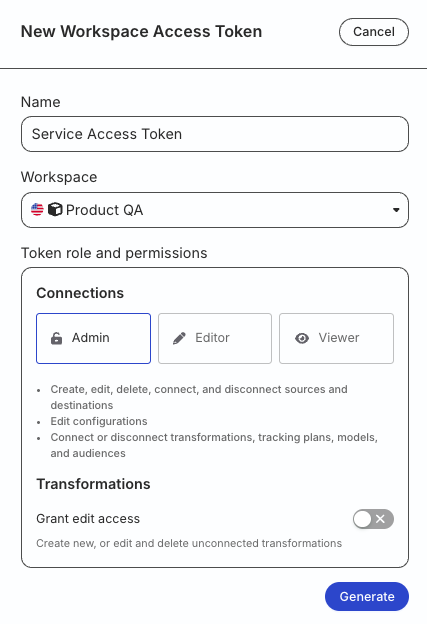
For testing or development purposes only: Generate a Personal Access Token with Read-Write role
RudderStack recommends using a workspace-level Service Access Token for authentication.
Any action authenticated by a Personal Access Token will break if the user is removed from the organization or a breaking change is made to their permissions.
Install the dagster-rudderstack package to use Dagster with RudderStack:
pipinstalldagster-rudderstack
Set up resources
You can define resources like your RudderStack connection details (for example, access token) in Dagster - this establishes the context for running the operations.
A sample code defining a resource for Reverse ETL and Profiles is shown:
The RudderStackRETLResource and RudderStackProfilesResource parameters are described below:
Parameter
Description
Default value
access_token Required
The Service Access Token mentioned in the Prerequisites section.
-
rs_cloud_url
The RudderStack API URL depending on your region.
Standard (US): https://api.rudderstack.com
EU: https://api.eu.rudderstack.com
https://api.rudderstack.com
request_max_retries
Maximum number of times requests to the RudderStack API should be retried before failing.
3
request_retry_delay
Time (in seconds) to wait between each request retry.
1
request_timeout
Time (in seconds) after which the requests to RudderStack are declared timed out.
30
poll_timeout
Time (in seconds) after which the polling for a triggered job is declared timed out.
None (keeps polling till the job completes or fails)
Define jobs
Ops are RudderStack-specific operations that let you define a Dagster job for your Profiles or Reverse ETL syncs that run on a defined schedule. You can also define a job with a dependency on Profiles runs followed by Reverse ETL syncs.
Make sure to set the schedule type to Manual in the RudderStack dashboard for both Reverse ETL syncs and Profiles jobs.
This way, the sync jobs can be triggered only via Dagster.
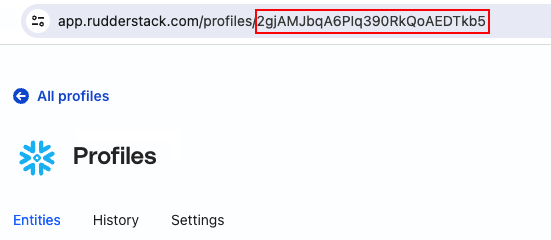
# jobs.pyfromdagsterimportjob,ScheduleDefinition,ScheduleDefinitionfromdagster_rudderstack.ops.profilesimportrudderstack_profiles_op,RudderStackProfilesOpConfigfrom.resourcesimportrudderstack_profiles_resource@job(resource_defs={"profiles_resource":rudderstack_profiles_resource})defrs_profiles_run():rudderstack_profiles_op()rudderstack_profile_schedule=ScheduleDefinition(job=rs_profiles_run,cron_schedule="0 0 * * *",# Runs every day at midnight.run_config={"ops":{"rudderstack_profiles_op":RudderStackProfilesOpConfig(profile_id="<profiles_project_id")}},default_status=DefaultScheduleStatus.RUNNING)
Make sure to provide the Profiles project ID in RudderStackProfilesOpConfig.
Define job sequence
This section is helpful in cases where you want to run your Profiles project first and then trigger one or multiple Reverse ETL syncs to update the downstream tools.
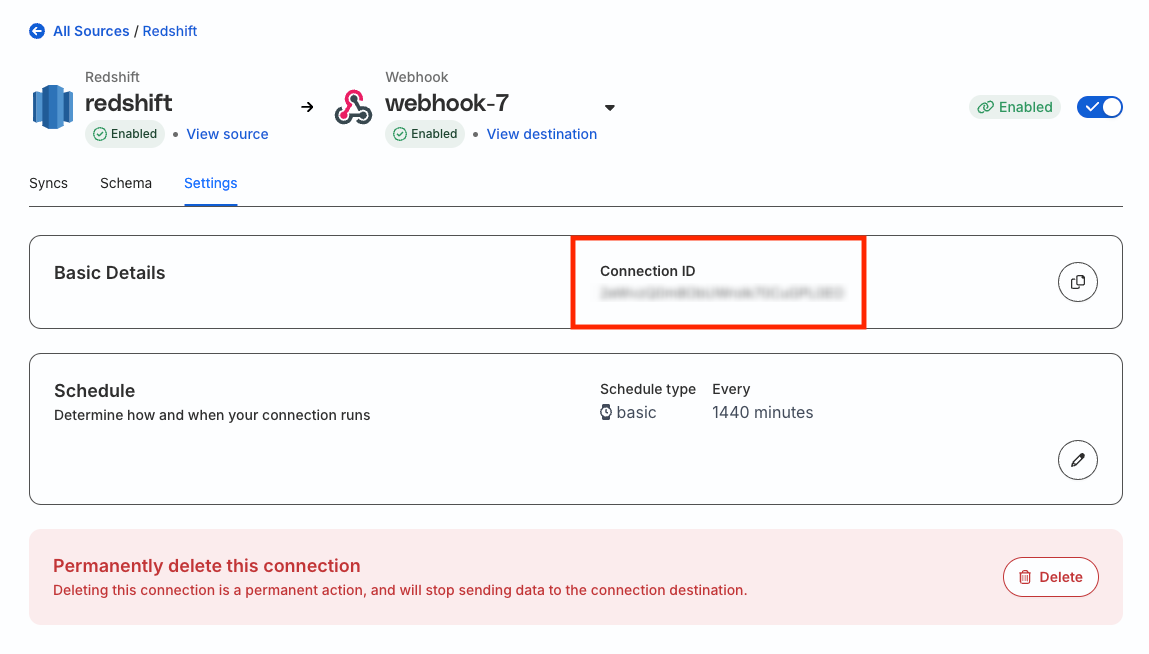
The following code highlights how you can create a DAG of multiple Reverse ETL syncs that are triggered after a successful Profiles run.
# jobs.pyfromdagsterimportjob,ScheduleDefinition,ScheduleDefinitionfromdagster_rudderstack.ops.retlimportrudderstack_sync_op,RudderStackRETLOpConfigfromdagster_rudderstack.ops.profilesimportrudderstack_profiles_op,RudderStackProfilesOpConfigfrom.resourcesimportrudderstack_retl_resource,rudderstack_profiles_resource@job(resource_defs={"profiles_resource":rudderstack_profiles_resource,"retl_resource":rudderstack_retl_resource})defrs_profiles_then_retl_run():profiles_op=rudderstack_profiles_op()rudderstack_sync_op(start_after=profiles_op)rudderstack_sync_schedule=ScheduleDefinition(job=rs_profiles_then_retl_run,cron_schedule="0 0 * * *",# Runs every day at midnight.run_config=RunConfig(ops={"rudderstack_profiles_op":RudderStackProfilesOpConfig(profile_id="<profiles_project_id>"),"rudderstack_sync_op":RudderStackRETLOpConfig(connection_id="<retl_connection_id>"),})default_status=DefaultScheduleStatus.RUNNING)
This site uses cookies to improve your experience while you navigate through the website. Out of
these
cookies, the cookies that are categorized as necessary are stored on your browser as they are as
essential
for the working of basic functionalities of the website. We also use third-party cookies that
help
us
analyze and understand how you use this website. These cookies will be stored in your browser
only
with
your
consent. You also have the option to opt-out of these cookies. But opting out of some of these
cookies
may
have an effect on your browsing experience.
Necessary
Always Enabled
Necessary cookies are absolutely essential for the website to function properly. This
category only includes cookies that ensures basic functionalities and security
features of the website. These cookies do not store any personal information.
This site uses cookies to improve your experience. If you want to
learn more about cookies and why we use them, visit our cookie
policy. We'll assume you're ok with this, but you can opt-out if you wish Cookie Settings.