Bot Management
- free
- growth
- enterprise
9 minute read
This guide walks you through RudderStack’s bot management feature in detail and explains how to use it for detecting and filtering bot traffic for web sources.
Overview
RudderStack’s Bot Management feature lets you detect, flag, and drop bot traffic on web sources before it enters your data pipelines. By identifying and managing bot events early in your data flow, you can significantly improve data quality and reduce unnecessary costs.
Note that:
Bot detection is available in the Free, Growth, and Enterprise plans. However, you can flag and drop bot events in the Growth and Enterprise plans only.
Only Admins can configure bot management for the workspace
This feature is only applicable for the following web sources:
- JavaScript (v3.0.1 and above)
- Flutter
- AMP Analytics
The current implementation focuses on user agent-based detection and does not include behavioral detection
Some sophisticated bots may evade detection if they use standard user agents
Required permissions
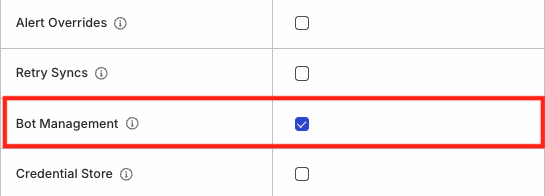
Only Admins and Members with the Bot Management permission can configure bot management at a workspace and source level.
Permissions for legacy RBAC system
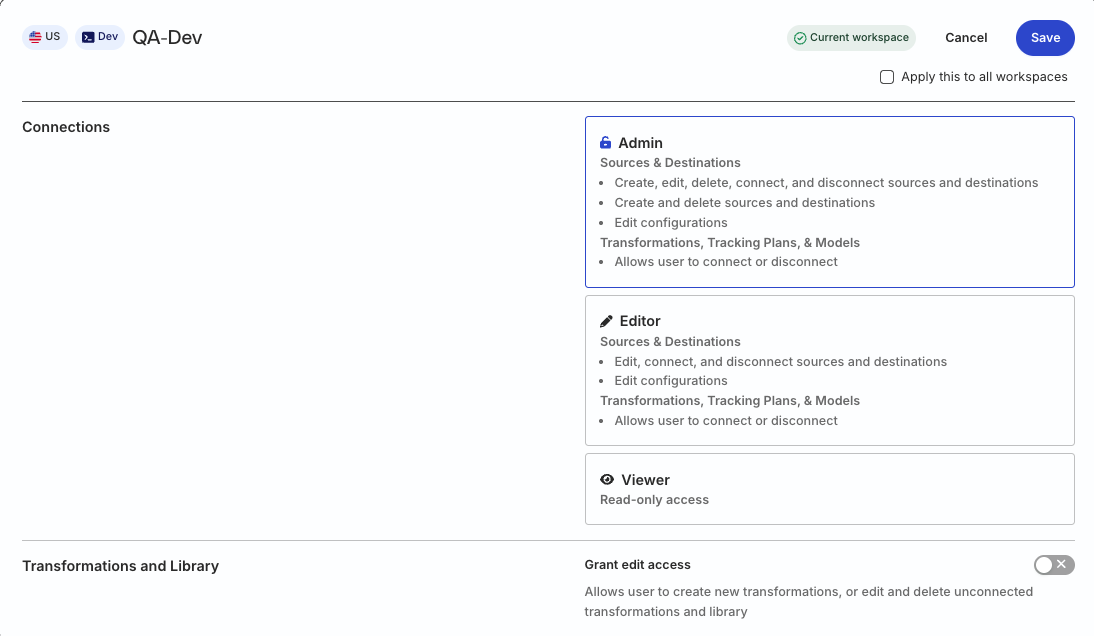
In the legacy Permissions Management (RBAC) system, only Org Admins and members with the Connections Admin role in their workspace policy can use this feature.
What is bot management?
Bot management is a feature that identifies web events generated by bots, then gives you the ability to flag or drop those events.
You can flag or drop those events in the Growth and Enterprise plans only.
With this feature, you can:
- Detect bot events on web sources.
- Flag bot events for downstream analysis.
- Block bot events entirely.
- Create global bot management settings for all web sources.
- Apply custom bot management settings for individual web sources.
- Monitor bot event volume patterns through the source Events view.
Which pain points does bot management address?
- Inconsistent bot detection: Previously, each analytics platform in your stack implemented its own approach to bot detection, creating inconsistent visitor counts and engagement metrics across platforms. Bot management provides a single, reliable filtering layer that standardizes bot detection across your web sources.
- Data quality degradation: Bot events mixed with legitimate customer events corrupts datasets, leading to unreliable conversion metrics and misleading signals about feature usage. Bot management ensures your teams can work with clean, accurate data.
- Unnecessary costs: Bot events generate unwanted costs across the stack, from piplines to data stores to analytics tools. Bot management gives you the tools to control cost at every stage.
- Marketing inefficiency: Marketing and advertising budgets are often consumed by non-human bot events, inflating customer acquisition costs and making campaign performance metrics unreliable. Bot management helps ensure your marketing efforts target real users.
How bot management works
This section explains the bot detection, flagging, and dropping mechanisms in detail.
Bot detection
To detect bots, RudderStack analyzes user agent strings in the context of each event payload.
RudderStack provides two detection options:
- Default detection: Uses a predefined list of known bot patterns in the user agent string to identify common bots. This list includes common AI crawlers.
- IAB list integration: Uses the International Advertising Bureau (IAB) bot list to identify bots in the user agent string. This option is available only if you have purchased the IAB bot list or have an active subscription for list updates.
To use the IAB list integration, you must have purchased the IAB bot list or have a subscription for updates. Contact RudderStack to set up a RudderStack-assisted integration using your IAB credentials.
Bot event management actions
You can flag and drop bot events in the Growth and Enterprise plans only.
When bot events are detected, you have two options for taking action:
1. Forward events with a flag
When enabled, RudderStack forwards the event with bot details in the context object of the payload. Flagging payloads is useful when you want to perform deeper bot analysis in a downstream system.
In this method, RudderStack:
- Adds an
isBot: trueflag in the root levelcontextobject - Includes a
botobject with helpful details likenameandurl(when available)
Flagged events are ingested and not dropped, so they count towards your paid event volume.
Example of a flagged event:
{
  "userId": "",
  "anonymousId": "anon-2dfb-4ba389c577037c5fdd4a",
  "event": "Product Added",
  "properties": {
    "product_id": "SKU123",
    "product_name": "Wireless Headphones"
  },
  "context": {
    "ip": "11.22.33.44",
    "userAgent": "Mozilla/5.0 (Macintosh; Crawler)",
    "isBot": true,
    "bot": {
      "name": "OAISearchBot",
      "url": "https://platform.openai.com/docs/bots"
    },
    "app": {
      "name": "Store Web App",
      "version": "2.1.0"
    }
  },
  "timestamp": "2025-02-17T10:30:45.123Z",
  "type": "track"
}
2. Drop events
When enabled, RudderStack drops bot events at the gateway and they are not ingested into the pipeline. Note that these events:
- Are not included your billable event volume
- Are not sent to any destinations
Dropped events cannot be replayed or recovered.
Configure bot management settings
You can configure bot management at two levels:
Workspace-level configuration
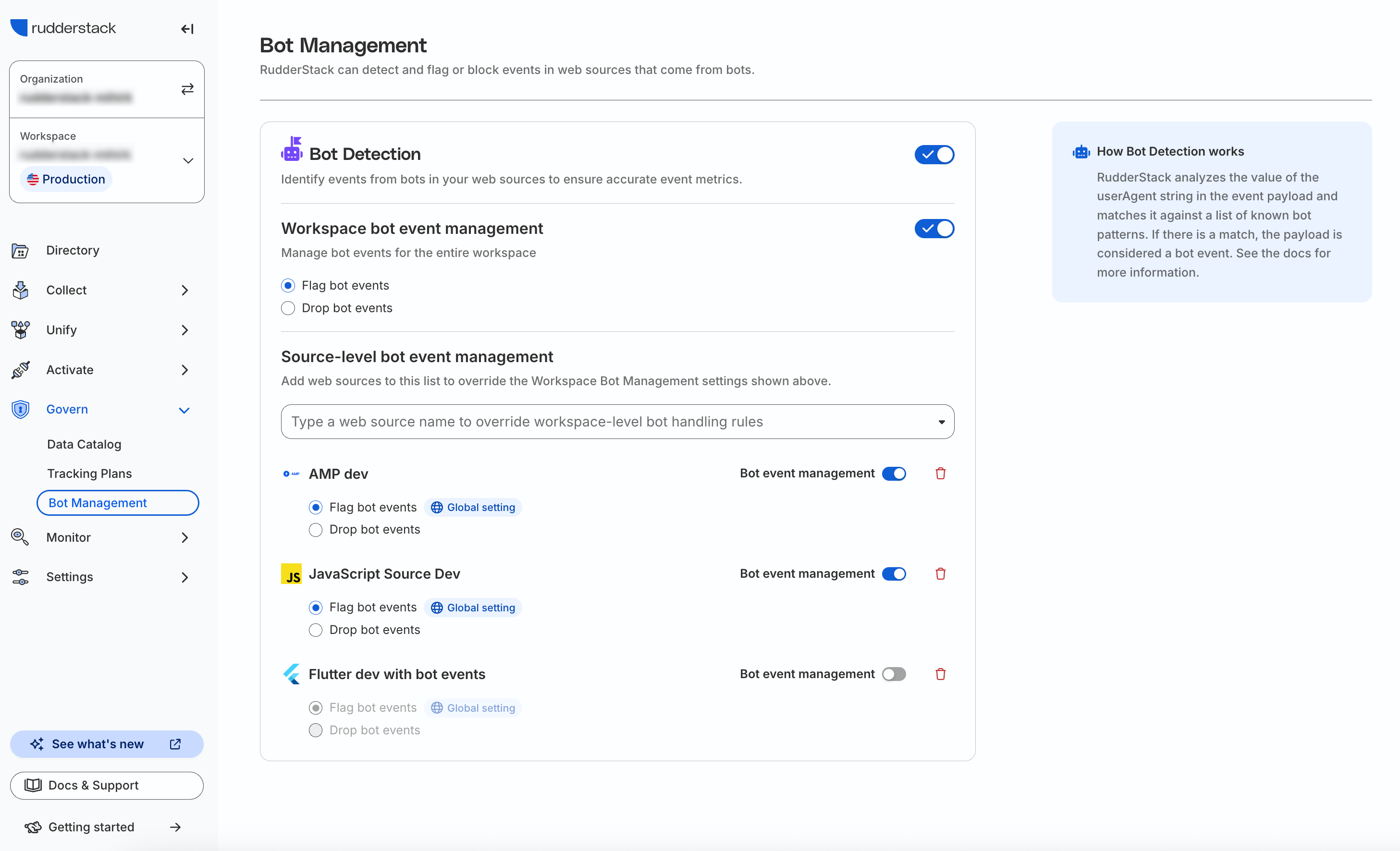
- Go to Govern > Bot Management to configure bot detection, flagging, and dropping for your workspace.
- Turn on the Bot Detection toggle to enable the bot detection feature in your workspace. This will enable bot detection across all web sources. You can then configure the bot management settings globally, or for specific sources in your workspace.
Workspace bot event management
This section lets you flag or drop bot events across all web sources in the workspace.
To configure bot management for a specific web source, see Source-level configuration.
Source-level configuration
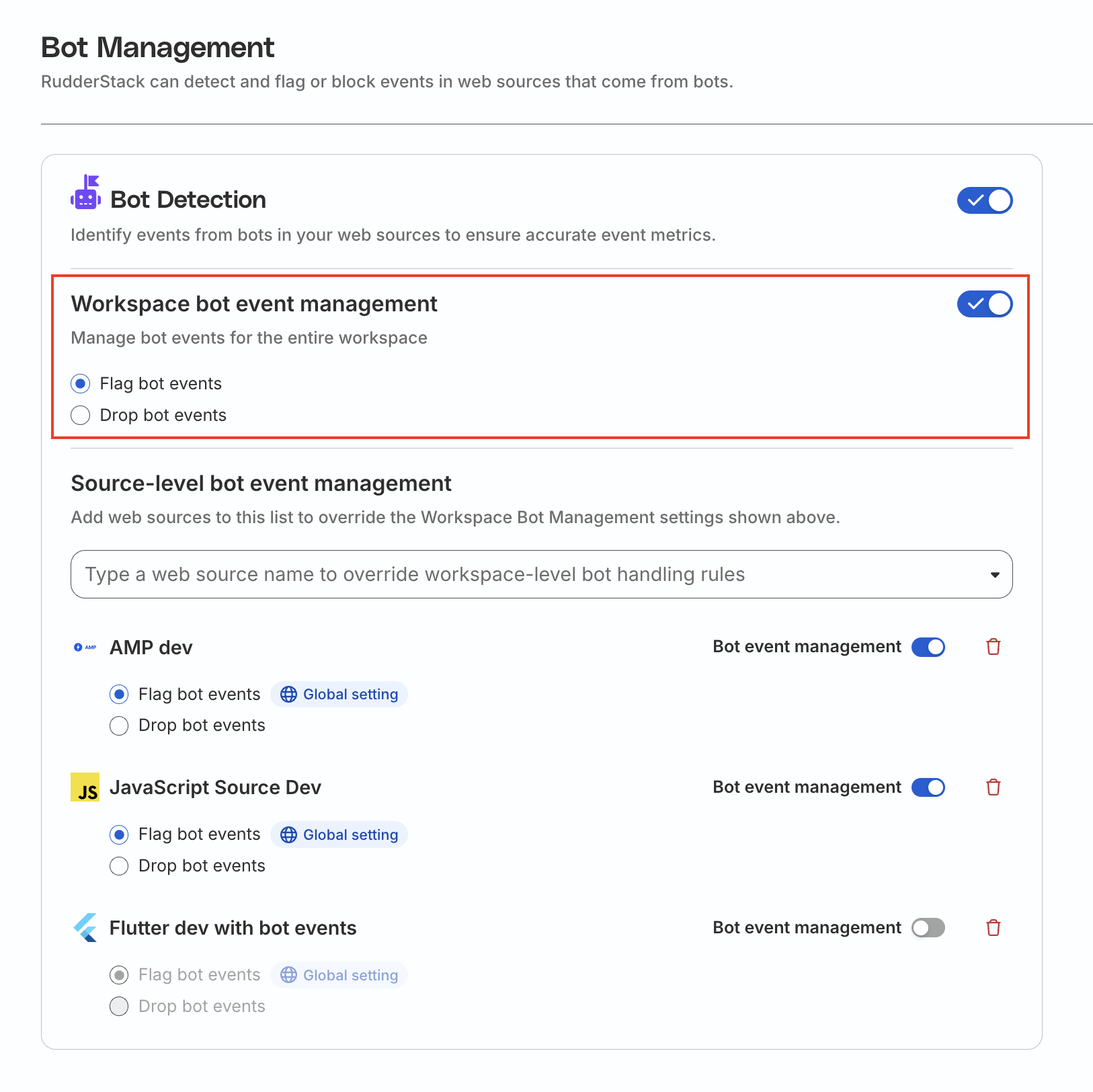
You can use the Source-level bot event management section to override the global bot management settings for specific web sources and specify the configuration per source based on your requirements.
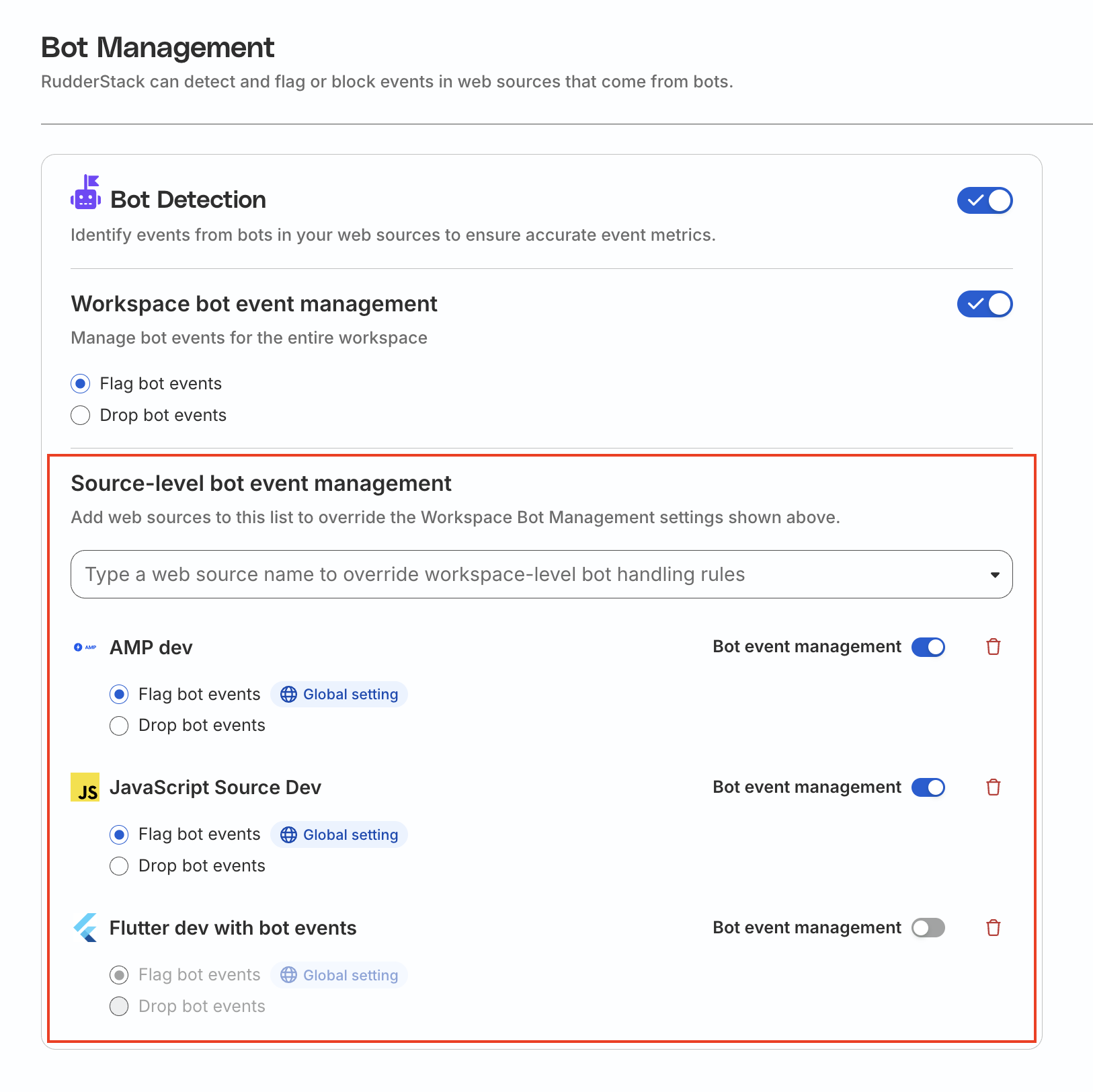
See the below use cases for more information on how to use the settings in this section:
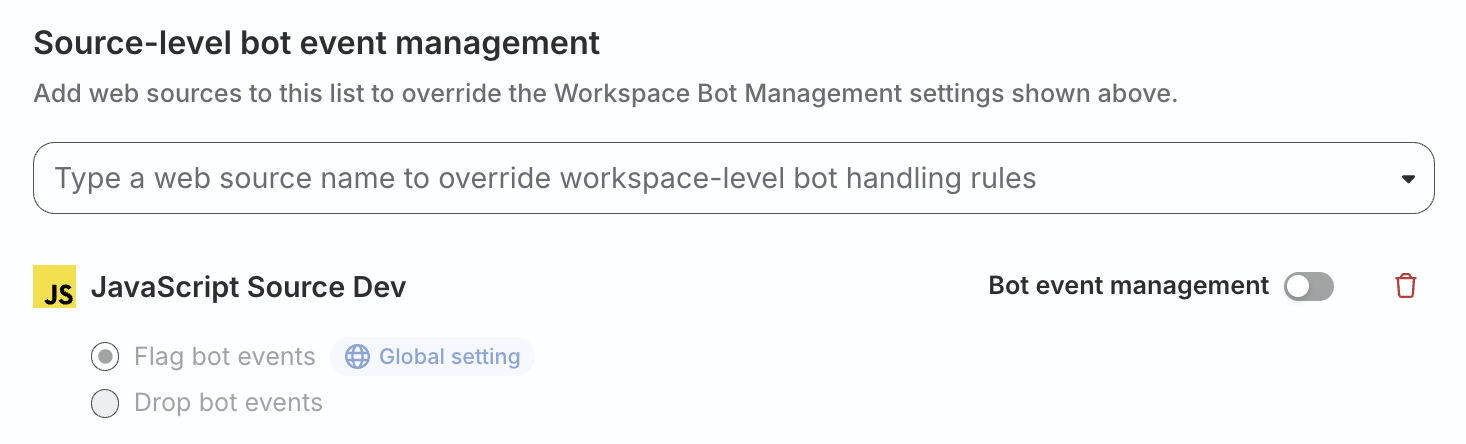
1. Disable bot management for a specific source
- Select the source from the dropdown. You will see the Bot event management setting toggled on and the global setting selected by default.
- Turn off the Bot event management toggle.
In this case, bots will still be detected, but not flagged or dropped.
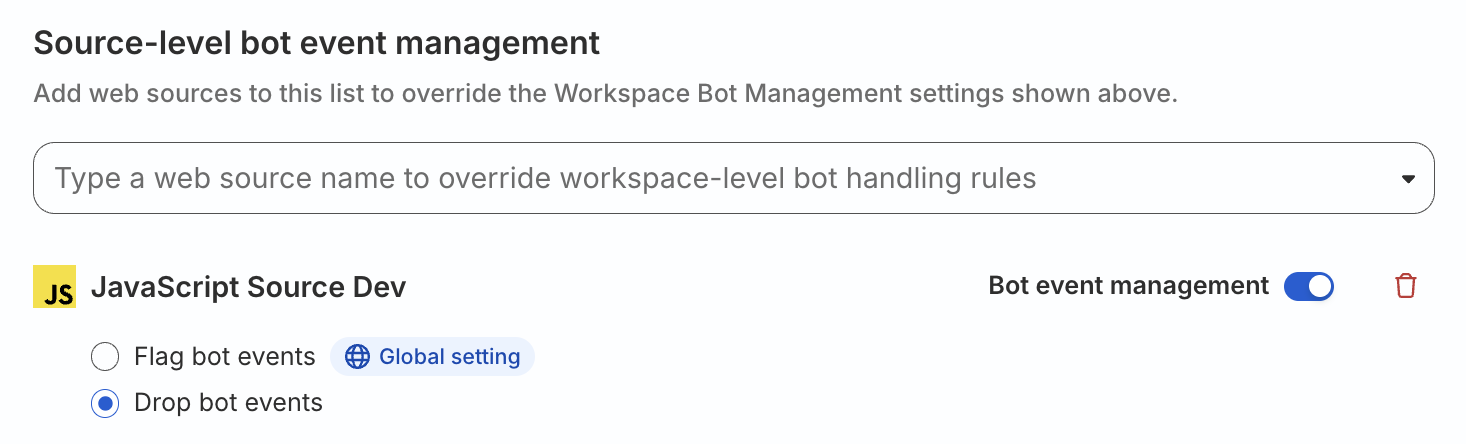
2. Configure different bot management actions a specific source
- Select the source from the dropdown. You will see the Bot event management setting toggled on and the global setting selected by default.
- Choose a different management action setting (flag/drop).
In this case, a different bot management action will apply to the configured source. The global bot management settings will continue to apply to all the other sources.
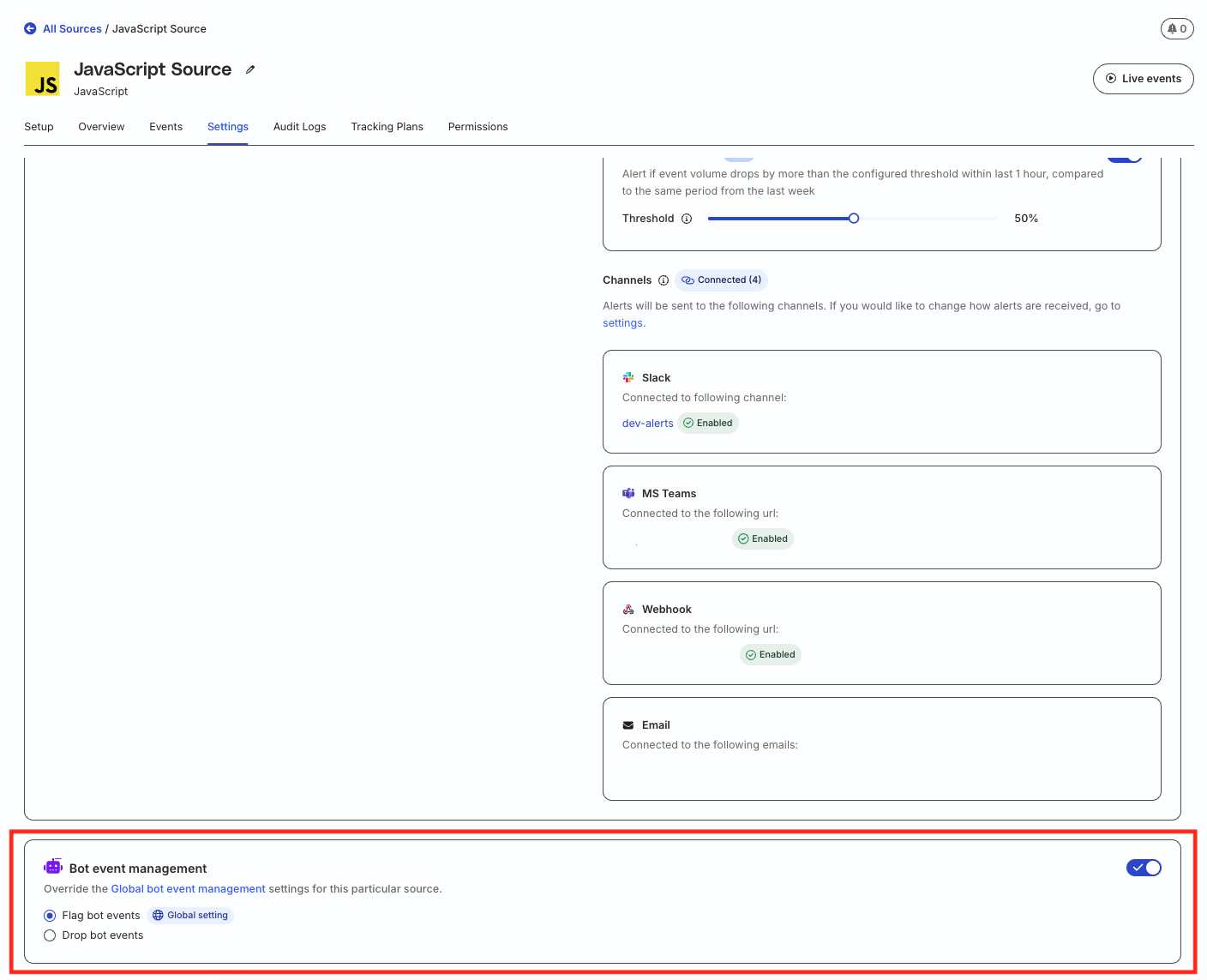
Manage bot management in source settings
- Go to the Settings tab of the source page.
- Scroll down to the Bot event management.
- If you have already configured the bot management settings in the Source-level bot event management section of the Govern > Bot Blocking page, then they will be reflected here.
- Update the settings as required.
Any updates made to the bot management settings in this section will automatically reflect in the Source-level bot event management section.
View bot event metrics
You can view the bot event metrics for a particular source in the Events tab of that source page.
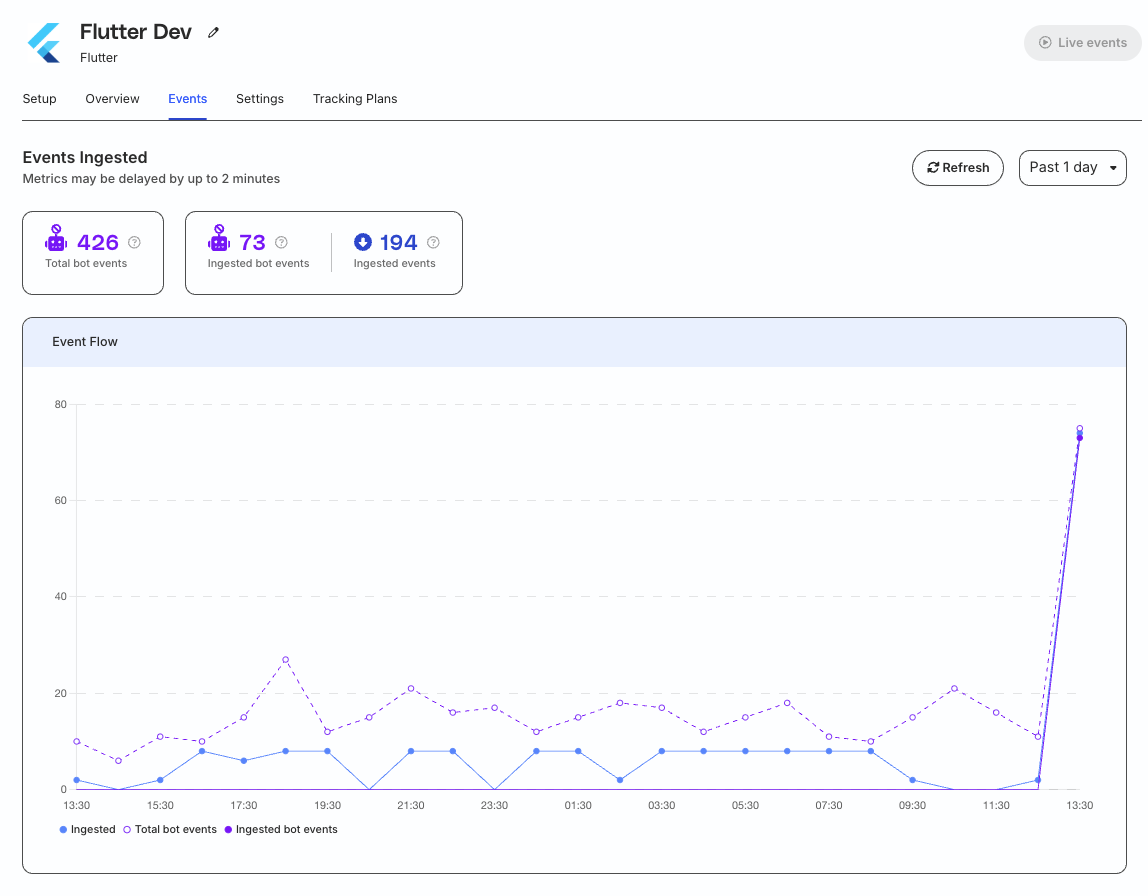
Total bot events
The Total bot events metric corresponds to the total number of non-deduplicated events generated by bots for that source.
Ingested bot events
The Ingested bot events metric corresponds to the number of deduplicated bot events ingested by the source.
Note that this event count also depends on whether the bot management settings are configured to flag or drop bot events. See the end-to-end example below for more information on how this metric is calculated.
Ingested events
The Ingested events metric corresponds to the total number of events ingested by the source. Note that this number:
- Includes deduplicated bot events
- Excludes dropped bot events if bot dropping is enabled
Effect of deduplication on ingested bot events
RudderStack’s Event Deduplication feature ensures that the same event is not processed multiple times, with the goal of achieving exactly-once delivery — this is important because events can sometimes be sent more than once due to retries.
How event deduplication works
Every event sent through RudderStack SDKs is assigned a unique
messageId. This ID remains the same even if the event is retried due to delivery failures (caused by network issues or various other factors).When RudderStack receives an event, it checks if the
messageIdhas already been processed. If it has, the event is dropped; otherwise, the event is processed and themessageIdis stored for future reference.
Deduplication has more effect on bot events than non-bot events, as bots generate a lot of events with the same messageId which end up getting deduplicated.
As a result, while you might see a higher number of bot events in the Total bot events metric, whereas the Ingested bot events count can be lower.
End-to-end example
This section illustrates how deduplication affects bot event metrics.
Consider a JavaScript SDK that sends 1000 events, where:
- 450 events are from bots, with only 300 unique bot events
- 550 events are unique, non-bot events
- Event deduplication is enabled by default
Case 1: Bot events are forwarded with a flag
The following table shows how the metrics look like when bot management is configured to forward events with flag:
| Metric | Value | Breakdown |
|---|---|---|
| Total bot events | 450 |
|
| Ingested bot events | 300 | 300 unique bot events |
| Ingested events | 850 |
|
Case 2: Bot events are dropped
The following table shows how the metrics look like when bot management is configured to drop bot events:
| Metric | Value | Breakdown |
|---|---|---|
| Total bot events | 450 |
|
| Ingested bot events | 0 | Excluded because of the bot management setting |
| Ingested events | 550 |
|
Considerations for implementing bot management
Keep the following points in mind before you implement the bot management feature:
Good bots vs. bad bots
When enabling the bot detection and management feature, consider the different types of bots that may interact with your site.
Good bots
- Search engine crawlers like Google or Bing
- Price aggregators
- Helpful for SEO and product discovery
- Generate events that don’t represent customer behavior
Bad bots
- Competitive scrapers (monitoring prices, inventory)
- Automated threats (account takeover attempts, credit card testing)
- Particularly common in competitive ecommerce sectors
Impact on data analysis
- Historical data comparison: Data patterns may change after enabling bot dropping and it is likely that downstream teams will see meaningful changes in event volume.
- Marketing attribution: Metrics like conversion rates and customer acquisition costs may shift.
- A/B testing: Results may differ with cleaner data.
Recommendations
- Start with flagging: Begin by forwarding bot events with a flag to understand your bot traffic patterns before dropping events.
- Monitor bot metrics: Use the provided analytics to understand how much of your traffic is from bots.
- Review flagged events: Periodically check flagged bot events to ensure legitimate traffic isn’t being misclassified.
FAQ
Does bot management work with the older JavaScript SDK versions?
The bot management feature is supported in JavaScript SDK v3.0.1 and above. RudderStack recommends using the latest version of the SDK for best results.
