MTU (Monthly Tracked Users) Usage
- enterprise
4 minute read
RudderStack’s MTU (Monthly Tracked Users) pricing model does billing based on the count of unique users who interact with RudderStack’s Event Stream pipelines within a given month.
The MTU model is an alternative to the events-based pricing model and helps you align costs more closely with the actual user engagement.
Definitions
| Term | Definition |
|---|---|
| Unique user (user) | An individual interacting with a customer’s application (web or mobile) whose activities generate events tracked by RudderStack. |
| Anonymous ID | Unique identifier assigned to a user by RudderStack before they log in or sign up. |
| User ID | Unique identifier assigned to a user after they log in or sign up. |
| Merged IDs | A set of anonymous IDs that have been associated with a user ID. |
What is an MTU?
An MTU is a unique user who interacts with a customer’s application within a month and is identified through events tracked by RudderStack.
See the Use case section for more information on how RudderStack tracks MTUs.
How RudderStack calculates MTUs
RudderStack counts unique users by leveraging HyperLogLog that tracks both user IDs and anonymous IDs across various events.
The different phases involved in this process are listed below:
Event tracking
RudderStack tracks events (like identify, track, group) generated by users that interact with a customer’s application (website, mobile apps, etc.)
Identification and association
RudderStack then tracks the following identifiers depending on whether the interacting user has logged in or signed up. See Definitions for more details on these identifiers:
- Anonymous ID
- User ID
- Merged ID
ID pool generation
RudderStack forms the below ID pools based on the tracked identifiers:
| Pool | Description |
|---|---|
| User ID + Anonymous ID | A combined pool of user IDs and anonymous IDs. |
| Merged ID | A pool containing all the merged IDs, that is, anonymous IDs for which there are associated user IDs. |
RudderStack then computes the MTU count using the below formula:

Note the following:
- RudderStack counts MTUs across different Event Stream sources present in the same workspace. Users interacting with sources present in different workspaces are tracked separately.
- RudderStack does not store any ID for tracking purposes. Also, it does not use your warehouse to obtain or store the tracking information. As a result, note that the estimated MTU count includes an error margin of approximately 1%.
- RudderStack does not track MTUs for the Reverse ETL and Extract pipelines. Support for tracking MTUs for Profiles is coming soon.
Use case
The following use case highlights how RudderStack tracks MTUs across different sources:
- A user visits a web application instrumented with RudderStack’s JavaScript SDK without signing up or logging in. An event is generated including a new
anonymousId- RudderStack tracks it as a part of the MTUs. - Later, the same user signs up to the application and a new user ID is generated for them. A new
identifyevent is generated including both theuserIdandanonymousId. RudderStack still counts this as one MTU as it tracked and observed theanonymousIdbefore. - Now, the same user interacts (without logging in) with the customer’s iOS application that is instrumented with RudderStack’s iOS (Obj-C) SDK. This generates an event with a different
anonymousIdand RudderStack tracks them as a separate MTU. - Once the user logs in, a new
identifyevent is generated and tracked with the aboveuserIdand the new iOSanonymousId, so RudderStack stops tracking thisanonymousIdand counts them as the same MTU.
The attributed user counts are not mutually exclusive - users can exist across multiple sources.
Get usage details
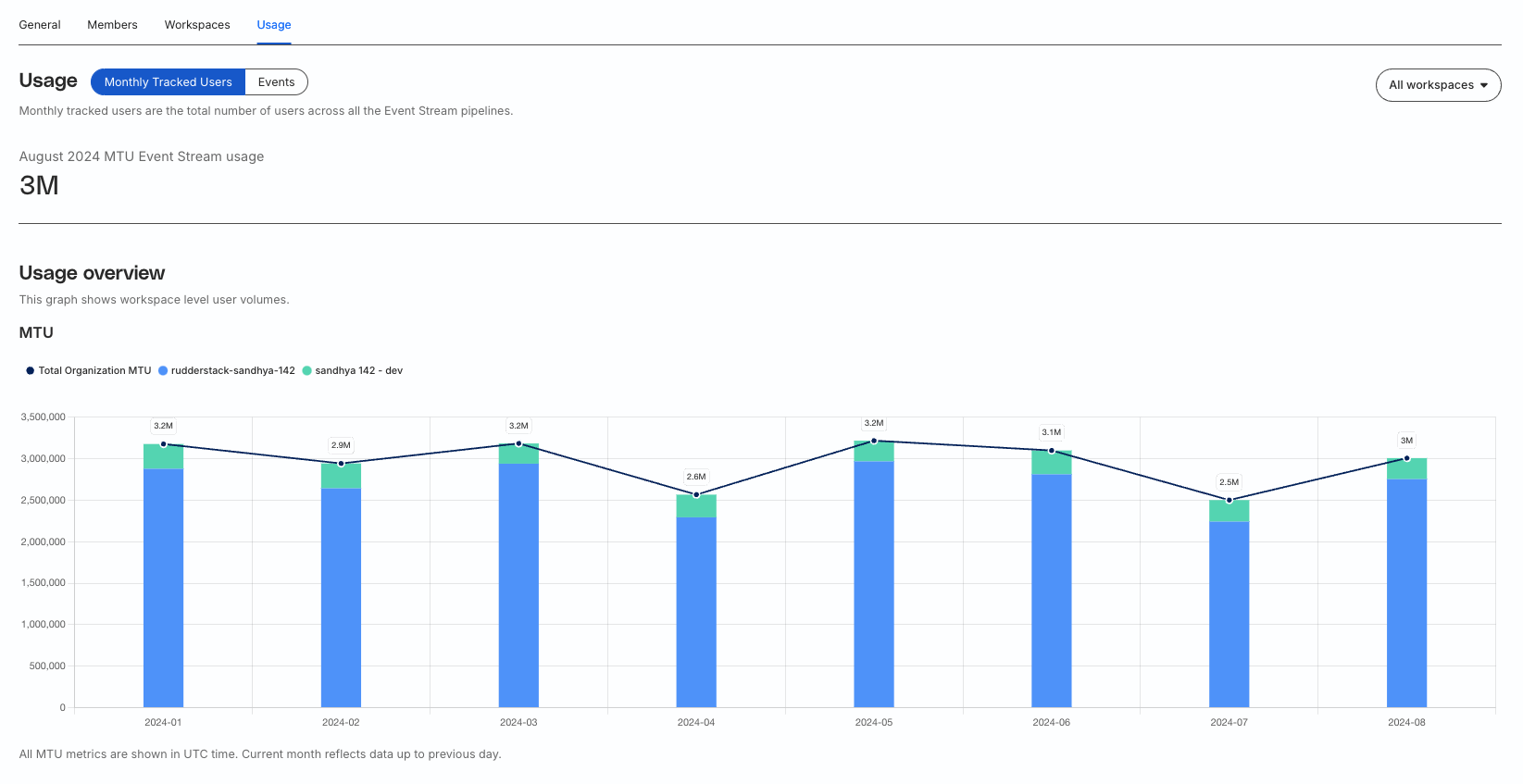
In your RudderStack dashboard, go to Settings > Organization and click the Usage tab to get the detailed MTU metrics.
The MTU counter resets at the last day of every month (midnight in UTC time).
By default, you see the metrics for all the workspaces within your organization.
Select a particular workspace from the dropdown to get the workspace level MTU metrics.
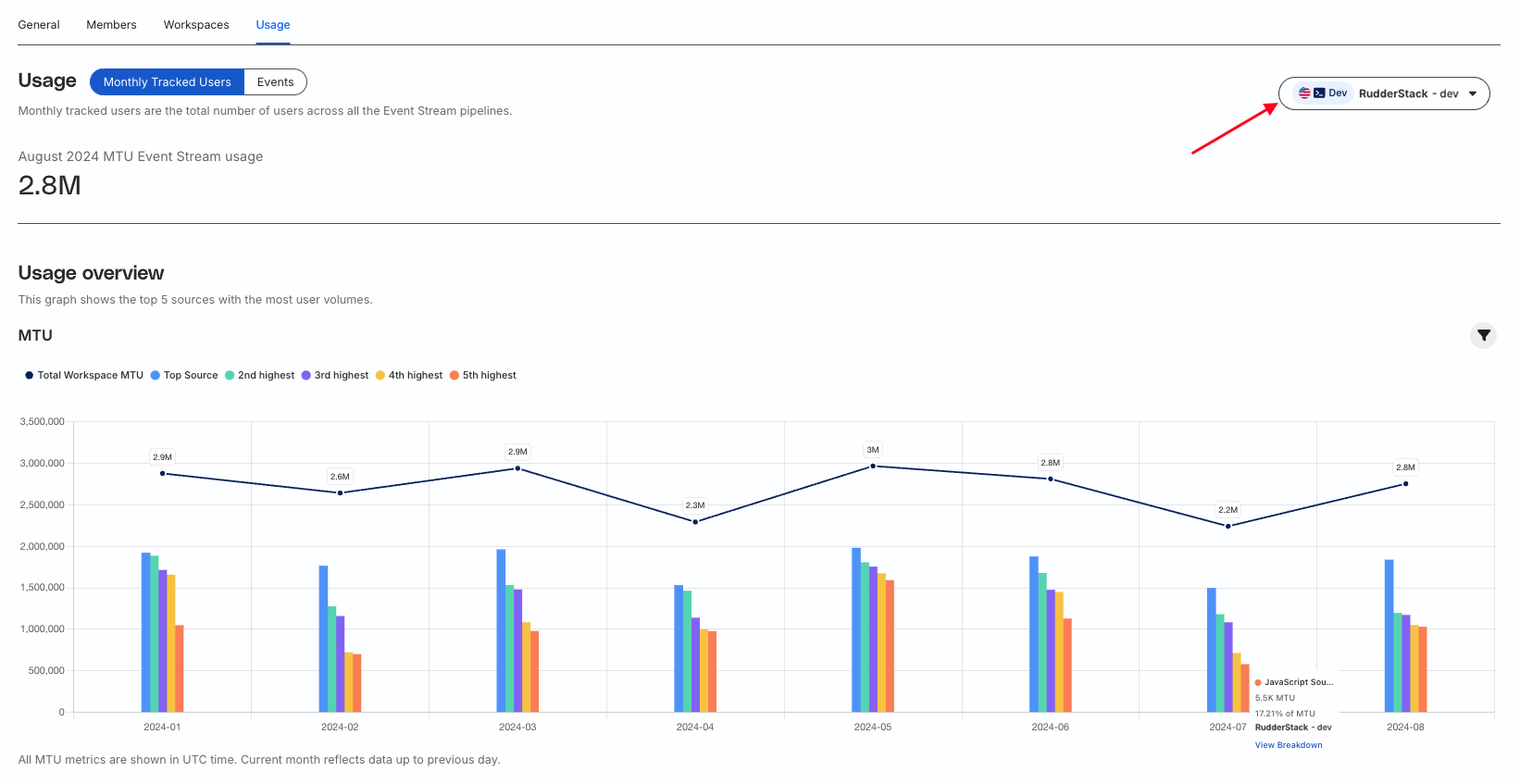
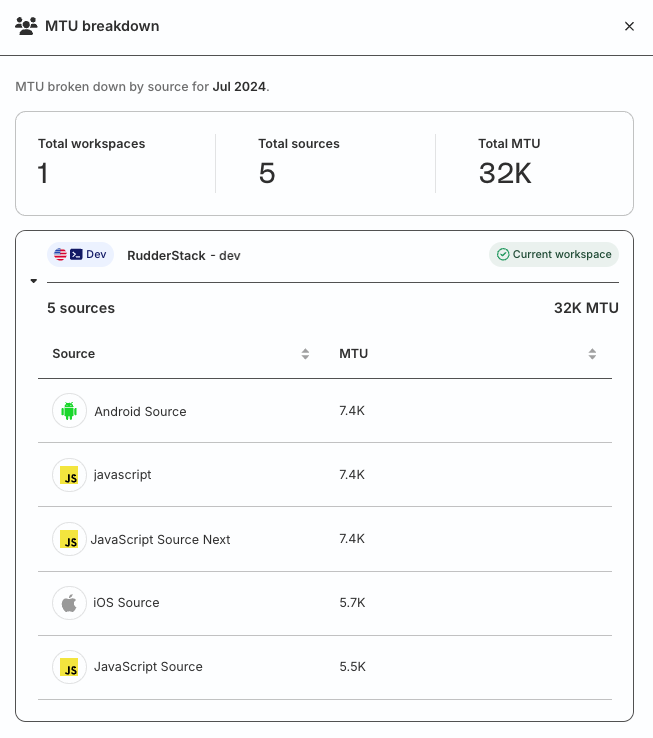
As seen in the above image, the graph gives the top five Event Stream sources with the most user volumes. Hover over a bar to get the following details:
- Source name
- MTU count
- Percentage of total MTU
- Workspace name
Click the View Breakdown option to see the MTU breakdown by source for the particular month.