Data Management
- free
- growth
- enterprise
5 minute read
The Data Management tab in the Settings > Workspace section allows you to configure the data retention and governance settings for your workspace.
Only Admins can configure the data retention and governance settings in this tab.
Data definitions
RudderStack does not permanently store any customer data except the following:
- Aggregate “Count” data on Event Name, Event Type, Source ID, Destination ID
- Error codes
- RudderStack customers’ records (usernames, billing-related details, etc.)
All other customer data can be classified as either transient or non-transient and it may either be stored in your location, for example, AWS, or by RudderStack on a rolling 7-day or 30-day basis depending on your plan and retention settings.
RudderStack’s data retention policy defines data as they pertain to the primary components of its service — the Data Plane and Control Plane.
Transient customer data
Transient customer data can be defined as all in-transit data, that is, stored for less than 3 hours, as an essential part of delivering the RudderStack product experience. This data includes:
- Data Plane: Events that hit the RudderStack gateway. See Data Plane architecture for more details.
- Control Plane: The in-transit data captured in the Live Events tab of the RudderStack dashboard.
Because Live Events can include sensitive event payloads, the data is stored and served from the same region as your data plane — it does not cross regional boundaries.
Non-transient customer data
Non-transient customer data can be defined as data that can persist for more than 3 hours only if configured by the RudderStack user. This includes:
- Data Plane: This includes gateway dumps, that is, raw data for every successfully-ingested event.
- Control Plane: Data in the reporting service (sample events and responses).
Event data retention options
Event data retention options are available in the Growth and Enterprise plans. Free plan users only see the Sample event data retention option.
To choose how you want to store event data, follow these steps:
- Log in to your RudderStack dashboard.
- Go to Settings > Workspace > Data Management.
- Choose one of the data storage options in the Data retention section:
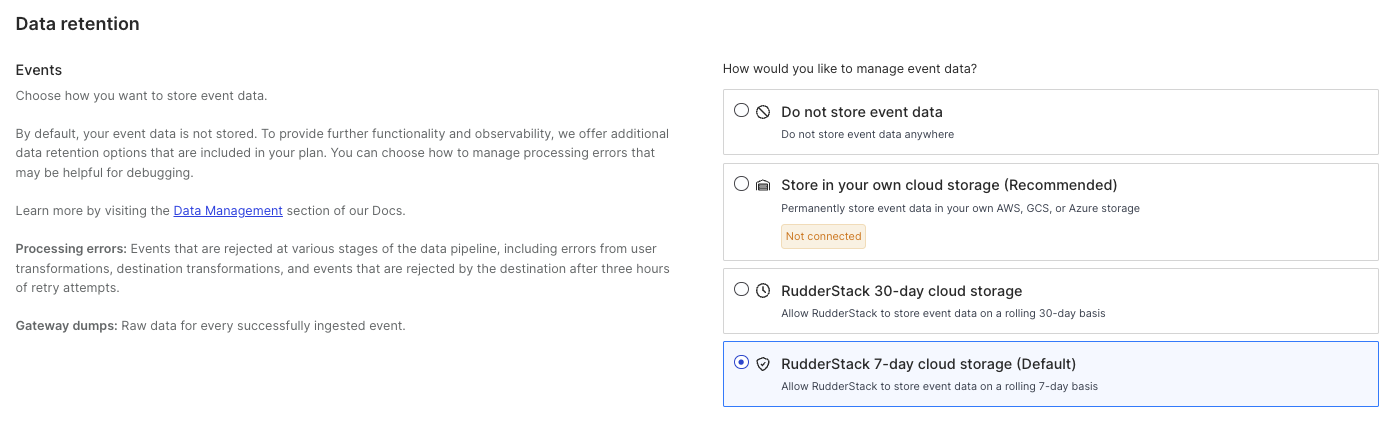
1. Do not store event data
If you choose this option, RudderStack will not store any of your event data.
2. Store event data in your own cloud storage (Recommended)
Select this option to use the Event Replay functionality.
Selecting this option brings up a modal allowing you to connect a storage bucket with your RudderStack data.
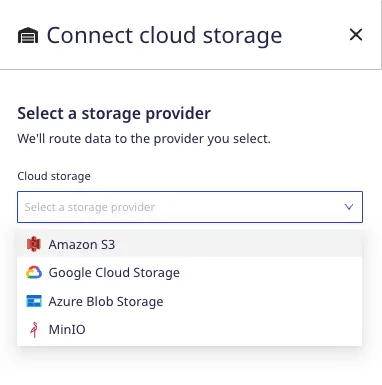
RudderStack supports storage via AWS, GCS, Azure, and MinIO if you select this option.
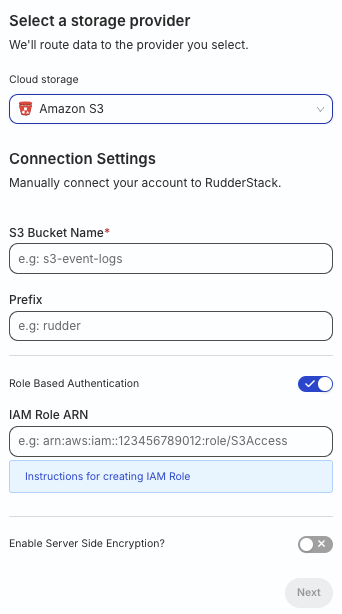
When connecting your cloud storage provider to RudderStack, you will first need to create a storage bucket and configure the credentials for RudderStack to access the datastore. Follow the steps listed below depending on your cloud provider:
- Create your S3 bucket.
- In the dashboard, specify the S3 Bucket Name and Prefix.
- Role Based Authentication is turned on by default. Create a RudderStack IAM role and specify the IAM Role ARN.
If you have disabled Role Based Authentication (not recommended), configure the permissions for your S3 bucket. Then, enter the Access key ID and Secret Access Key.
- Enable server-side encryption, if needed.
If you are self-hosting RudderStack using RudderStack Open Source:
- Create your S3 bucket.
- Configure relevant permissions for your S3 bucket. Note the Access key ID and Secret Access Key.
- Configure the bucket settings in the dashboard.
- Create your object storage bucket.
- Configure the relevant permissions for your bucket.
- Connect your storage provider in the RudderStack dashboard.
- Login to the Azure portal and create a storage account.
- Click Containers under Blob service and create a new container.
- Connect your storage provider in the RudderStack dashboard.
- Login to your MinIO service and set up your bucket.
- Connect your storage provider in the RudderStack dashboard.
3. RudderStack 30-day cloud storage
This option is available only in the Enterprise plan.
Choosing this option allows RudderStack to store and delete your event data on a rolling 30-day basis.
4. RudderStack 7-day cloud storage (Default)
By default, RudderStack stores event data on a rolling 7-day basis in RudderStack cloud storage. This prevents data loss if a rare incident occurs.
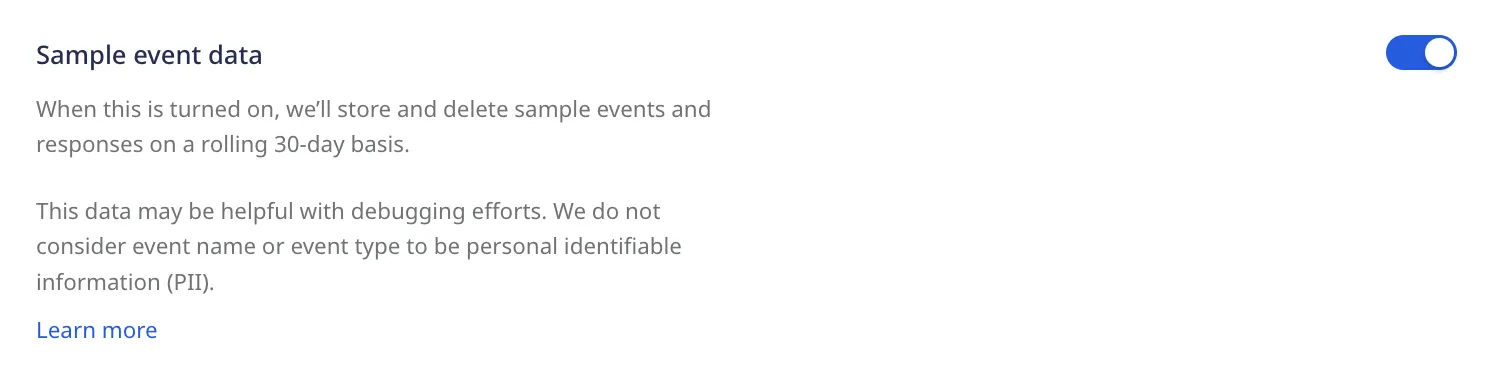
Sample event data
When the Sample event data setting is enabled, RudderStack stores and deletes sample events and responses on a rolling 30-day basis. This data may be helpful for debugging your events.
RudderStack does not consider the event name or event type to be Personally Identifiable Information (PII).
Plan-based retention options
Based on your plan, RudderStack provides different options for event storage:
- Sample events and responses: Available on all plans. RudderStack stores and deletes sample events and responses on a rolling 30-day basis. On the Free plan, this is the only retention-related setting.
- Event data: Available on Growth and Enterprise plans. This includes events sent to RudderStack, including gateway dumps.
See the below table for the storage options supported by different RudderStack plans:
| Data type | Free | Growth | Enterprise |
|---|---|---|---|
| Sample event data | |||
| Event data |
|
|
Data governance
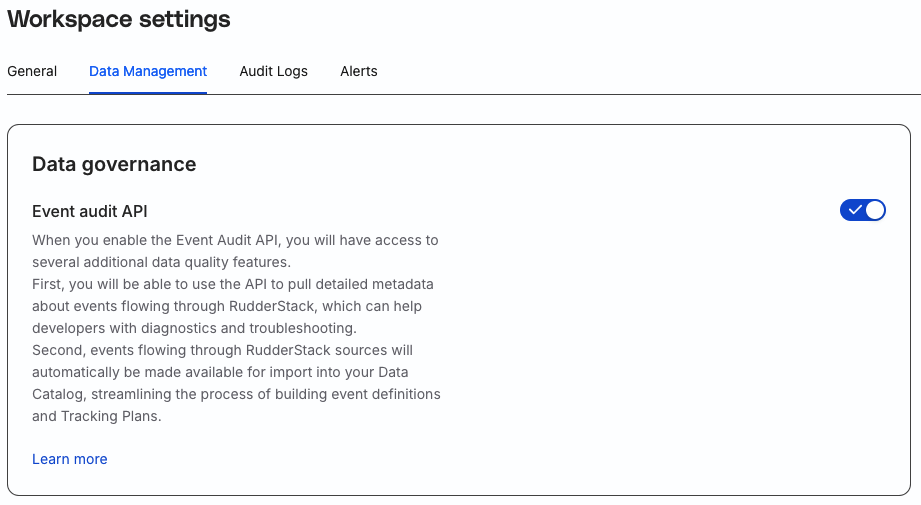
Scroll down to the Data governance section and toggle on the Event audit API setting. This setting lets you toggle on/off the Event Audit API. Use this API to monitor and act on any non-compliant data coming into your RudderStack sources based on predefined rules.
Limit PII access
See the following sections for information on limiting access to PII-related features depending on whether you are using the legacy Permissions Management (RBAC) system or the new Access Management system:
- Legacy Permissions Management (RBAC): See Permissions Management
- Access Management (PBAC): See PII Permissions
