Sync Audiences to Iterable
Private Beta6 minute read
This guide lists the steps to configure Iterable Audience as a destination in RudderStack and sync the created audiences to it.
Prerequisites
- An Iterable API key with permission to manage lists and add/remove users.
- Confirm your Iterable project type — Email-based, User ID-based, or Hybrid, so you map the correct identifier fields during sync setup
Setup
- Set up an audience in RudderStack using the Audience Builder.
- Go to the Syncs tab of the audience page and click Add sync. Then, select Iterable Audience.
- Click New destination — you can also select an already-configured destination here.
- Specify a unique name to identify this destination in RudderStack.
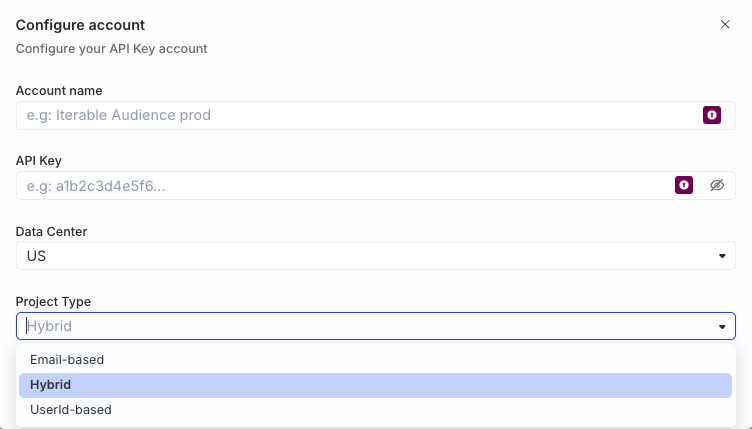
- In the Iterable account section, click Select to choose an existing account. To add a new account, click Add account > API Key, and specify the following settings:
| Setting | Description |
|---|---|
| Account Name | Specify a unique account name. |
| API Key | Enter your Iterable server-side API key. RudderStack sends this value as the Api-Key header. |
| Data Center | Select the Iterable data center for your project.
|
| Project Type | Select your Iterable project type — Email-based, User ID-based, or Hybrid — to determine which identifier fields you can map in the sync. |
- Proceed to configure the mapping settings.
Configure sync
This section lists the settings to correctly configure your audience syncs to the Iterable Audience destination.
Select list
In this section, you can create a new Iterable list or use an existing one. The selected list is where users are subscribed or unsubscribed during each sync.
- Create new list: Specify the list name and optional description. RudderStack creates the list in Iterable while creating the connection.
- Use existing list: Select an existing list from the dropdown. Click the refresh icon to fetch the latest lists from Iterable.
Update existing users only
This setting is visible only for Hybrid and User ID-based project types. It is set to No by default.
The following table describes the behavior of this setting:
| Setting | Behavior |
|---|---|
| Yes | Iterable updates only users that already exist in your project. Rows whose userId or email is not found are reported as failed records and are not added to the list. |
| No | Iterable creates new users when subscribing — it creates a placeholder email, if not provided . |
Sync mode
RudderStack supports only Mirror mode for this integration.
Map identifiers
In this section, map your warehouse columns to Iterable identifier fields based on your project type. See Identifier mappings and validation for the fields available per project type.
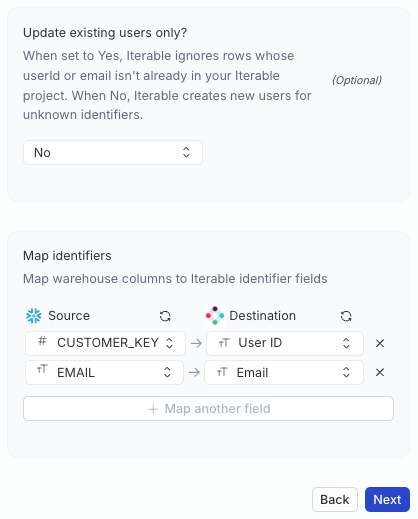
Click Map another field to add additional identifier mappings as required.
Sync settings
Two options are available to schedule your audience syncs:
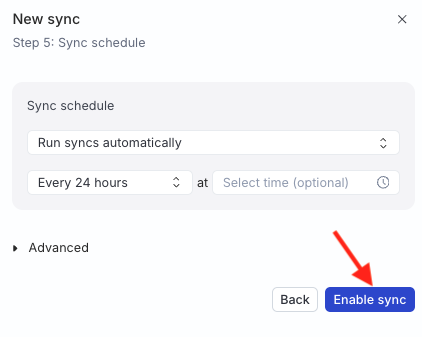
- Run syncs automatically based on a specified frequency (every 5 minutes, 10 minutes, 15 minutes, 30 minutes, 1 hour, 3 hours, 6 hours, 12 hours, or 24 hours) and a specific time (in UTC).
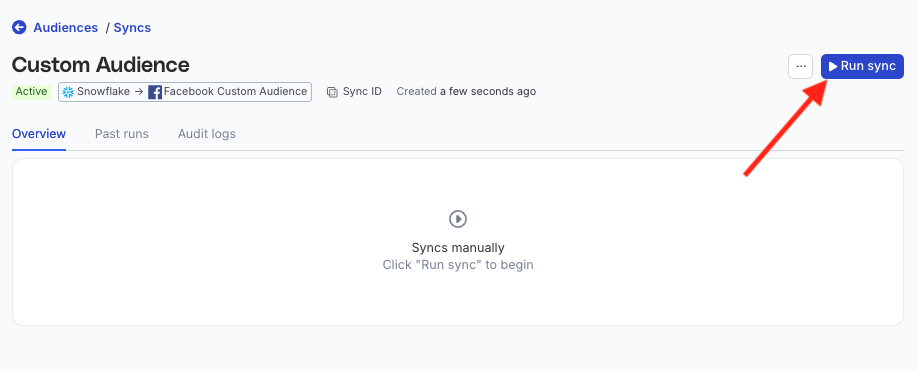
- Run syncs manually — trigger a sync from the sync details page. You will need to run the sync each time.
Sync observability settings
| Setting | Description | ||||||
|---|---|---|---|---|---|---|---|
| Retain sync logs | This setting is toggled on by default and instructs RudderStack to store the sync logs in your warehouse. You can also configure the below settings:
| ||||||
| Retry failed records | This setting is toggled on by default and causes RudderStack to continually retry sending the failed records. | ||||||
| Retain and show failures | This setting is toggled off by default. Turn it on to have RudderStack write the error recorded for every failed record to a failed records table in your warehouse and show it in the sync’s failed records view. It applies from the next sync and can take up to a minute to reach your data plane.
|
Storing sync logs, snapshot tables, and failed records may incur additional warehouse costs.
Enable sync
Once the setup is complete, enable the sync.
Identifier mappings and validation
You can map warehouse columns to the following Iterable identifier fields based on your project type:
| Project type | Identifier | Description |
|---|---|---|
| Email-based | email | Map a warehouse column to the user’s email address. |
| UserId-based | userId | Map a warehouse column to the user’s Iterable user ID. |
| Hybrid | email, userId | Map warehouse columns to both fields. When a row includes both values, both are sent so Iterable can match on either identifier.
|
In mirror mode, audience membership changes map to Iterable list operations:
| Action | Iterable operation |
|---|---|
| Insert or update | Subscribe (add user to the list) |
| Delete | Unsubscribe (remove user from the list)
|
Note that:
- Subscribe and unsubscribe requests are batched, with up to 1000 subscribers per API request.
- RudderStack calls Iterable’s
/api/lists/subscribeand/api/lists/unsubscribeendpoints to make these requests.
Identifier validation
Before sending data to Iterable, each row is validated based on the mapped identifier fields:
| Identifier | Validation |
|---|---|
email | Must be a valid email address. Values are normalized to lowercase and trimmed before sending. |
userId | Must be non-empty with no leading or trailing whitespace. Iterable treats whitespace-padded user IDs as distinct identifiers, which can cause mismatches on unsubscribe. |
Rows with no valid identifier are skipped and reported as failed records in the sync report. The sync completes with failures rather than stopping entirely.
- Invalid identifier values are not sent to Iterable.
- If a row has no valid identifier, the entire row is marked as failed.
FAQ
Where can I find the Iterable API key?
You can get the Iterable API key by navigating to Integrations > API Keys in your Iterable account.
For more information, refer to Iterable’s API key documentation.
Why are some rows marked as failed when Update existing users only is enabled?
When Update existing users only is set to Yes, Iterable does not create users for identifiers that are not already in your project. Those rows fail with a not-found error and appear as failed records in the sync report.
Does removing a user from the audience unsubscribe them from Iterable entirely?
No. Delete actions call Iterable’s list unsubscribe API, which removes the user from the synced list only. It does not unsubscribe them from all messaging channels in Iterable.
