Custom Audience Private Beta
3 minute read
The Audiences feature is in Private Beta, where we work with early users and customers to test new features and get feedback before making them generally available.
Reach out to Customer Success if you are interested in enabling this feature for your workspace.
The Custom Audience destination lets you sync Audiences to any HTTPS endpoint — internal APIs, regional ad platforms, partner systems, or niche marketing tools — without waiting for a native RudderStack integration.
Overview
With the Custom Audience destination, you can define how membership changes are delivered to your API by configuring the HTTP method, endpoint path, batch size, and a JSON request body template for each record action. At sync setup, marketers map warehouse columns to the fields your destination expects.
Some key features of this integration are:
- Per-action endpoints: Separate configuration for add, update, and remove operations
- Request body templates: Build the exact JSON payload your API expects, with access to batched records and connection metadata
- Configurable batching: Send up to 5,000 records per request (per action)
- Field-level hashing: Apply SHA256, SHA512, or MD5 per field when your API expects hashed identifiers
- Preview before save: Validate templates and inspect sample requests without delivering data to your API
- Mirror sync only: Membership changes are mirrored to the destination
How it works
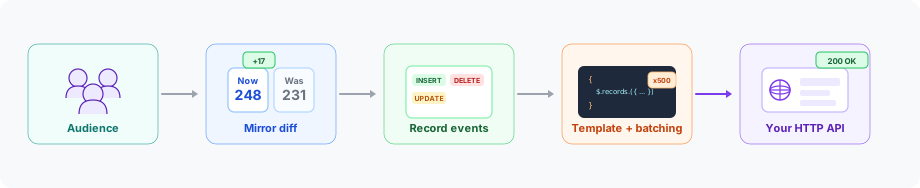
Custom Audience follows the same audience pipeline as native destinations (Facebook, Google Ads, LinkedIn, TikTok):
- Audience membership is computed from your data graph and warehouse source.
- Mirror sync compares the current membership to the previous snapshot and emits
recordevents with anINSERT,UPDATE, orDELETEaction. - RudderStack resolves your per-action endpoint and template, applies field hashing (when configured), batches records, and builds HTTP requests.
- RudderStack sends those requests to your API — success or failure is determined by the HTTP status code.
Unlike native audience destinations, RudderStack does not normalize field values (trim, lowercase, and so on) for this integration.
You will need to prepare your data in your warehouse, in your template, or on the receiving API as your contract requires.
Use cases
| Scenario | Description |
|---|---|
| Internal activation | Sync a high-value segment to a recommendation or personalization API |
| Unsupported ad platforms | Reach regional or industry-specific platforms that accept audience lists over HTTP |
| Partner data sharing | Send qualified leads to a partner CRM |
Limitations
| Limitation | Details |
|---|---|
| Event Stream sources | Only warehouse-backed audience sources are supported. |
| OAuth authentication | Not supported currently and may be added in a future release. Use API key, Bearer token, Basic Auth, or no auth. |
| Non-JSON payloads | Request bodies are JSON only (no XML or form-encoded bodies). |
| Audience creation at the destination | Create and manage audience lists on your platform first, then provide the audience ID and name when configuring the sync. |
| Automatic data normalization | The transformer does not trim, lowercase, or otherwise normalize values. |
| Partial batch success | An HTTP success status marks all records in the request as successful; a failure status marks all as failed. Response bodies are not parsed for per-record outcomes. |
| Combined-action APIs | Each action type sends separate HTTP requests. APIs that accept inserts, updates, and deletes in a single payload are not supported. |
| Multiple object types per destination | Create a separate destination instance for each object type (for example, user vs. company). |
| Changes in field definitions | If you change field definitions in the destination configuration after a sync is created, you must update existing syncs manually. Connection mappings are not updated automatically when destination fields are renamed or removed. |
Get started
- See Custom Audience Setup Guide for destination setup and request body template authoring
- See How to Sync Audiences to Custom Audience for sync configuration, mapping, and activation.
See also
- Syncs Overview: How audience syncs work across destinations
- Audiences Overview: Overview of audiences and their components
- How to Create an Audience: Build audiences in the Audience Builder
