# Custom Activation Setup Guide

<p>Use this guide to set up a Custom Activation destination in RudderStack.</p>
<p>To sync a saved audience to your Custom Activation destination, see <a href="https://www.rudderstack.com/docs/audiences/syncs/custom-activation/sync-audiences/" >How to Sync Audiences to Custom Activation</a>.</p>
<!-- end-chunk -->
<!-- begin-chunk -->
<h2 id="setup">Setup</h2><ol>
<li>Go to <strong>Collect</strong> &gt; <strong>Destinations</strong> &gt; <strong>New Destination</strong>.</li>
<li>Search and select <strong>Custom Activation</strong>.</li>
<li>Creating a source is <strong>optional</strong>. Click <strong>Continue</strong> to skip this step.</li>
<li>Configure the following settings to specify how RudderStack connects to your API and complete the setup:</li>
</ol>
<table>
<thead>
<tr>
<th>Setting</th>
<th><div>Description</div></th>
</tr>
</thead>
<tbody>
<tr>
<td>Name</td>
<td>A unique name that identifies this destination in your workspace.</td>
</tr>
</tbody>
</table>
<!-- end-chunk -->
<!-- begin-chunk -->
<h3 id="audience-delivery-api-configuration">Audience delivery API configuration</h3><table>
<thead>
<tr>
<th>Setting</th>
<th><div>Description</div></th>
</tr>
</thead>
<tbody>
<tr>
<td>Enter base URL</td>
<td>Specify the root URL for your API (for example, <code>https://api.example.com</code>). All requests are sent to this URL.</td>
</tr>
<tr>
<td>Specify authentication</td>
<td>Choose how RudderStack authenticates with your API. <br /><br />See <a href="#authentication" >Authentication</a> section below for details.</td>
</tr>
<tr>
<td>Custom headers</td>
<td>This <strong>optional</strong> setting lets you add extra key-value headers to every request (for example, <code>Content-Type</code>, <code>X-API-Version</code>).</td>
</tr>
</tbody>
</table>
<!-- end-chunk -->
<!-- begin-chunk -->
<h4 id="authentication">Authentication</h4><table>
<thead>
<tr>
<th>Method</th>
<th><div>Description</div></th>
</tr>
</thead>
<tbody>
<tr>
<td>No authentication</td>
<td>None — use this for public endpoints only</td>
</tr>
<tr>
<td>Basic Auth</td>
<td>Enter a username and password</td>
</tr>
<tr>
<td>API Key</td>
<td>Specify a header name (for example, <code>X-API-Key</code>) and API key value</td>
</tr>
<tr>
<td>Bearer Token</td>
<td>Enter a bearer token value</td>
</tr>
</tbody>
</table>
<!-- end-chunk -->
<!-- begin-chunk -->
<h3 id="endpoint-configurations">Endpoint configurations</h3><p>Configure how RudderStack <strong>adds</strong>, <strong>updates</strong>, and <strong>removes</strong> audience members:</p>
<table>
<thead>
<tr>
<th>Setting</th>
<th>When it runs</th>
</tr>
</thead>
<tbody>
<tr>
<td><strong>Add record</strong></td>
<td>A user enters the audience</td>
</tr>
<tr>
<td><strong>Update record</strong></td>
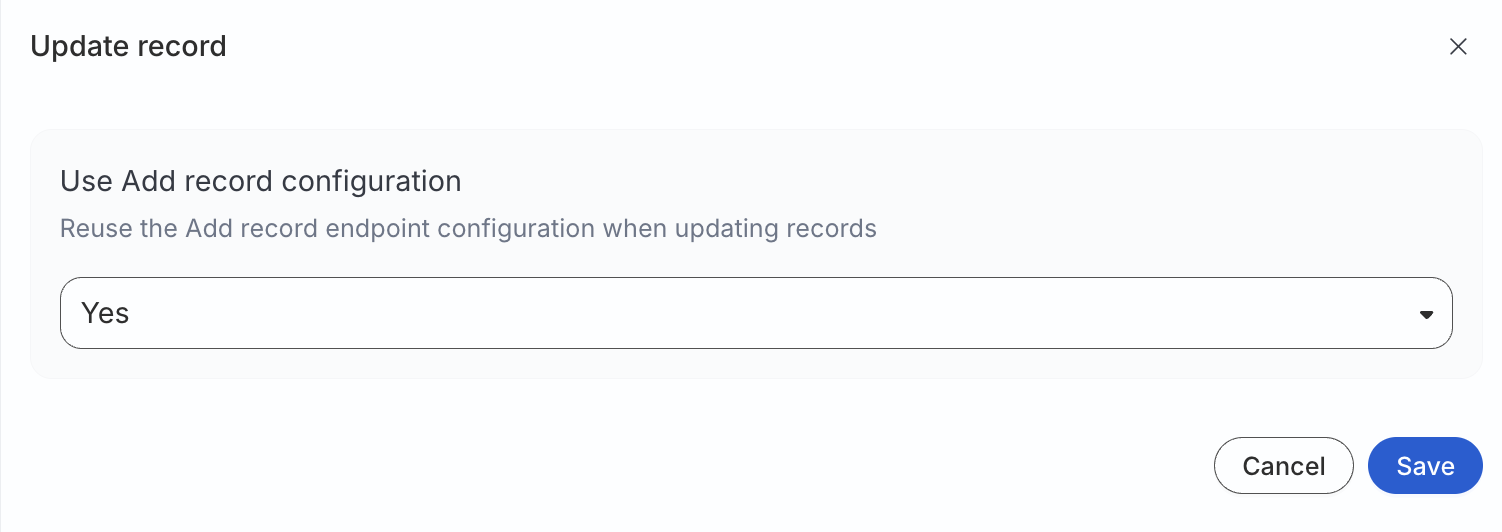
<td>A member&rsquo;s mapped attributes change. <br /><br />
<!DOCTYPE html>
<html lang="en">
<blockquote class="tip">
  <div class="tip-quote">
    
    <div class="tip-text">Set <strong>Use Add record configuration</strong> to <strong>Yes</strong> to reuse the same method, path, template, and fields as <strong>Add record</strong>.</div>
  </div>
</blockquote>
</html></td>
</tr>
<tr>
<td><strong>Remove record</strong></td>
<td>A user leaves the audience</td>
</tr>
</tbody>
</table>

<figure class="image--main "  >
    <a 
         href="/docs/images/audiences/destinations/custom-audience/use-add-record-configuration.webp"
        
        >
        <img src="/docs/images/audiences/destinations/custom-audience/use-add-record-configuration.webp" 
         alt="Use Add record configuration"  
         
         
        decoding="async" loading="lazy" class="img-shortcode"/>
    </a>
    
</figure>

<!-- end-chunk -->
<!-- begin-chunk -->
<h3 id="action-specific-settings">Action-specific settings</h3><p>Each action&rsquo;s (add/update/remove record) settings follow the same structure.</p>
<!-- end-chunk -->
<!-- begin-chunk -->
<h4 id="http-method-and-endpoint-path">HTTP method and endpoint path</h4><table>
<thead>
<tr>
<th>Setting</th>
<th>Description</th>
</tr>
</thead>
<tbody>
<tr>
<td>HTTP method</td>
<td><code>POST</code>, <code>PUT</code>, <code>PATCH</code>, <code>GET</code>, or <code>DELETE</code> for this action.</td>
</tr>
<tr>
<td>Endpoint path URL</td>
<td>Path appended to the <a href="#audience-delivery-api-configuration" >base URL</a>. <br /><br />It supports simple interpolation with connection values, for example <code>/audiences/{{connection.audienceId}}/members</code>.</td>
</tr>
</tbody>
</table>

<html lang="en">
<blockquote class="info">
  <div class="tip-quote">
    
    <div class="tip-text">The resolved URL is the base URL plus the evaluated endpoint path.</div>
  </div>
</blockquote>

</html>
<!-- end-chunk -->
<!-- begin-chunk -->
<h4 id="batch-size">Batch size</h4><table>
<thead>
<tr>
<th>Setting</th>
<th>Description</th>
<th>Default value</th>
</tr>
</thead>
<tbody>
<tr>
<td>Batch size</td>
<td>Maximum records per HTTP request for this action. Range <strong>1</strong>–<strong>5000</strong></td>
<td>5000</td>
</tr>
</tbody>
</table>
<!-- end-chunk -->
<!-- begin-chunk -->
<h4 id="request-body-template">Request body template</h4><p>Define the JSON body sent to your API. The template follows <a href="https://docs.jsonata.org/overview.html" >JSONata syntax</a>.</p>

<html lang="en">
<blockquote class="info">
  <div class="tip-quote">
    
    <div class="tip-text">Templates are validated when you save the destination. An invalid syntax is rejected with an error that identifies the action and issue.</div>
  </div>
</blockquote>

</html>
<p>A sample request body template is shown below:</p>
<div class="rs-code">
  <div class="rs-code__head">json<button class="rs-code__copy" type="button">
      
      Copy
    </button>
  </div>
  <div class="highlight"><pre class="chroma"><code class="language-json" data-lang="json">{
  &#34;audience_id&#34;: $$.connection.audienceId,
  &#34;elements&#34;: [$$.records.{
    &#34;userIds&#34;: [
      {&#34;idType&#34;: &#34;SHA256_EMAIL&#34;, &#34;idValue&#34;: sha256_email},
      {&#34;idType&#34;: &#34;GOOGLE_AID&#34;, &#34;idValue&#34;: google_aid}
    ],
    &#34;firstName&#34;: first_name,
    &#34;lastName&#34;: last_name,
    &#34;nested&#34;: {
      &#34;org&#34;: &#34;static_value&#34;
    }
  }]
}</code></pre></div>
</div>
<p><strong>Global objects available at runtime</strong></p>
<table>
<thead>
<tr>
<th>Object</th>
<th><div>Description</div></th>
</tr>
</thead>
<tbody>
<tr>
<td><code>$$.records</code></td>
<td>Array of records in the current batch (after field processing and hashing)</td>
</tr>
<tr>
<td><code>$$.connection</code></td>
<td>Sync connection metadata, including <code>audienceId</code></td>
</tr>
</tbody>
</table>
<p><strong>Allowed operations</strong></p>
<ul>
<li>Object and array construction</li>
<li>Path expressions (<code>$$.records</code>, <code>$$.connection.audienceId</code>)</li>
<li>Iteration with <code>{ ... }</code> — for example, <code>$$.records.{ &quot;email&quot;: email, &quot;user_id&quot;: user_id }</code></li>
<li>String, number, and boolean literals</li>
<li><code>Number()</code> casting where needed, for example,<code>$number($$.connection.audienceId)</code></li>
</ul>
<!-- end-chunk -->
<!-- begin-chunk -->
<h4 id="template-example">Template example</h4><p>A template for generic batched members is shown below:</p>
<div class="rs-code">
  <div class="rs-code__head">json<button class="rs-code__copy" type="button">
      
      Copy
    </button>
  </div>
  <div class="highlight"><pre class="chroma"><code class="language-json" data-lang="json">{
   &#34;audienceId&#34;: $$.connection.audienceId,
   &#34;users&#34;: [$$.records.{
    &#34;email&#34;: email,
     &#34;user_id&#34;: user_id
  }]
}</code></pre></div>
</div>
<!-- end-chunk -->
<!-- begin-chunk -->
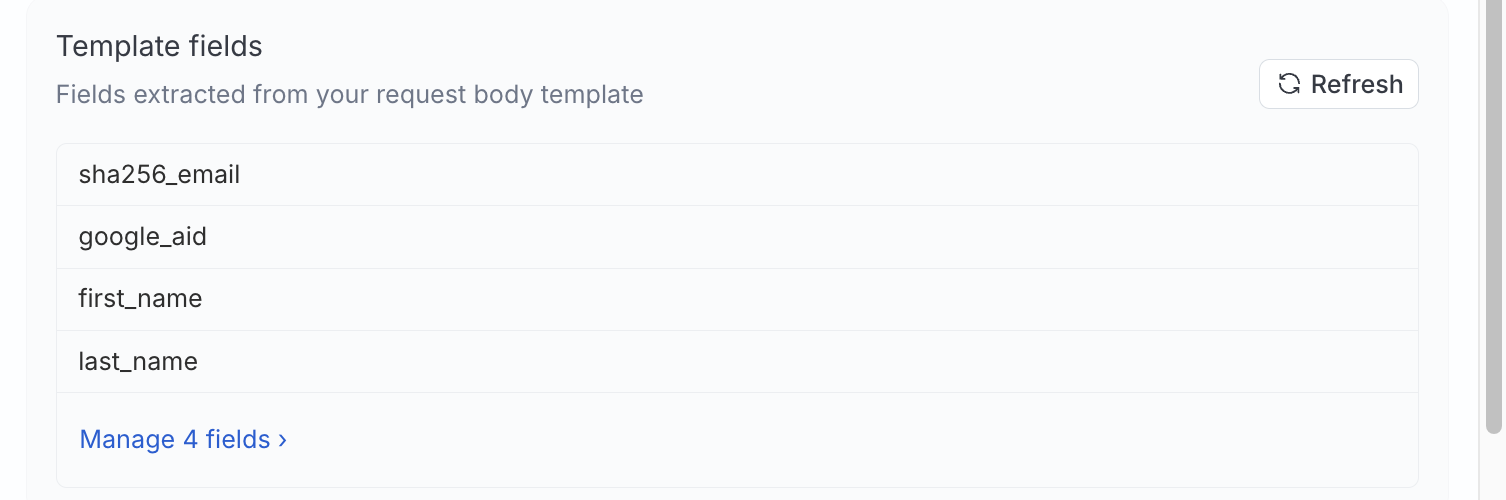
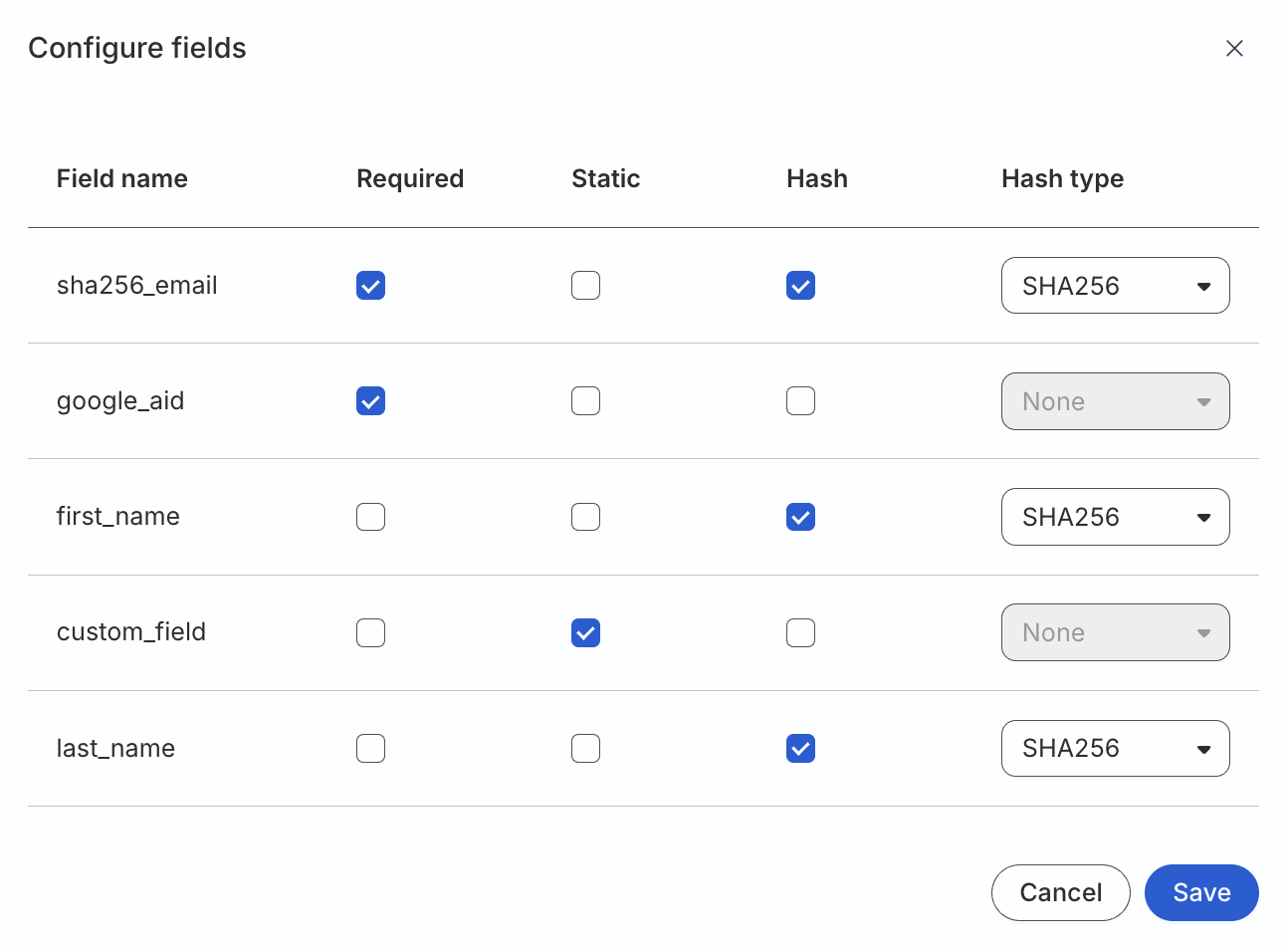
<h4 id="template-fields">Template fields</h4><p>After you define a template, RudderStack extracts field names referenced under <code>$$.records</code> and lists them under <strong>Template fields</strong>. Click <strong>Refresh</strong> to re-scan the template, or <strong>Manage fields</strong> to configure each field.</p>

<figure class="image--main "  >
    <a 
         href="/docs/images/audiences/destinations/custom-audience/template-fields.webp"
        
        >
        <img src="/docs/images/audiences/destinations/custom-audience/template-fields.webp" 
         alt="Manage template fields"  
         
         
        decoding="async" loading="lazy" class="img-shortcode"/>
    </a>
    
</figure>

<table>
<thead>
<tr>
<th>Field setting</th>
<th>Description</th>
</tr>
</thead>
<tbody>
<tr>
<td>Name</td>
<td>Destination-side field name used in the template</td>
</tr>
<tr>
<td>Required</td>
<td>If enabled, you must map the field to a warehouse column during <a href="https://www.rudderstack.com/docs/audiences/syncs/custom-activation/sync-audiences/#map-identifiers" >sync setup</a></td>
</tr>
<tr>
<td>Static</td>
<td>If enabled, the value is a literal you provide while <a href="https://www.rudderstack.com/docs/audiences/syncs/custom-activation/sync-audiences/#map-identifiers" >adding a sync</a></td>
</tr>
<tr>
<td>Hash</td>
<td>Hash algorithm applied before the template runs. You can choose between <strong>None</strong>, <strong>SHA256</strong>, <strong>SHA512</strong>, or <strong>MD5</strong>.</td>
</tr>
</tbody>
</table>

<figure class="image--main "  >
    <a 
         href="/docs/images/audiences/destinations/custom-audience/configure-fields.webp"
        
        >
        <img src="/docs/images/audiences/destinations/custom-audience/configure-fields.webp" 
         alt="Configure template fields"  
         
         
        decoding="async" loading="lazy" class="img-shortcode"/>
    </a>
    
</figure>

<blockquote class="warning">
  <div class="tip-quote">
    
    <div class="tip-text"><p>If you rename or remove template fields after syncs exist, make sure to update mappings on each affected sync manually.</p>
<p>See <a href="https://www.rudderstack.com/docs/audiences/syncs/custom-activation/sync-audiences/#troubleshooting" >Troubleshooting</a> for more information.</p>
</div>
  </div>
</blockquote>
<!-- end-chunk -->
<!-- begin-chunk -->
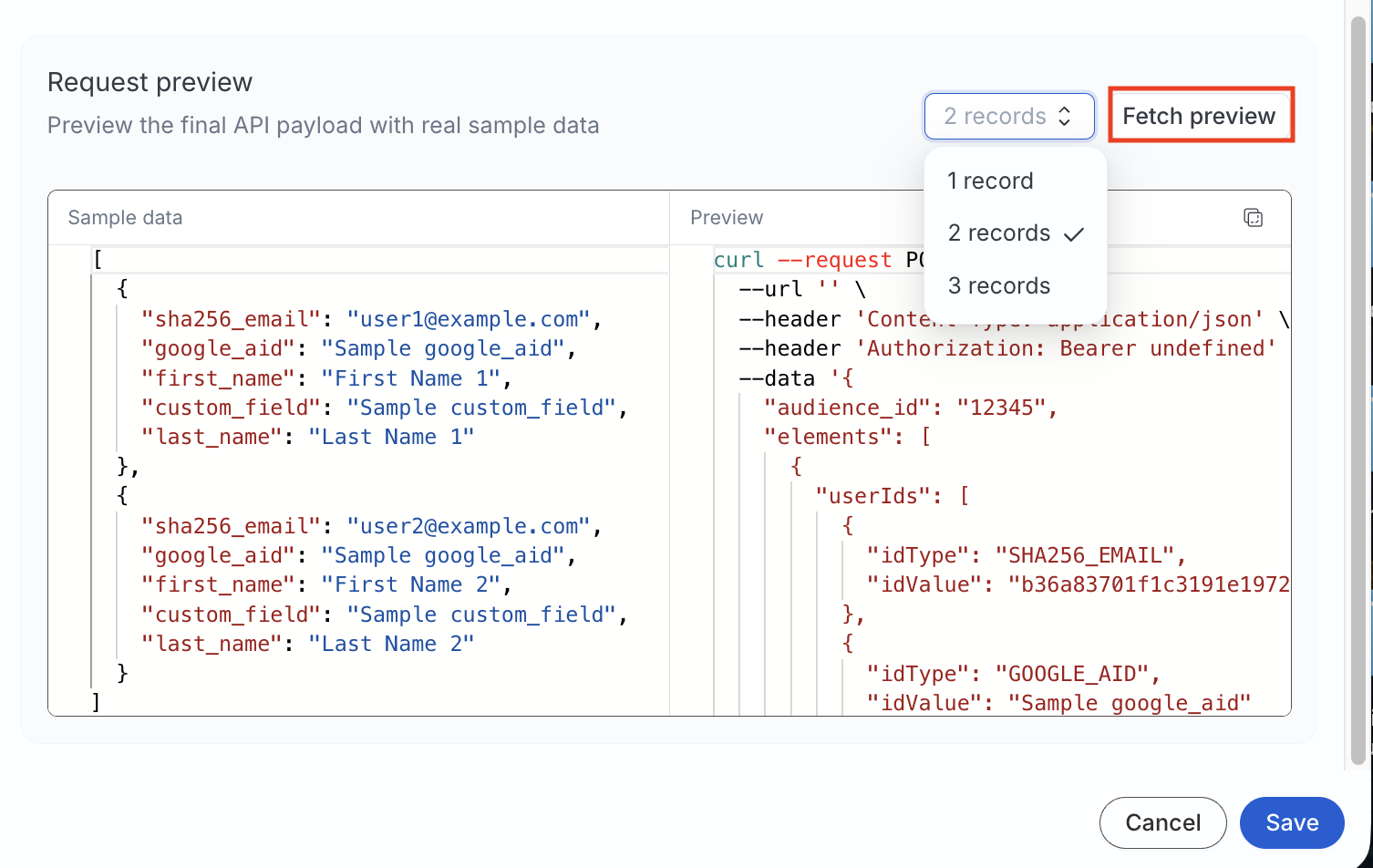
<h3 id="request-preview">Request preview</h3><p>Use <strong>Fetch preview</strong> to build a sample HTTP request from test records.</p>

<html lang="en">
<blockquote class="info">
  <div class="tip-quote">
    
    <div class="tip-text">Preview does not send traffic to your API.</div>
  </div>
</blockquote>

</html>
<ol>
<li>Choose how many sample records to include (for example, <strong>1 record</strong>).</li>
<li>Edit sample data if needed.</li>
<li>Click <strong>Fetch preview</strong> to see the resolved method, URL, headers, and JSON body.</li>
</ol>

<figure class="image--main "  >
    <a 
         href="/docs/images/audiences/destinations/custom-audience/fetch-preview.webp"
        
        >
        <img src="/docs/images/audiences/destinations/custom-audience/fetch-preview.webp" 
         alt="Fetch preview"  
         
         
        decoding="async" loading="lazy" class="img-shortcode"/>
    </a>
    
</figure>

<!-- end-chunk -->
<!-- begin-chunk -->
<h2 id="troubleshooting">Troubleshooting</h2><table>
<thead>
<tr>
<th>Issue</th>
<th><div>Resolution</div></th>
</tr>
</thead>
<tbody>
<tr>
<td>Template is rejected on save</td>
<td>The syntax is outside the <a href="#request-body-template" >allowlisted operations</a> — the error message names the action and position</td>
</tr>
<tr>
<td>Unexpected payload shape</td>
<td>Use the <a href="#request-preview" >Fetch preview</a> with the same sample records and action type (<code>INSERT</code>, <code>UPDATE</code>, or <code>DELETE</code>) to verify the payload shape</td>
</tr>
</tbody>
</table>
<!-- end-chunk -->
<!-- begin-chunk -->
<h2 id="next-steps">Next steps</h2><p>To sync a saved audience to your Custom Activation destination, see <a href="https://www.rudderstack.com/docs/audiences/syncs/custom-activation/sync-audiences/" >How to Sync Audiences to Custom Activation</a>.</p>
<br />