Sync Audiences to Braze Audiences
Private Beta4 minute read
This guide lists the steps to configure Braze Audiences as a destination in RudderStack and sync the created audiences to it.
Braze Audiences is separate from the event-stream Braze destination. Membership is written as a boolean custom attribute on each Braze user profile.
Prerequisites
- Obtain a Braze REST API key with permission to call
users.track/users.track.bulk. - Confirm access to Braze’s
/users/track/bulkendpoint (may require early access from Braze). - Identify your Braze data center (match the dashboard URL region).
Setup
- Set up an audience in RudderStack using the Audience Builder.
- Go to the Syncs tab of the audience page and click Add sync. Then, select Braze Audiences.
- Click New destination — you can also select an already-configured destination here.
- Specify a unique name to identify this destination in RudderStack.
- In the Braze account section, click Select to choose an existing account. To add a new account, click Add account, and specify the following settings:
| Setting | Description |
|---|---|
| Account Name | Specify a unique account name. |
| REST API Key | Enter your Braze REST API key with track/bulk permissions. |
| Data Center | Select the Braze data center for your workspace (for example US-03). |
- Proceed to configure the mapping settings.
Configure sync
This section lists the settings to correctly configure your audience syncs to the Braze Audiences destination.
Audience attribute name
Enter the Braze custom attribute name for this sync (for example, rs_loyalty_score_gt_100).
- Edit the auto-suggested sanitized name from the audience name if needed.
- Allowed characters: letters, numbers, and underscores only; maximum 255 characters.
- Do not use
external_id(reserved). - Braze creates the attribute on first write — there is no catalog picker.
Reuse one Braze account across many syncs. Give each sync a different attribute name so membership flags do not overwrite each other.
Sync mode
RudderStack supports only Mirror mode for this integration.
Map identifiers
Map a warehouse column to Braze external_id. Only this identifier is supported.
Sync settings
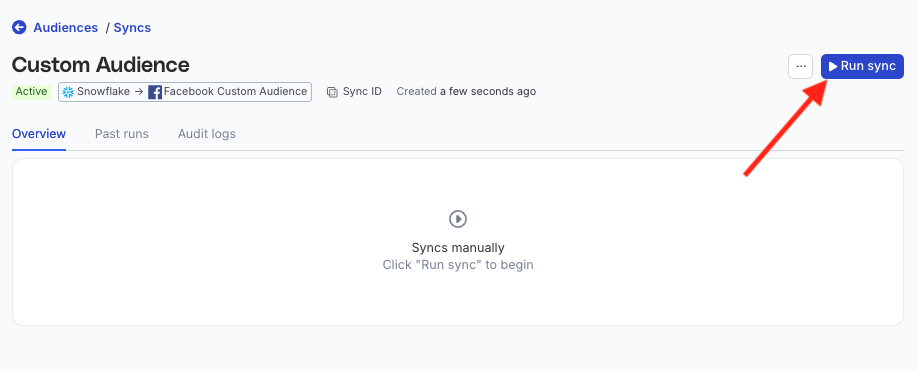
Two options are available to schedule your audience syncs:
- Run syncs automatically based on a specified frequency (every 5 minutes, 10 minutes, 15 minutes, 30 minutes, 1 hour, 3 hours, 6 hours, 12 hours, or 24 hours) and a specific time (in UTC).
- Run syncs manually — trigger a sync from the sync details page. You will need to run the sync each time.
Sync observability settings
| Setting | Description | ||||||
|---|---|---|---|---|---|---|---|
| Retain sync logs | This setting is toggled on by default and instructs RudderStack to store the sync logs in your warehouse. You can also configure the below settings:
| ||||||
| Retry failed records | This setting is toggled on by default and causes RudderStack to continually retry sending the failed records. | ||||||
| Retain and show failures | This setting is toggled off by default. Turn it on to have RudderStack write the error recorded for every failed record to a failed records table in your warehouse and show it in the sync’s failed records view. It applies from the next sync and can take up to a minute to reach your data plane.
|
Storing sync logs, snapshot tables, and failed records may incur additional warehouse costs.
Enable sync
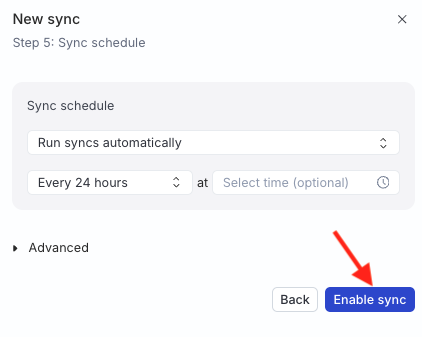
Once the setup is complete, enable the sync.
How membership is written to Braze
| Action | Braze custom attribute value |
|---|---|
| Insert or update | true |
| Delete | false
|
Each sync calls Braze POST /users/track/bulk (batched up to 1000 users per request).
Identifier validation
| Identifier | Validation |
|---|---|
external_id | Must be a non-empty string or finite number after trim. |
Rows without a valid external_id are reported as failed records. Invalid values are not sent to Braze.
FAQ
Where can I find the Braze REST API key?
In Braze, go to Settings > APIs and Identifiers > API Keys. See also the Braze setup guide.
How is this different from the Braze event-stream destination?
Use Braze for streaming events and profile updates. Use Braze Audiences only for audience / Reverse ETL membership as a boolean custom attribute.
Does removing a user from the audience delete the attribute in Braze?
No. Leave / delete sets the attribute to false. The key remains on the profile.
