Audience Builder Reference
Private Beta- enterprise
6 minute read
For a step-by-step walkthrough, see How to Create an Audience.
Condition types
| Type | What it filters | Example |
|---|---|---|
| Properties | Columns on the data source | lifetime_value >= 5000 |
| Relations | Related records (existence or aggregate) | Customers who placed 3+ orders in the last 90 days |
| Events | Timestamped event tables (with time windows) | 3+ Add to Cart interactions in the last 7 days |
| Audiences | Membership in other saved audiences | Not in Recently Contacted |
Relations
Relationship conditions combine:
- A path of one or two relationship hops
- An optional condition on the final entity (for example,
store_type = "Flagship") - A quantifier (
any/all/none) or aggregate (count,sum,avg,min,max), or both - An optional time window (when the related entity is an event model)
Events
Events use the same structure as relations but also support time windows:
| Mode | Description |
|---|---|
| Any time | No time filter (default) |
| In the last | Relative window, for example In the last 30 days |
| Between | Absolute date range |
| After | On or after a specific date |
| Before | Before a specific date |
AND / OR logic
- Conditions inside a group are joined with AND by default
- Toggle to OR to match any condition instead of all
- Combine groups for mixed logic:
(A AND B) OR (C AND D)
Operator reference
The operators available depend on the column’s data type.
| Label | Operator | String | Number | Boolean | Datetime |
|---|---|---|---|---|---|
| equal | eq | ✓ | ✓ | ✓ | ✓ |
| not equal to | neq | ✓ | ✓ | ✓ | ✓ |
| greater than | gt | — | ✓ | — | ✓ |
| greater than or equal to | gte | — | ✓ | — | ✓ |
| less than | lt | — | ✓ | — | ✓ |
| less than or equal to | lte | — | ✓ | — | ✓ |
| between | btw | — | ✓ | — | ✓ |
| not between | nbtw | — | ✓ | — | ✓ |
| in | in | ✓ | ✓ | ✓ | ✓ |
| not in | nin | ✓ | ✓ | ✓ | ✓ |
| containing | like | ✓ | — | — | — |
| not containing | nlike | ✓ | — | — | — |
| is empty | empty | ✓ | — | — | — |
| is not empty | nempty | ✓ | — | — | — |
| set | nnull | ✓ | ✓ | ✓ | ✓ |
| not set | null | ✓ | ✓ | ✓ | ✓ |
| in the last | inlast | — | — | — | ✓ |
Aggregates: Compare COUNT, SUM, AVG, MIN, and MAX with eq, neq, gt, gte, lt, and lte.
For string columns, is empty / is not empty match a blank value (''). They are distinct from not set / set, which matchNULL/ non-NULL.
Array operators
Array columns (for example, string tags or ID lists) use a dedicated operator set:
| Label | Operator | Description |
|---|---|---|
| containing | contains | Array includes the given string value |
| not containing | ncontains | Array does not include the given string value |
| item count equal to | size_eq | Array length equals a number |
| item count greater than | size_gt | Array length is greater than a number |
| item count greater than or equal to | size_gte | Array length is greater than or equal to a number |
| item count less than | size_lt | Array length is less than a number |
| item count less than or equal to | size_lte | Array length is less than or equal to a number |
| is empty | empty | Array has zero elements |
| is not empty | nempty | Array has one or more elements |
| set | nnull | Column is not NULL |
| not set | null | Column is NULL |
For arrays, is empty means length zero. A NULL array matches not set, not is empty.
JSON columns
JSON (and warehouse equivalents such as VARIANT / OBJECT) columns support:
- Column-level set / not set to check whether the JSON value itself is present
- Optional path filter to match a nested scalar inside the column
To filter on a nested value:
- Choose the JSON property.
- Open the with… path filter.
- Enter a dot-separated object path (for example,
plan.tierorcart.total). - Choose the leaf type: string, number, or boolean.
- Choose an operator and value for that leaf (or path-level set / not set to check whether the path exists).
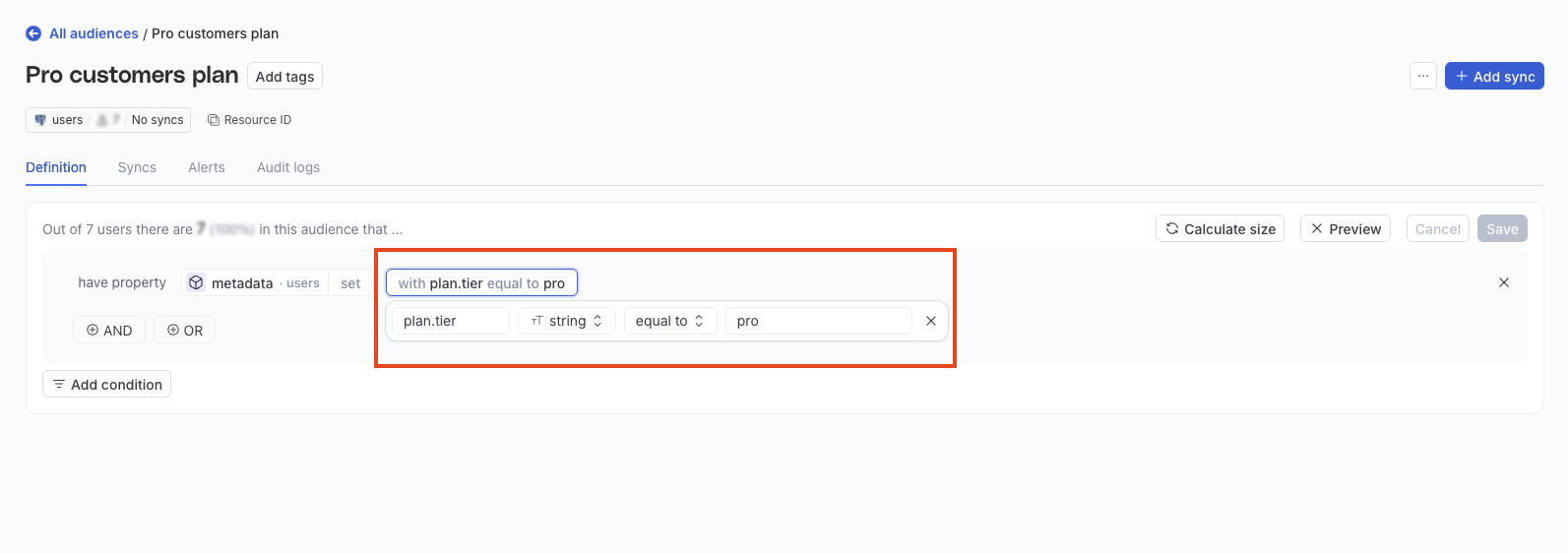
Note that:
- Path filters use object keys only (for example,
a.b.c) — array indexes and wildcards in the path are not supported. - Leaf operators follow the same rules as scalar columns of that type. For example, a string leaf supports equal to, containing, is empty, and set. A number leaf supports comparisons such as greater than.
- For Amazon Redshift, some
SUPERcolumns can use the same path-filter flow when the builder exposes them for JSON-style filtering.
Audience size calculation
You can see the audience size based on the currently specified conditions whenever you open a saved audience and after every save.
To see the calculation for any unsaved changes, click Calculate size.

Preview sample audience data
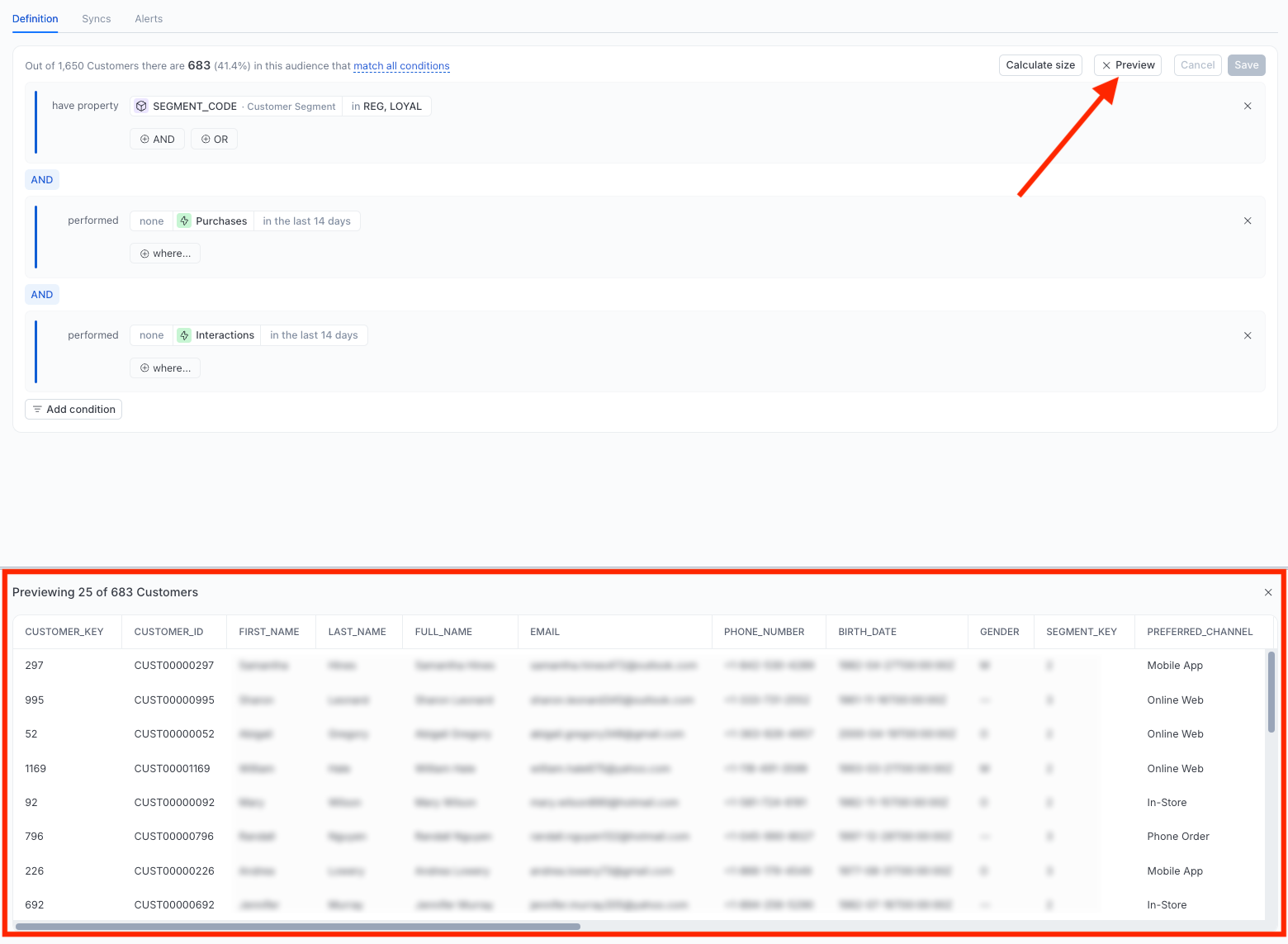
Click Preview to see a sample of the audience data.
Examples
The following examples use a typical ecommerce Data Graph where Customers is the data source, related to Accounts, Sales, Customer Interactions, Products, and Stores.
High value customers
- Properties:
LIFETIME_VALUE >= 5000
Frequent buyers (last 90 days)
- Events:
Customers → Sales,COUNT(Sales) >= 10, time windowin the last 90 days
Churn risk: High value but lapsed
- Group 1 (Properties):
LIFETIME_VALUE >= 500 - Group 2 (Events):
Customers → Sales, quantifiernone, time windowin the last 90 days - Combine with: AND
Customers with a tag and enterprise plan
- Properties (array):
TAGScontainingvip - Properties (JSON):
METADATAwith pathplan.tierequal toenterprise
Current limitations
- Relationship hops: Up to 2 hops. Deeper traversal will be supported in a future release.
- Logical nesting: Up to 2 levels deep.
- Predicates per audience: Up to 100 (configurable per workspace).
- Audience reference depth: Up to 2 levels deep.
- Time windows: Apply only to event models. Entity relationships query across all time by default.
- Aggregates on multi-hop paths: Allowed only when the path contains a single
1:manyedge.
FAQ
How do I use AND and OR?
Each group is all-AND or all-OR. Click the AND/OR label between conditions to switch. To combine both, create separate condition groups.
What’s the difference between a quantifier and an aggregate?
- A quantifier answers yes/no, for example, Do any matching records exist?
- An aggregate answers a numeric question, for example, What’s the count/sum/avg? (
count,sum,avg,min,max).
Use a quantifier for existence and an aggregate for counting or summing values.
What’s the difference between is empty and not set?
- is empty / is not empty on string columns match a blank string (
'') versus any non-blank value. - On array columns, is empty / is not empty match length zero versus one or more elements.
- not set / set match whether the column is
NULLor has any value (including''or an empty array).
A row with email = '' matches is empty, not not set. A row with email IS NULL matches not set, not is empty.
How do I filter on a value inside a JSON column?
- Choose the JSON property.
- Open the with… path filter.
- Enter a dot-separated object path (for example,
plan.tierorcart.total). - Choose the leaf type: string, number, or boolean.
- Choose an operator and value for that leaf (or path-level set / not set to check whether the path exists).
Use column-level set / not set when you only care whether the JSON column itself is present.
