You are viewing documentation for an older version.

Automate Project Management with Rudder CLI and GitHub Actions
Alpha- free
- growth
- enterprise
3 minute read
This guide explains how to validate and manage your Rudder CLI projects directly via GitHub workflows.
Key features
By leveraging the Rudder CLI Project Manager Action, you can:
- Validate your Rudder CLI project files
- Perform a dry run of any changes to your project files
- Apply the changes to your RudderStack workspace
Prerequisites
A GitHub repository containing your Tracking Plan YAML files
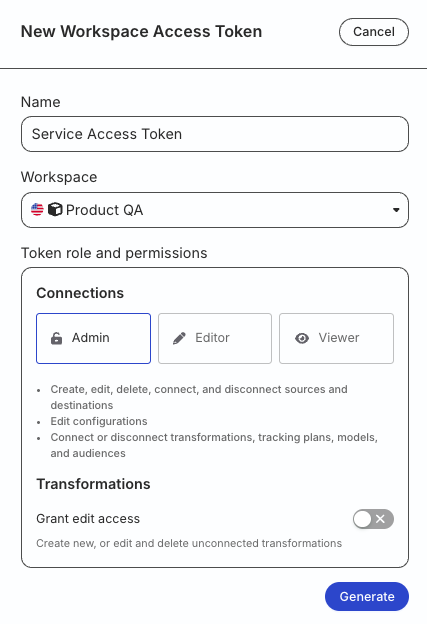
Generate a workspace-level Service Access Token in the RudderStack dashboard with the following permissions to manage Data Catalog and Tracking Plans:
| Resource | Permissions |
|---|---|
| Tracking Plans | Create & Delete, Edit |
| Data Catalog | Edit |
- If you’re on Free or self-hosted plan, or for testing and development only: Generate a Personal Access Token with Read-Write role
Any action authenticated by a Personal Access Token will break if the user generating the token is removed from the organization or there is a breaking change to their permissions.
Token permissions for legacy RBAC system
If you are on the legacy Permissions Management (RBAC) system, your workspace-level Service Access Token should have minimum Admin permissions.
See Generate a workspace-level Service Access Token for steps to create the token.
Setup
Follow the steps in the below sections in the exact order to set up the GitHub Actions workflow.
Step 1: Configure repository secrets
- In your GitHub repository, go to Settings > Secrets and variables > Actions.
- Add a new repository secret as follows:
- Name:
RUDDERSTACK_ACCESS_TOKEN(use this exact name so it matches the workflow below) - Value: The access token generated in the Prerequisites section
RudderStack recommends storing this token in GitHub Secrets and referencing it in your workflow using
${{ secrets.RUDDERSTACK_ACCESS_TOKEN }}.Do not expose the token directly in your workflow files.
Step 2: Create Actions workflow
Create the following workflow in your .github/workflows/ directory:
name: Manage Rudder CLI projects

on:
  push:
    branches: [main]
  pull_request:
    branches: [main]

jobs:
  validate:
    runs-on: ubuntu-latest
    steps:
      - uses: actions/checkout@v4
      - name: Validate Project Files
        uses: rudderlabs/rudder-cli-action@v1.0.1
        env:
          RUDDERSTACK_ACCESS_TOKEN: ${{ secrets.RUDDERSTACK_ACCESS_TOKEN }}
        with:
          location: "<path_to_root_project_folder>/"
          mode: "validate"

  apply:
    runs-on: ubuntu-latest
    needs: validate
    if: github.ref == 'refs/heads/main'
    steps:
      - uses: actions/checkout@v4
      - name: Apply Project Files
        uses: rudderlabs/rudder-cli-action@v1.0.1
        env:
          RUDDERSTACK_ACCESS_TOKEN: ${{ secrets.RUDDERSTACK_ACCESS_TOKEN }}
        with:
          location: "<path_to_root_project_folder>/" #Required
          mode: "apply" #Required
Note that:
- The previous Action
rudderlabs/rudder-tracking-plan-action@v1.0.0is now deprecated.- You can update the CLI action version by modifying the
usesparameter in the workflow file — see the Rudder CLI Project Manager Action releases for the latest version.
Some of the key inputs are described below:
| Input | Description | Default value |
|---|---|---|
locationRequired | Path to the folder containing the Rudder CLI project files. | - |
modeRequired | Operation mode — acceptable values are validate, dry-run, and apply.See Modes for more information. | - |
cli_version | Version of the Rudder CLI tool to use. | v0.10.0 |
RUDDERSTACK_ACCESS_TOKENRequired | The access token for the RudderStack workspace. | - |
Modes
The mode parameter defines the operation mode of the GitHub Action. You can specify either of the following values:
| Value | Notes |
|---|---|
validate |
|
dry-run |
|
apply | Applies the relevant changes to your RudderStack workspace. |
How it works
This section explains the GitHub Actions workflow:
- The action only triggers when files in your root project directory are modified.
- The action automatically syncs the changes with RudderStack when you merge them with the
mainbranch. It uses theapplymode (mode: apply) to push the relevant changes.
