You are viewing documentation for an older version.

CLI-based Data Catalog and Tracking Plan Management
Alpha- free
- growth
- enterprise
3 minute read
This feature is in Alpha as part of RudderStack’s Early Access Program, where we work with early users and customers to test new features and get feedback before making them generally available. Note that these features are functional but can change as we improve them.
Before you get started, note the following:
- See the limitations section to learn more about current differences between the CLI and UI.
- RudderStack recommends testing this feature in a clean Dev workspace.
- Contact the Product team if you have any questions.
RudderStack’s CLI-based Tracking Plans management feature helps you manage Tracking Plans and Data Catalog as code by leveraging the new CLI-based workflow. It helps you bring data governance into your existing development workflows through code-first management.
With this feature, you can bring the same rigor and process to your Tracking Plans that you apply to your application code, ensuring consistency and quality in your data collection strategy.
Key features
With RudderStack’s CLI-based Tracking Plan management, you get the following features:
Declarative YAML configuration
- Define and manage events, properties, and Tracking Plans directly in your codebase using simple YAML files.
- Create reusable property definitions with advanced validation rules like minimum/maximum length, patterns, enums, etc. across multiple events.
- Define dynamic validation rules using Conditional Validation that adapt based on context.
- Leverage a structured referencing system to associate events and properties to a Tracking Plan.
Powerful Rudder CLI tool
This feature comes with a powerful Rudder CLI utility that lets you:
- Create, update, and delete Tracking Plan resources via command line.
- Verify your YAML configurations locally before pushing changes to production.
- Sync the local configuration files with your RudderStack workspace.
In contrast to how Infrastructure-as-Code (IaC) tools typically depend on external object storage like S3 to maintain their state, you can store the relevant state directly in RudderStack, thereby significantly reducing configuration overhead.
You only need the YAML configuration files and a RudderStack token to use Rudder CLI.
Git integration and CI/CD support
- Leverage GitHub Actions to automatically validate and deploy Tracking Plans from your repository.
- Use the standard Git workflows to track changes, implement version control, manage branches, and make any other modifications.
Who can use this feature?
The CLI-based Data Catalog and Tracking Plan management feature is helpful for data teams who need to:
- Manage their Tracking Plans and Data Catalog programmatically with consistent tracking standards.
- Integrate their Tracking Plan changes into their existing development workflows.
- Validate their Tracking Plan changes before deployment.
Get started
- Install the Rudder CLI tool in your preferred environment.
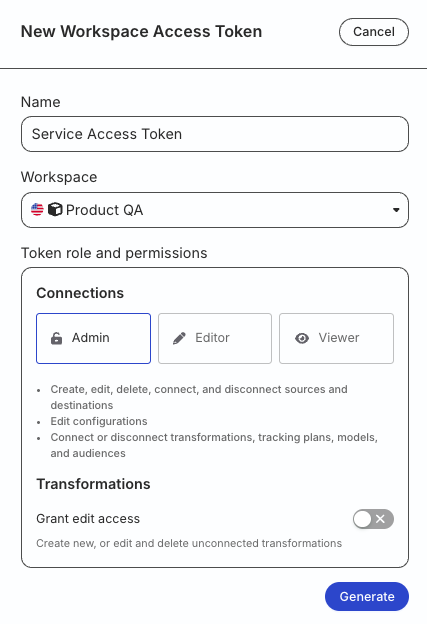
- Generate a workspace-level Service Access Token in the RudderStack dashboard with the following permissions to manage Data Catalog and Tracking Plans:
| Resource | Permissions |
|---|---|
| Tracking Plans | Create & Delete, Edit |
| Data Catalog | Edit |
- If you’re on Free or self-hosted plan, or for testing and development only: Generate a Personal Access Token with Read-Write role
Any action authenticated by a Personal Access Token will break if the user generating the token is removed from the organization or there is a breaking change to their permissions.
Token permissions for legacy RBAC system
If you are on the legacy Permissions Management (RBAC) system, your workspace-level Service Access Token should have minimum Admin permissions.
See Generate a workspace-level Service Access Token for steps to create the token.
- Initialize a new Tracking Plan project with YAML definitions. Then, sync the changes to your workspace.
- Automate Tracking Plan management using GitHub Actions.
Limitations
Rudder CLI only supports pushing updates to RudderStack, not pulling. This means you will need to test with a clean Dev workspace where the Data Catalog is empty and there are no Tracking Plans.
Contact the Product team or your Technical Account Manager if you need a new workspace.
