You are viewing documentation for an older version.

Project Structure
14 minute read
Once you complete the Profile Builder CLI steps, you will be able to see the Profiles project on your machine.
Site configuration file
RudderStack creates a site configuration file (~/.pb/siteconfig.yaml) while creating a warehouse connection. It contains the following details including secrets (if any):
- Warehouse connection details and its credentials.
- Git repository connection credentials (if any). Follow the below steps to add the same:
- Generate the SSH Key.
- Associate the SSH key to your Git project.
- Add private key as credentials in the
siteconfig.yamlfile underkeyfield in thegitcredsfield.
If you have multiple Profiles projects and they use different warehouse connections, you can store the details for multiple connections in the same site configuration file.
A sample site configuration file containing multiple warehouse connection details is shown below:
connections:
  # connection name
  prod-db-profile:
      target: dev
      outputs:
          dev:
              account: inb828.us-west-3
              dbname: MAT_STORE_DEV
              password: password_dev
              role: PROFILES_ROLE_DEV
              schema: AB_SCHEMA_DEV
              type: snowflake
              user: profiles_demo
              warehouse: DEV_WAREHOUSE
          prod:
              account: inc654.us-west-3
              dbname: MAT_STORE
              password: password
              role: PROFILES_ROLE
              schema: AB_SCHEMA
              type: snowflake
              user: profiles_demo
              warehouse: PROD_WAREHOUSE
  test-db-profile:
      target: test
      outputs:
          db:
              access_token: dabasihasdho
              catalog: rs_dev
              host: adb-98.18.azuredatabricks.net
              http_endpoint: /sql/1.0/warehouses/919uasdn92h
              port: 443
              schema: rs_profiles
              type: databricks
              user: johndoe@abc.onmicrosoft.com
          dev:
              account: uk12.us-west-1
              dbname: RUDDERSTACK_DB
              password: password
              role: RS_ROLE
              schema: RS_PROFILES
              type: snowflake
              user: johndoe
              warehouse: RS_WAREHOUSE
          snowflake-keypair: # example of an unencrypted Snowflake key-pair
              type: snowflake
              account: vb8.us-east-1
              dbname: PROD_DB
              role: PROFILES_ROLE
              warehouse: RUDDER
              schema: RS_PROFILES
              user: PROFILES_USER_UNC
              useKeyPairAuth: true
              privateKey: -----BEGIN PRIVATE KEY----- ..keyvalue.. -----END PRIVATE KEY-----
          snowflake-encrypted-keypair: # example of an encrypted Snowflake key-pair
              type: snowflake
              account: vb8.us-east-1
              dbname: PROD_DB
              role: PROFILES_ROLE
              warehouse: RUDDER
              schema: RS_PROFILES
              user: PROFILES_USER_EC
              useKeyPairAuth: true
              privateKey: -----BEGIN ENCRYPTED PRIVATE KEY----- ..keyvalue.. -----END ENCRYPTED PRIVATE KEY-----
              privateKeyPassphrase: valuegoeshere!
          redshift_v1:
              dbname: warehouse_rs
              host: warehouse.abc.us-east-3.redshift.amazonaws.com
              password: password
              port: 5419
              schema: rs_profiles
              type: redshift
              user: redshift_user
          redshift_v2:
              workgroup_name: warehouse_workgroup
              region: us-east-1
              driver: v2
              sslmode: require
              dbname: warehouse_rs
              schema: rs_profiles
              type: redshift
              access_key_id: ******************
              secret_access_key: ******************************
           big:
              credentials:
                auth_provider_x509_cert_url: https://www.googleapis.com/oauth2/v1/certs
                auth_uri: https://accounts.google.com/o/oauth2/auth
                client_email: johndoe@big-query-integration-poc.iam.gserviceaccount.com
                client_id: "123345678909872"
                client_x509_cert_url: https://www.googleapis.com/robot/v1/metadata/x509/johndoe%40big-query-integration-poc.iam.gserviceaccount.com
                private_key: |
                    -----BEGIN PRIVATE KEY-----
                   ## private key
                    -----END PRIVATE KEY-----
                private_key_id: <PRIVATE_KEY_ID>
              project_id: big-query-integration-poc
                token_uri: https://oauth2.googleapis.com/token
                type: service_account
                project_id: rs_profiles
              schema: rs_profiles
              type: bigquery
              user: johndoe@big-query-integration-poc.iam.gserviceaccount.com
gitcreds:
 - reporegex: "git@github.com:REPO_OWNER/*" # in case of ssh url
   key: |
       -----BEGIN OPENSSH PRIVATE KEY-----
       **********************************************************************
       **********************************************************************
       **********************************************************************
       **********************************************************************
       ****************************************************************
       -----END OPENSSH PRIVATE KEY-----
 - reporegex: "https://github.com/rudderlabs/*" # https url
   basic_auth:
     username: oauth2
     password: ... # your GitHub access token with read permission
py_models:
    enabled: true # in case you are using Python models in your project, else set it to false
    python_path: /opt/anaconda3/bin/python # the path where Python is installed (run `which python` to get the full path). If `py_models` is not enabled, set it to `""`. For Windows, you may pass the path value as: python.exe
    credentials_presets: null
    allowed_git_urls_regex: ""
cache_dir: /Users/YOURNAME/.pb/WhtGitCache/ # For Windows, the directory path will have forward slash (\)
filepath: /Users/YOURNAME/.pb/siteconfig.yaml # For Windows, the file path will have forward slash (\)
RudderStack recommends defining twotargetwithin a single connection: one for dev/staging and the other for production. For example, refer to the connection namedprod-db-profilein the sample file above. The default target is set todev, as specified by thetargetkey. To change the output to production, you can runpb run -t prod.
Profiles project structure
The following image shows the folder structure of the project:
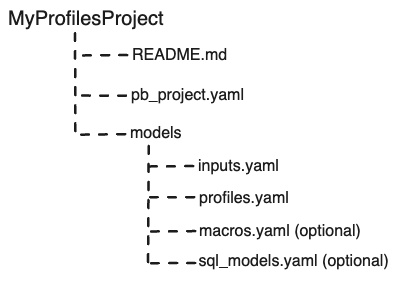
README.md
The README.md file provides a quick overview on how to use PB along with SQL queries for data analysis.
pb_project.yaml
The pb_project.yaml file contains the project details like the name, schema version, warehouse connection, entityEntity refers to a digital representation of a class of real world distinct objects for which you can create a profile. names along with ID types, etc.
A sample pb_project.yaml file with entity type as user:
# Project name
name: sample_attribution

# Project's yaml schema version
schema_version: 72

# Name of warehouse connection in siteconfig.yaml
connection: prod-db-profile

# Directory to store models
model_folders:
  - models

# Entities in the project and their ids
entities:
  - name: user
    id_column_name: <column_name> # If not specified, this field is set to <entity_name>_main_id by default.

    # Use the following (id_stitcher) field to define a custom ID stitcher model (optional).
    # id_stitcher: models/user_id_stitcher

    id_types:
      - main_id
      - user_id
      - anonymous_id
      - email
      - shopify_customer_id
      - device_id
    # Feature views - to get all features/traits of an entity into a single view (optional)
    feature_views:
      using_ids:
        - id: email
          name: customer_profile_by_email
        - id: device_id
          name: customer_profile_by_device_id
id_types:
  - name: shopify_customer_id
  - name: device_id
    filters:
      - type: exclude
        value: "carol.foster@example.com"
  - name: anonymous_id
    filters:
      - type: exclude
        value: ""
      - type: exclude
        value: "unknown"
      - type: exclude
        value: "NaN"
  - name: email
    filters:
      - type: include
        regex: ".+@.+"
      - type: exclude
        sql:
          select: email
          from: inputs/csv_email_blacklist
  - name: user_id
    filters:
      - type: exclude
        sql:
          select: user_id
          from: inputs/models/sql_exclusion_model


# lib packages can be imported to signify that this project's properties are inherited
packages:
  - name: corelib
    url: "https://github.com/rudderlabs/rudderstack-profiles-corelib/tag/schema_{{best_schema_version}}"

# Profiles can also use certain model types defined in Python.
# Examples include ML models. Those dependencies are specified here.
python_requirements:
  - profiles-pycorelib==0.1.0
  - profiles-rudderstack==0.14
The following table explains the fields used in the above file:
| Field | Data type | Description |
|---|---|---|
name | String | Name of the project. |
schema_version | Integer | Project’s YAML version. Each new schema version comes with improvements and added functionalities. |
connection | String | Connection name from siteconfig.yaml used for connecting to the warehouse. |
model_folders | String | Names of folders where model files are stored. |
entities | List | Lists all the entities used in the project for which you can define models. Each entry for an entity here is a JSON object specifying entity’s name and attributes. |
packages | List | List of packages with their name and URL. Optionally, you can also extend ID types filters for including or excluding certain values from this list. |
python_requirements | List | Constraint your Profiles project to run only on specific version(s). |
entities
| Field | Data type | Description |
|---|---|---|
name | String | Name of the entity used in the project. |
id_column_name | Name of the main ID column for an entity. If not provided explicitly, its value is set to <entity_name>_main_id. | |
id_stitcher | String | Profiles project includes an ID stitcher model (default_id_stitcher) by default even if you do not define any specs for creating one.To create a custom ID stitcher model, you can use the id_stitcher field and pass its path as the value (for example, models/name_of_id_stitcher). |
id_types | List | List of the identifier types you want the id_stitcher model to consume, process, and stitch together. You can further define filters on these id types. |
feature_views | List | (Optional) Lists all the view names along with their ID’s being served for feature view model. |
The identifiers listed in
id_typesmay have a many-to-one relationship with an entity but each ID must belong to a single entity.For example, a
userentity might haveid_typesas thesalesforce_id,anonymous_id,session_id(a user may have many session IDs over time). However, it should not include something likeip_address, as a single IP can be used by different users at different times and it is not considered as a user identifier.
filters
You can filter out the ID types you do not want to include in the stitching process by using the filters field.
For example:
- If
emailis an ID type but you have internal testing emails you want to filter out, you can define those here. - If you want to exclude all the blacklisted email addresses, you can create an input model (for example,
csv_email_blacklist) with CSV file as a source, that contains all such email addresses. - If you want to exclude all the
user_ids, you can create an SQL model (for example,sql_exclusion_model) that contains a specific logic to enlist all such IDs.
| Field | Data type | Description |
|---|---|---|
type | String | Type of filter. Allowed values are include or exclude. |
value | String | Value to match, for example, you can reject certain invalid ID values like NaN, unknown, test@domain.com, etc. |
regex | String | Regular expression with which to match the values. |
sql | List | SQL statement with select and from keys. |
packages
You can import library packages in a project signifying where the project inherits its properties from.
| Field | Data type | Description |
|---|---|---|
name | String | Specify a name. |
url | String | HTTPS URL of the lib package, with a tag for the best schema version. |
Models folder
Models folder contains all the input sources your Profiles project will consume and process.
Whenever you create a Profiles project using pb init pb project, the default inputs.yaml and profiles.yaml are created in the Models folder.
inputs.yaml
The inputs.yaml file contains the configuration for all the input sources which Profiles uses to run models and create outputs like the ID graph, feature view, etc. You can also define specific constraints on the input sources using the contract key.
RudderStack supports the following input sources:
- Table: Specify the table’s name in the
tablekey. - View: Specify the view’s name in the
viewkey. - S3 bucket: Specify the path of the CSV file in your bucket in the
s3key. See Use Amazon S3 bucket as input for more information. - Local CSV file: Specify the file path in the
csvkey. See Use CSV file as input for more information.
You can also specify the table/view along with the column name and SQL expression for retrieving values. The input specification may also include metadata and the constraints on those columns.
A sample inputs.yaml file:
inputs:
    # name of the input source
  - name: salesforceTasks
    contract:
      is_optional: false
      is_event_stream: true
      with_entity_ids:
        - user
      with_columns:
        - name: activitydate
        - name: whoid
    app_defaults:
      # name of the table for input data
      table: salesforce.task
      # For BigQuery, it is recommended to use view (view: _views_<view_name>) instead of table for event streaming data sets.
      occurred_at_col: activitydate
      row_identifier:
        - activitydate
        - whoid
      # aliases to select from the input table
      ids:
        # column name or sql expression
        - select: "whoid"
          type: salesforce_id
          # entity to which the id belongs
          entity: user
          to_default_stitcher: true
  - name: salesforceContact
    contract:
      is_optional: false
      is_event_stream: true
      with_entity_ids:
        - user
      with_columns:
        - name: createddate
        - name: id
        - name: email
    app_defaults:
      table: salesforce.contact
      # For BigQuery, it is recommended to use view (view: _views_<view_name>) instead of table for event streaming data sets.
      occurred_at_col: createddate
      ids:
        - select: "id"
          type: salesforce_id
          entity: user
          to_default_stitcher: true
        - select: "case when lower(email) like any ('%gmail%', '%yahoo%') then lower(email)  else split_part(lower(email),'@',2) end"
          type: email
          entity: user
          to_default_stitcher: true
  - name: websitePageVisits
    contract:
      is_optional: false
      is_event_stream: true
      with_entity_ids:
        - user
      with_columns:
        - name: timestamp
        - name: anonymous_id
        - name: context_traits_email
        - name: user_id
    app_defaults:
      table: autotrack.pages
      # For BigQuery, it is recommended to use view (view: _views_<view_name>) instead of table for event streaming data sets.
      occurred_at_col: timestamp
      ids:
        - select: "anonymous_id"
          type: rudder_anon_id
          entity: user
          to_default_stitcher: true
        # below sql expression check the email type, if it is gmail and yahoo return email otherwise spilt email return domain of email.
        - select: "case when lower(coalesce(context_traits_email, user_id)) like any ('%gmail%', '%yahoo%') then lower(coalesce(context_traits_email, user_id))  \
              else split_part(lower(coalesce(context_traits_email, user_id)),'@',2) end"
          type: email
          entity: user
          to_default_stitcher: true
The following table explains the fields used in the above file:
| Field | Data type | Description |
|---|---|---|
name | String | Name of the input model. |
contract | Dictionary | A model contract provides essential information about the model like the necessary columns and entity IDs that it should contain. This is crucial for other models that depend on it, as it helps find errors early and closer to the point of their origin. |
app_defaults | Dictionary | Values that input defaults to when you run the project directly. For library projects, you can remap the inputs and override the app defaults while importing the library projects. |
contract
| Field | Data type | Description |
|---|---|---|
is_optional | Boolean | [Optional] Whether the model’s existence in the warehouse is mandatory. Default value: False |
is_event_stream | Boolean | [Optional] Whether the table/view is a series/stream of events. A model that has a timestamp column is an event stream model.Default value: False |
with_entity_ids | List | List of all entities with which the model is related. A model M1 is considered related to model M2 if there is an ID of model M2 in M1’s output columns. |
with_columns | List | List of all ID columns that this contract is applicable for. |
app_defaults
| Field | Data type | Description |
|---|---|---|
table/view | String | Name of the warehouse table/view containing the data. You can prefix the table/view with an external schema or database in the same warehouse, if applicable. Note that you can specify either a table or view but not both. |
s3 | String | Name of the CSV file in your Amazon S3 bucket containing the data. |
csv | String | Name of the CSV file in your local storage containing the data. The file path should be relative to the project folder. |
occurred_at_col | String | Name of the column in table/view containing the timestamp. |
row_identifier | String | (Optional) List of all the identifiers whose combination acts as a primary key. If the unique row exists already during the run process while creating a copy of the input table, it is not copied again. |
ids | List | Specifies the list of all IDs present in the source table along with their column names (or column SQL expressions). Note: Some input columns may contain IDs of associated entities. By their presence, such ID columns associate the row with the entity of the ID. The ID Stitcher may use these declarations to automatically discover ID-to-ID edges. |
ids
| Field | Data type | Description |
|---|---|---|
select | String | Specifies the column name to be used as the identifier. You can also specify a SQL expression if some transformation is required. Note: You can also refer table from another Database/Schema in the same data warehouse. For example, table: <database_name>.<schema_name>.<table_name>. |
type | String | Type of identifier. All the ID types of a project are declared in pb_project.yaml. You can specify additional filters on the column expression.Note: Each ID type is linked only with a single entity. |
entity | String | Entity name defined in the pb_project.yaml file to which the ID belongs. |
to_default_stitcher | Boolean | Set this optional field to false for the ID to be excluded from the default ID stitcher.Default value: True |
profiles.yaml
The profiles.yaml file defines the Profiles semantic models. Each model (defined in model_type field) is a prepackaged SQL model that takes your inputs and runs in the warehouse to output the defined views and tables.
You can define the entity_vars/input_vars under var_groups which are used to create the output tables.
The following profiles.yaml file defines a group of vars named vars_list and a user_profile model:
var_groups:
  name: vars_list
  entity_key: user # This is the name defined in project file. If we change that, we need to change the name here too.
  vars:
    - entity_var:
        name: is_mql
        select: max(case when salesForceLeadsTable.mql__c == 'True' then 1 else 0 end)
        from: inputs/salesForceLeadsTable
        description: Whether a domain is mql or not
    - entity_var:
        name: blacklistFlag
        select: max(case when exclude_reason is not null then 1 else 0 end)
        from: inputs/blacklistDomains
        where: (context_sources_job_run_id = (select top 1 context_sources_job_run_id from blacklistDomains order by timestamp desc))
        is_feature: false
    - entity_var:
        name: ignore_domain
        select: case when {{user.Var("blacklistFlag")}} = 1 or {{user.Var("domainSummary_account_type")}} like '%free%' then 1 else 0 end
        description: Whether a domain should be ignored for the analysis
    - entity_var:
        name: salesEvents
        select: json_agg(activitydate, case when (type='Email' or tasksubtype = 'Email') then case when lower(subject) like '%[in]%' then 'sf_inbound_email' \
              else 'sf_outbound_email' end when macro(call_conversion) then 'sf_call' else null end as event)
        from: inputs/salesforceTasks
        description: Salesforce touches are converted to one of following events - sf_inbound_email, sf_outbound_email, sf_call, null
        is_feature: false
    - entity_var:
        name: webhookFormSubmit
        select:  min(timestamp)
        from: inputs/webhookSource
        where: variable_1 is null and timestamp < sales_conversion_timestamp and timestamp > var('start_date')
models:
  - name: user_profile
    model_type: feature_table_model
    model_spec:
      validity_time: 24h # 1 day
      entity_key: user
var_groups
| Field | Data type | Description |
|---|---|---|
name | String | A unique name for the var_group. |
entity_key | String | The entity to which the var_group belongs to. |
vars | Object | This section is used to specify variables, with the help of entity_var and input_var. Aggregation on stitched ID type is done by default and is implicit. |
Optionally, you can create models using the above vars. The following fields are common for all the model types:
| Field | Data type | Description |
|---|---|---|
name | String | Name of the model. Note that a table with the same name is created in the data warehouse. For example, if you define the name as user_table, the output table will be named something like Material_user_table_<rest-of-generated-hash>_<timestamp-number>. |
model_type | String | Defines the type of model. Possible values are: id_stitcher, feature_table_model, sql_template, entity_cohort, id_collator, python_model, feature_view, etc. See model types for more infromation. |
model_spec | Object | Defines the detailed configuration specification for the target model. |
macros.yaml
You can optionally use macros - reusable functions that encapsulate complex processing logic directly within the SQL expression. See Macros for more information on their usage.
sql_models.yaml
You can use SQL models that are suitable for advanced use cases where you want a model that does some intermediary transformations, joins, or unions on some data before it is consumed by the identity stitcher or feature creation models. See SQL Models for more information.
