You are viewing documentation for an older version.

Cohorts
6 minute read
Cohort is a subset of entityEntity refers to a digital representation of a class of real world distinct objects for which you can create a profile. instances meeting a specified set of characteristics, behaviors, or attributes. For example, if you have user as an entity, you can define cohorts like known users, new users, or North American users.
Using RudderStack Profiles, you can create the desired cohorts for entities and target specific user segments by enabling targeted campaigns and analysis.
Define cohorts
Profiles lets you define cohorts as a model under model_type field in your profiles.yaml file:
- Default cohort: When you define an entity, a default cohort
<entity>/all(user/allfor theuserentity) is created automatically. It contains the set of all instances of that entity. Any other cohort you define for that entity is derived from it. - Derived cohort: When you define a cohort based on a pre-existing cohort (base cohort), it becomes a derived cohort. A derived cohort inherits the features of the base cohort. You can filter out the member instances of the base cohort based on a set of characteristics, behaviors, or attributes for the derived cohort. You must specify the base cohort in the derived cohort’s definition using the
extendsfield.
For example, known_users is a cohort derived from the base cohort user/all (set of all users), whereas known_mobile_users is derived from its base cohort known_users.
When you run a Profiles project including cohorts, the output of the cohort is stored in a table/view with the same name.
Sample cohort
You can apply filters using the include/exclude clauses to specify a boolean expression over any of the entity vars defined on the base cohort or its ancestors. Certain features might hold relevance only for the specific cohorts. For example, SSN feature may only be applicable for American users.
Example 1: Let’s consider the following profiles.yaml file which defines a cohort knownUsUsers to include users from US with a linked email address.
models:
  - name: knownUsUsers
    model_type: entity_cohort
    model_spec:
      extends: user/all
      materialization:
        output_type: table
      filter_pipeline:
        - type: exclude
            # exclude users which don't have any linked email.
          value: "{{ user.Var('id_type_email_count') }} = 0"
        - type: include
            # include users with country US.
          value: "{{ user.Var('country') }} = 'US'"
Here, the extends keyword specifies the base cohort users/all. You can also specify the path of a custom defined base cohort, if applicable. The value field in filter_pipeline must be a boolean expression over any of the entity_vars defined on the base cohort or its ancestor cohorts.
Example 2: Let’s derive the us_credit_card_users cohort from the knownUsUsers as a base cohort. It filters the known US users who possess a credit card and have spent more than 10 thousand USD in last transaction. The extends field specifies the path of the base cohort which is models/knownUsUsers.
models:
  -  name: us_credit_card_users
     model_type: entity_cohort
     model_spec:
       extends: models/knownUsUsers
       materialization:
         output_type: view
       filter_pipeline:
         - type: include
           value: "{{ knownUsUsers.Var('has_credit_card') }} = 1"
         - type: include
           value: "{{ user.Var('last_transaction_value') }} > 10000"
Example 3: Let’s consider another scenario where you can unify different cohorts (north_american_users, and south_american_users) to create a new cohort.
models:
  - name: american_users
    model_type: entity_cohort
    model_spec:
       extends: user/all
       filter_pipeline:
         - type: include
           sql:
             select: user_main_id
             from: "{{ this.DeRef('models/north_american_users') }}"
         - type: include
           sql:
             select: user_main_id
             from: "{{ this.DeRef('models/south_american_users') }}"
             where: user_main_id != null
Associate features with cohort
You can also use var_groups to target a cohort instead of an entire entity which will provide a comprehensive 360-degree view combining relevant features.
To do so, associate features with a cohort by specifying the entity_cohort key and passing the cohort’s path to it within a var_group, as shown:
var_groups:
  - name: known_us_users_vars #vars targeted to knownUsUsers cohort
    entity_cohort: models/knownUsUsers
    vars:
      - entity_var:
          name: has_credit_card
          select: max(case when lower(payment_details_credit_card_company) in ('visa','american express','mastercard') then 1 else 0 end)
          from: inputs/rsOrderCreated
          description: If the user has a credit card.
          default: false

  - name: user_vars #vars targeted to default user/all cohort
    entity_key: user
    vars:
      - entity_var:
          name: last_transaction_value
          from: inputs/rsOrderCreated
          select: first_value(total_price_usd)
          window:
            order_by:
              - case when TOTAL_PRICE_USD is not null then 2 else 1 end desc
              - timestamp desc
      - entity_var:
          name: country
          from: inputs/rsIdentifies
          select: first_value(address_country)
          where: address_country is not null and address_country != ''
          window:
            order_by:
              - timestamp desc
To apply the features to the entire user entity, you can use an entity_key in user_vars.
In avar_group, you can use eitherentity_keyorentity_cohortbut not both. Settingentity_keyasuseris equivalent to settingentity_cohortasuser/all.
Feature view of cohort
You can establish a holistic 360 feature view of a cohort within its definition. This view consolidates all the features associated with the specified identifiers, providing a complete overview of the cohort.
The following example shows how to define a feature view for the knownUsUsers cohort:
models:
  - name: knownUsUsers
    model_type: entity_cohort
    model_spec:
      extends: users/all
      materialization:
        output_type: table
      filter_pipeline:
        - type: exclude
            # exclude users which don't have any linked email.
          value: "{{ user.Var('id_type_email_count') }} = 0"
        - type: include
            # include users with country US.
          value: "{{ user.Var('country') }} = 'US'"
      # to define a 360 feature view of knownUsUsers cohort [optional]
      feature_views:
        # view with entity's `main_id` as identifier
        name: known_us_users_feature_view
        using_ids:
          - id: email
            # view with `email` as identifier
            name: us_users_with_email
Here, the known_us_users_feature_view view contains all the features of the knownUsUsers cohort and uses main_id as the identifier. There is another us_users_with_email view which also contains all the features of the knownUsUsers cohort but uses email as the identifier (specified in using_ids field).
Use cohorts
Once you have defined cohorts in your profiles.yaml file, you can choose to run your project in either of the following ways:
Profile CLI
Run your Profiles CLI project using the pb run command to generate output tables.
Profiles UI
To view cohorts in the RudderStack dashboard, you can make your Profiles CLI project available in a Git repository and import it in the RudderStack dashboard. See Import Profiles Project from Git for more information.
Once imported, you can run your project by navigating to the History tab and clicking Run. After a successful run of the project, you can view the output for cohorts in the Entities tab of the project:
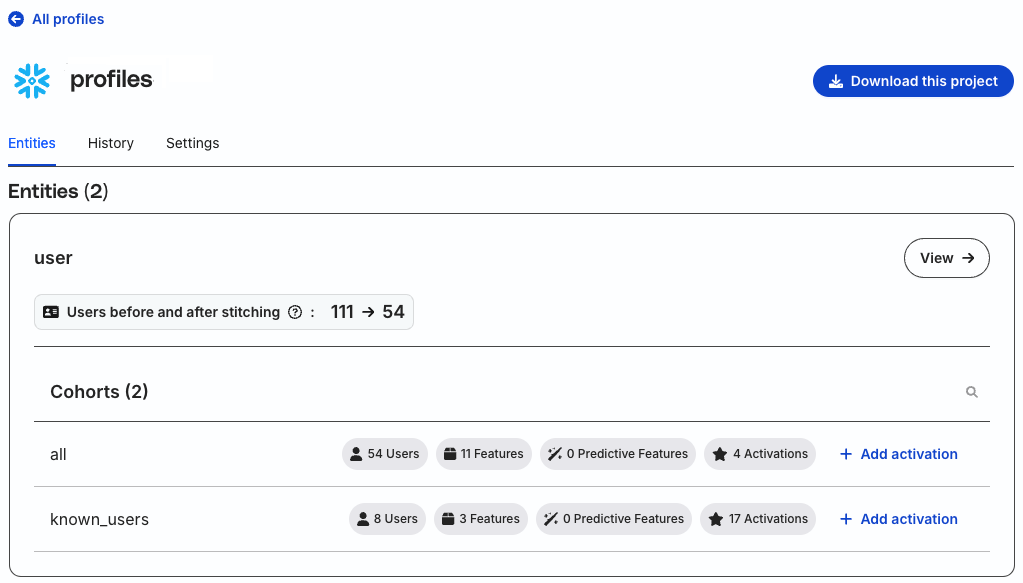
Contact Profiles support team in RudderStack’s Community Slack if you are unable to see the Entities tab.
You can further activate your cohorts data by syncing it to the downstream destinations. See Activations for more information.
