
Tracking Plan API

Use our tracking plan API to programmatically manage your tracking plans.

danger
This API is deprecated. See Data Catalog API to create and manage your tracking plans programmatically.

The Tracking plan API lets you programmatically create and manage your tracking plans. You can use the API to:

  • Create/update/fetch tracking plans associated with your workspace
  • Define tracking plan rules
  • Create/update tracking plan configurations for a particular source
  • Link and unlink a source/events to a tracking plan
  • Delete a tracking plan

Prerequisites

To use the tracking plan API successfully:

info
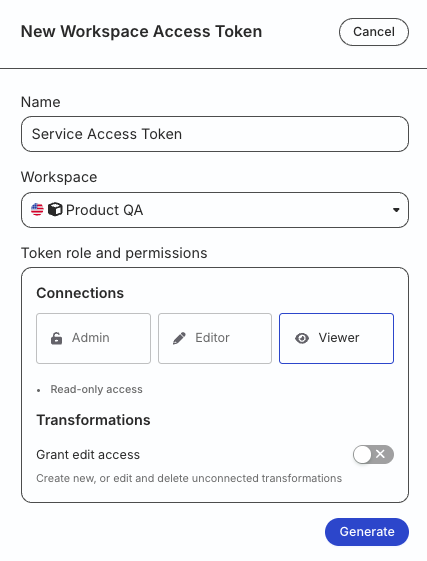
For production use cases, RudderStack recommends using a service access token instead of personal access token.

API authorization

The Tracking Plan API uses Basic Authentication for authenticating all requests.

If you’re using Postman, authenticate the API by including an empty string ("") as the username and your workspace-level Service Access Token as the password in the Authorization tab.

info

RudderStack recommends using:

You can also pass your Service Access Token in the authorization header directly:

Authorization: Basic {Base64Encoded(:<SERVICE_ACCESS_TOKEN>)}

An example is shown below:

  • Username: "" (empty string)
  • Service Access Token: <SERVICE_ACCESS_TOKEN>
  • Header: Basic {Base64Encoded(:<SERVICE_ACCESS_TOKEN>)}
info
Verify that the Service Access Token is valid if you get an Invalid Authorization Header error.

Base URL

Use the base URL for your API requests depending on your region:

Tracking plan API usage

Tracking plan APIDescription
Tracking PlansThis section contains all the requests and the examples related to:

  • Creating a tracking plan
  • Fetching a single or all tracking plans
  • Updating a tracking plan
  • Upserting a tracking plan
  • Deleting a tracking plan
Tracking Plan RulesThis section contains all the requests and the examples related to setting the tracking plan rules like:

  • Creating events
  • Fetching all events
  • Fetching all events linked to a tracking plan
  • Updating events by ID
  • Linking or unlinking events from a tracking plan
  • Deleting events
It also contains upsert and deletion requests for all non-track rules (applicable for identify, group, page, and screen events) like:

  • Creating or updating a non-track rule for a tracking plan
  • Deleting a non-track rule mapped to a tracking plan
Source Tracking Plan ConnectionsThis section contains all the requests and the examples related to tracking plan configurations like:

  • Creating or updating tracking plan configurations for a source ID
  • Fetching all tracking plan configurations by source ID
  • Fetching all sources connected to a tracking plan
  • Linking or unlinking a source to a tracking plan

Event structure

To perform the tracking plan validation successfully, your event payload structure must conform to the standard RudderStack event spec.

See the following sample event payloads for more information:

You can also see the example request in the Create Tracking Plan API for the event formatting structure.


Questions? Contact us by Email or on Slack