

How to Set Up Rudder AI Reviewer Beta

Set up the Rudder AI Reviewer GitHub Action to automatically review pull requests for SDK instrumentation issues.

This guide explains how to set up Rudder AI Reviewer to automatically review pull requests for SDK instrumentation issues.

Prerequisites

You need the following to get started:

  • A GitHub repository with Actions enabled
  • Set up a JavaScript source in your RudderStack workspace and note its Source ID:
Source ID
info
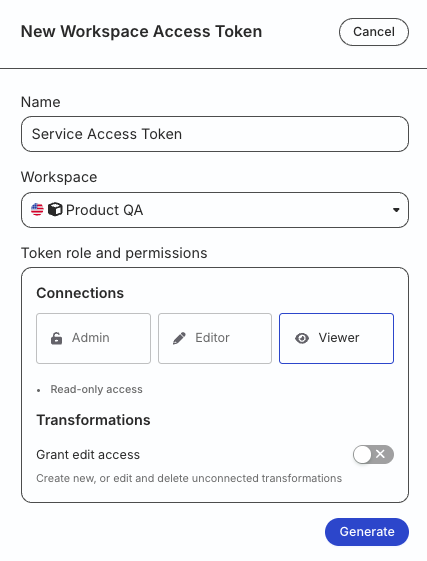
The workspace-level Service Access Token has Read permissions by default. You do not need to assign any resource permissions while generating the token.

Token permissions for legacy RBAC system

If you are on the legacy Permissions Management (RBAC) system, your workspace-level Service Access Token should have Viewer permission.

See this documentation for more information on generating the token.

workspace-level Service Access Token with Viewer permission

Setup

Add the following workflow to your repository at the .github/workflows/rudder-ai-reviewer.yml location:

name: Rudder AI Reviewer
on:
  pull_request:
    types: [opened, synchronize]

permissions:
  contents: read        # Required to checkout the repository
  pull-requests: write  # Required to post review comments

jobs:
  review:
    runs-on: ubuntu-latest
    steps:
      - uses: actions/checkout@93cb6efe18208431cddfb8368fd83d5badbf9bfd # v5.0.1

      - name: Rudder AI Reviewer
        uses: rudderlabs/rudder-ai-reviewer@v1
        with:
          source-id: ${{ secrets.RUDDERSTACK_SOURCE_ID }}
          service-access-token: ${{ secrets.RUDDERSTACK_SERVICE_ACCESS_TOKEN }}

Inputs

InputDescriptionDefault value
source-id
Required
The ID of the source in your RudderStack workspace-
service-access-token
Required
The workspace-level Service Access Token created in your RudderStack workspace-
root-directoryRoot directory of the project (useful for monorepos)-
github-tokenGitHub token for API access${{ github.token }}

Monorepo support

If your repository is a monorepo and the instrumented application is in a subdirectory, use the root-directory input to specify the path:

- name: Rudder AI Reviewer
  uses: rudderlabs/rudder-ai-reviewer@v1
  with:
    source-id: ${{ secrets.RUDDERSTACK_SOURCE_ID }}
    service-access-token: ${{ secrets.RUDDERSTACK_SERVICE_ACCESS_TOKEN }}
    root-directory: 'apps/frontend'  # Path to your application

Examples

See the Rudder AI Reviewer GitHub repository for examples of the feedback provided by the AI reviewer.

See more

Questions? We're here to help.

Join the RudderStack Slack community or email us for support