# How to Connect a Warehouse to Lookout


<blockquote class="announcement">
  <div class="tip-quote">
    
    <div class="tip-text"><strong>Rudder Lookout</strong> is currently in <strong>Public Beta</strong>. <a href="mailto:product@rudderstack.com" >Contact the Product team</a> if you have any questions.</div>
  </div>
</blockquote>

<p>The Lookout agent requires access to your data warehouse to answer questions about your data.</p>
<p>The agent lists tables, inspects schema, and runs SQL to answer questions, build dashboards, and investigate your pipelines. The results flow straight into charts, tables, metrics, and funnels.</p>
<p>Lookout supports the following warehouses:</p>
<ul>
<li>PostgreSQL</li>
<li>Snowflake</li>
<li>Redshift</li>
<li>BigQuery</li>
<li>Databricks</li>
<li>ClickHouse</li>
</ul>
<!-- end-chunk -->
<!-- begin-chunk -->
<h2 id="connect-a-warehouse">Connect a warehouse</h2>
<html lang="en">
<blockquote class="info">
  <div class="tip-quote">
    
    <div class="tip-text">Only admins can create, connect, edit, and test a warehouse connection. See <a href="https://www.rudderstack.com/docs/activate/lookout/workspaces/roles/" >Roles and Permissions</a> for more information.</div>
  </div>
</blockquote>

</html>
<ol>
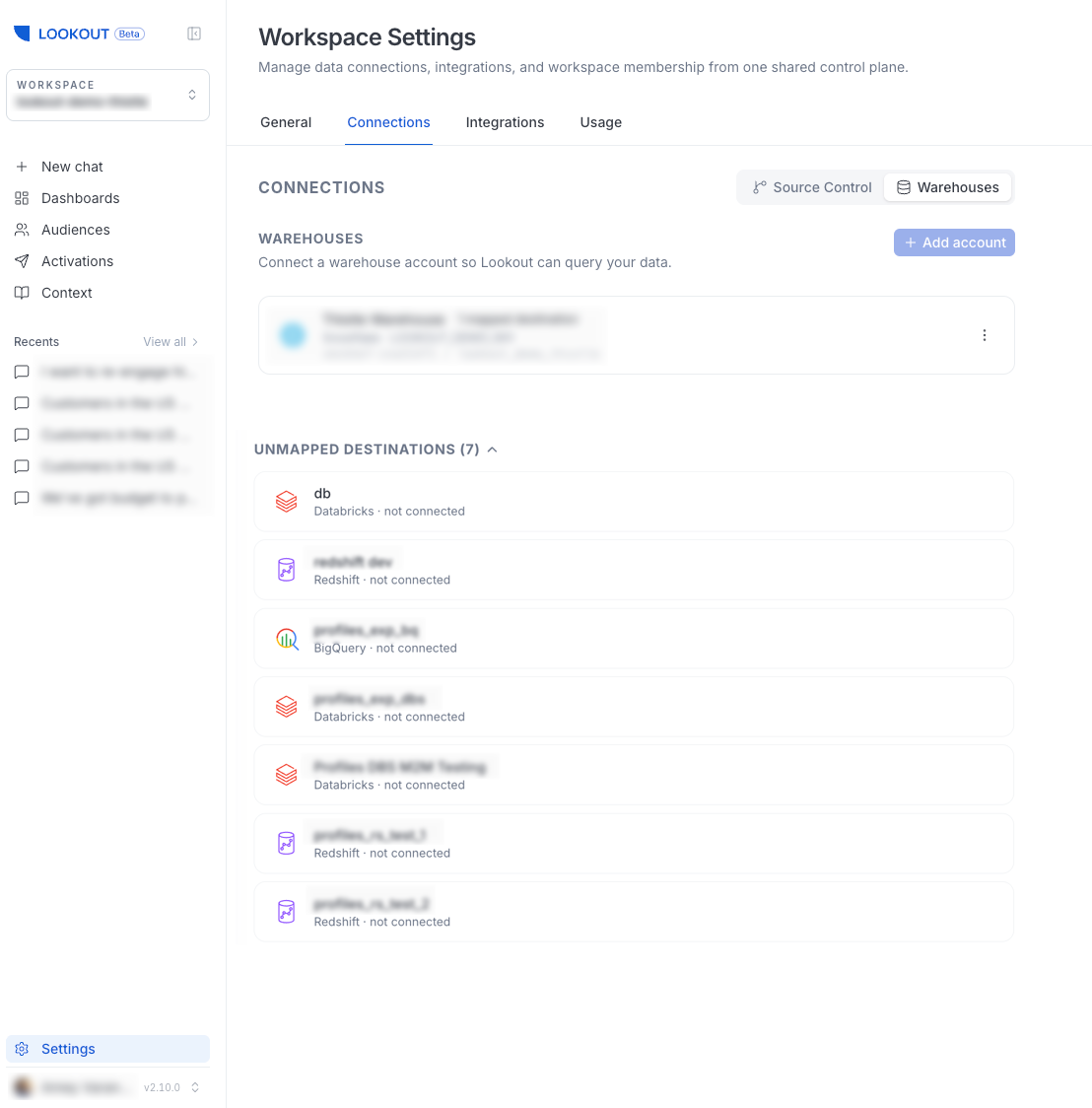
<li>Go to <strong>Settings</strong> &gt; <strong>Connections</strong> &gt; <strong>Warehouses</strong>.</li>
<li>Select <strong>Add account</strong> and choose your warehouse type.</li>
<li>Enter the connection details and save.</li>
</ol>
<p>Note that:</p>
<ul>
<li>Connected warehouses appear at the top of the page.</li>
<li>RudderStack destinations that are not yet mapped to a warehouse connection are listed under <strong>Unmapped Destinations</strong>, so you can see at a glance what is available to connect.</li>
</ul>

<figure class="image--main "  >
    <a 
         href="/docs/images/lookout/warehouse-account-settings.webp"
        
        >
        <img src="/docs/images/lookout/warehouse-account-settings.webp" 


        decoding="async" loading="lazy" class="img-shortcode"/>
    </a>
    
</figure>

<!-- end-chunk -->
<!-- begin-chunk -->
<h2 id="best-practices">Best practices</h2><p>Follow these best practices to ensure a smooth and secure connection to your warehouse.</p>
<!-- end-chunk -->
<!-- begin-chunk -->
<h3 id="dedicated-read-only-service-account">Dedicated read-only service account</h3><p>For every warehouse, connect Lookout through a <strong>dedicated service identity that has read-only access</strong> rather than reusing a person&rsquo;s credentials or an account with broad privileges. This isolates RudderStack&rsquo;s access to your warehouse, keeps it strictly read-only, and makes it easy to audit or revoke independently of anyone&rsquo;s personal login.</p>
<p>Each platform has its own name for this kind of identity, but the principle is the same — create an identity, grant it read-only access to the data Lookout needs, and use it for the connection:</p>
<table>
<thead>
<tr>
<th>Warehouse</th>
<th>Identity to create</th>
<th><div>Access to grant</div></th>
</tr>
</thead>
<tbody>
<tr>
<td><strong>Snowflake</strong></td>
<td>Service user with a dedicated read-only role</td>
<td><code>SELECT</code> on the relevant databases/schemas</td>
</tr>
<tr>
<td><strong>BigQuery</strong></td>
<td>Service account</td>
<td>Read-only roles (for example, Data Viewer + Job User)</td>
</tr>
<tr>
<td><strong>Databricks</strong></td>
<td>Service principal</td>
<td>Read-only grants on the relevant catalogs/schemas</td>
</tr>
<tr>
<td><strong>Redshift</strong></td>
<td>IAM service user / dedicated database user</td>
<td><code>SELECT</code> on the relevant schemas</td>
</tr>
<tr>
<td><strong>PostgreSQL</strong></td>
<td>Dedicated database role</td>
<td><code>SELECT</code> (read-only) on the relevant schemas</td>
</tr>
<tr>
<td><strong>ClickHouse</strong></td>
<td>Dedicated database user</td>
<td><code>SELECT</code> (read-only) on the relevant databases</td>
</tr>
</tbody>
</table>

<!DOCTYPE html>
<html lang="en">
<blockquote class="tip">
  <div class="tip-quote">
    
    <div class="tip-text">Scope the grant to only the databases, schemas, and tables Lookout needs. Read-only, least-privilege access keeps the connection&rsquo;s blast radius small.</div>
  </div>
</blockquote>
</html>
<p>Note that creating a service account, role, or user, and granting it read-only access usually requires warehouse-administrator privileges. If you don&rsquo;t manage your warehouse directly, reach out to your <strong>Infra team</strong> to have it set up.</p>
<p>The exact credentials and permissions each warehouse needs are shown on its connection page in <strong>Settings</strong> &gt; <strong>Connections</strong> &gt; <strong>Warehouses</strong>.</p>
<!-- end-chunk -->
<!-- begin-chunk -->
<h3 id="allocate-and-isolate-compute">Allocate and isolate compute</h3><p>The following recommendations help Lookout respond quickly while keeping costs predictable. They are written with Snowflake in mind, but the same principles apply to other warehouses — the exact settings may differ:</p>
<ul>
<li><strong>Assign enough compute</strong>: Larger compute size means faster queries and quicker access to your data, which makes the agent feel more responsive.</li>
<li><strong>Isolate the workload</strong>: Where possible, point Lookout at a <strong>separate, dedicated compute resource</strong> rather than one shared with production jobs. This isolates Lookout&rsquo;s usage for cleaner cost attribution and avoids competing with other workloads.</li>
<li><strong>Auto-suspend aggressively</strong>: Configure the compute to shut down quickly when idle — for example, after <strong>5 minutes of inactivity or less</strong>. Because Lookout&rsquo;s usage is bursty, aggressive auto-suspend keeps costs low without affecting responsiveness.</li>
</ul>
<!-- end-chunk -->
<!-- begin-chunk -->
<h2 id="read-only-access">Read-only access</h2><p>Warehouse access is strictly <strong>read-only</strong>. The agent can query and inspect your data, but it can&rsquo;t write to or alter your warehouse.</p>
<p>Note that:</p>
<ul>
<li>Dashboards store their <strong>definition</strong>, not their data — they re-run their queries on every load and store no result rows on RudderStack&rsquo;s servers</li>
<li>Connection credentials are encrypted at rest</li>
</ul>
<p>See <a href="https://www.rudderstack.com/docs/activate/lookout/security/" >Security and Data Handling</a> for more information.</p>
<!-- end-chunk -->
<!-- begin-chunk -->
<h2 id="where-warehouse-data-is-used">Where warehouse data is used</h2><p>Once a warehouse is connected, the same connection powers the following Lookout features:</p>
<ul>
<li><a href="https://www.rudderstack.com/docs/activate/lookout/working-with-lookout/chat/" >Chat answers</a>: Natural-language questions answered with live queries</li>
<li><a href="https://www.rudderstack.com/docs/activate/lookout/working-with-lookout/dashboards/" >Dashboards</a>: Panels that re-run their queries on every load</li>
<li><a href="https://www.rudderstack.com/docs/activate/lookout/audiences/" >Audiences</a>: Segments built from your warehouse data and kept in sync with destinations</li>
<li><a href="https://www.rudderstack.com/docs/activate/lookout/integrations/slack/" >Slack</a>: The same answers from a Slack DM or channel</li>
</ul>

