# How to Use Databricks Metric Views in Lookout


<blockquote class="announcement">
  <div class="tip-quote">
    
    <div class="tip-text"><strong>Rudder Lookout</strong> is currently in <strong>Public Beta</strong>. <a href="mailto:product@rudderstack.com" >Contact the Product team</a> if you have any questions.</div>
  </div>
</blockquote>

<p>Lookout reads the metric views your data team defines in Unity Catalog. It then answers questions and builds audiences with the governed descriptions, display names, and synonyms on those views.</p>
<!-- end-chunk -->
<!-- begin-chunk -->
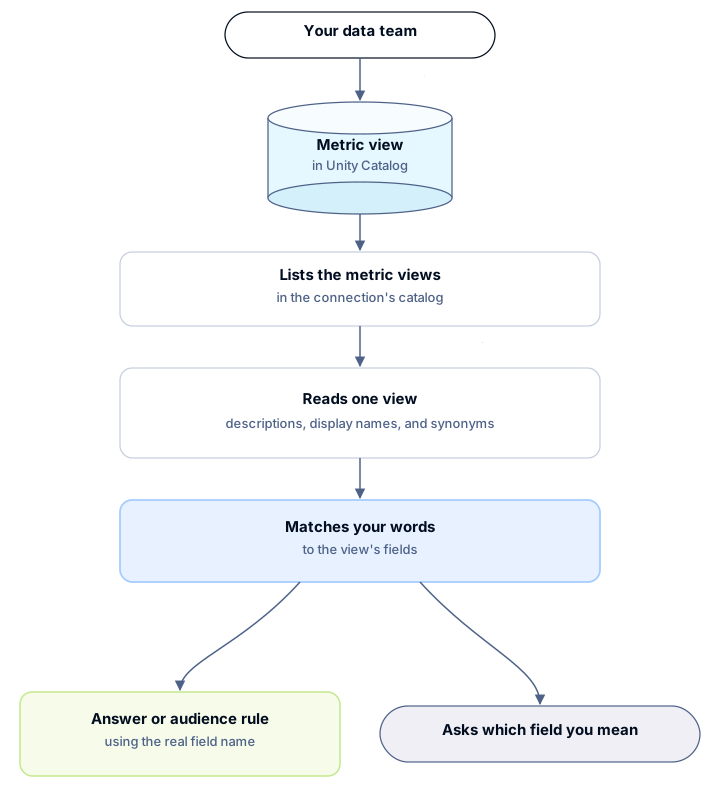
<h2 id="trace-a-metric-view-through-lookout">Trace a metric view through Lookout</h2><p>Lookout reads the definition, not your data. It runs two metadata queries, and only when a question needs them. One query lists the metric views in the connection&rsquo;s catalog. One query per view reads that view&rsquo;s descriptions, display names, and synonyms. Lookout screens and caps that text, then matches your words to the view&rsquo;s fields.</p>
<p>When one field matches, Lookout writes the answer or the audience rule with the real field name. When a word fits two fields, Lookout asks which field you mean.</p>

<figure class="image--main ">
<a href="/docs/images/lookout/databricks-metric-views.svg">
<img src="/docs/images/lookout/databricks-metric-views.svg" alt="Flow from a data team writing metric view YAML in Unity Catalog, through Lookout listing views and reading descriptions, display names, and synonyms, to either an answer that uses the real field name or a question about which field you mean" decoding="async" loading="lazy" class="img-shortcode"/>
</a>
</figure>

<p>Both queries read catalog metadata only. Lookout creates nothing in your Databricks workspace.</p>

<html lang="en">
<blockquote class="info">
  <div class="tip-quote">
    
    <div class="tip-text">Lookout runs these queries from <a href="https://www.rudderstack.com/docs/activate/lookout/working-with-lookout/chat/" >Chat and Ask Questions</a> and from <a href="https://www.rudderstack.com/docs/activate/lookout/audiences/" >Audiences and Activation</a>. Lookout in Slack does not read metric views yet.</div>
  </div>
</blockquote>

</html>
<!-- end-chunk -->
<!-- begin-chunk -->
<h2 id="connect-a-databricks-catalog">Connect a Databricks catalog</h2><p>Lookout reads metric views only in the catalog on that connection. One connection covers one catalog. When the views sit in two catalogs, add a connection for each.</p>
<p>Only an admin can add the connection — see <a href="https://www.rudderstack.com/docs/activate/lookout/workspaces/roles/" >Roles and Permissions</a> for more information.</p>
<ol>
<li>Define the metric views in Unity Catalog. Display names and synonyms need YAML version <strong>1.1</strong>. On a cluster, that metadata needs Databricks Runtime 17.3 or above. A SQL warehouse already runs a current Databricks SQL version, so you don&rsquo;t pick a runtime for it. On version 0.1, Lookout still reads each column&rsquo;s Unity Catalog comment. See <a href="https://docs.databricks.com/aws/en/uc-semantics/metric-views/feature-availability" >Metric View Feature Availability</a> in the Databricks documentation.</li>
<li>In Lookout, go to <strong>Settings</strong> &gt; <strong>Connections</strong> &gt; <strong>Warehouses</strong>.</li>
<li>Select <strong>Add account</strong>, then <strong>Databricks</strong>.</li>
<li>Enter the <strong>Workspace Host</strong> and <strong>HTTP Path</strong>. Choose an <strong>Authentication type</strong>, then enter a <strong>Personal Access Token</strong>, or an <strong>OAuth Client ID</strong> and <strong>OAuth Client Secret</strong>.</li>
<li>Set <strong>Catalog</strong> to the catalog that holds the metric views. The form marks it optional, but Lookout reads metric views only when it is set.</li>
</ol>
<p>If your warehouse restricts network access, allow the Lookout IP addresses before you test the connection. See <a href="https://www.rudderstack.com/docs/activate/lookout/integrations/warehouses/#allow-lookout-to-reach-your-warehouse" >Allow Lookout to reach your warehouse</a>.</p>
<!-- end-chunk -->
<!-- begin-chunk -->
<h2 id="grant-catalog-privileges">Grant catalog privileges</h2><p>The principal on the connection needs to see the metric views and read them. Display names and synonyms need no extra privilege. They come back in the same read as the definition.</p>
<table>
  <thead>
      <tr>
          <th>Privilege</th>
          <th>On</th>
          <th>Why Lookout needs it</th>
      </tr>
  </thead>
  <tbody>
      <tr>
          <td><code>USE CATALOG</code></td>
          <td>The connection&rsquo;s catalog</td>
          <td>Lists the catalog&rsquo;s metric views from <code>information_schema.tables</code></td>
      </tr>
      <tr>
          <td><code>USE SCHEMA</code></td>
          <td>Each schema that holds metric views</td>
          <td>Reaches the views inside it</td>
      </tr>
      <tr>
          <td><code>SELECT</code></td>
          <td>Each metric view, or the whole schema</td>
          <td>Reads the definition with <code>DESCRIBE TABLE EXTENDED ... AS JSON</code>, and lets Lookout query the view</td>
      </tr>
  </tbody>
</table>
<p>Grant those privileges to the principal Lookout uses. Replace <code>main</code>, <code>sales</code>, and the principal name with your own:</p>
<div class="rs-code">
  <div class="rs-code__head">sql<button class="rs-code__copy" type="button">
      
      Copy
    </button>
  </div>
  <div class="highlight"><pre class="chroma"><code class="language-sql" data-lang="sql">GRANT USE CATALOG ON CATALOG main TO `lookout-service-principal`;
GRANT USE SCHEMA ON SCHEMA main.sales TO `lookout-service-principal`;
GRANT SELECT ON SCHEMA main.sales TO `lookout-service-principal`; -- or ON VIEW, one view at a time</code></pre></div>
</div>
<!-- end-chunk -->
<!-- begin-chunk -->
<h2 id="write-a-metric-view">Write a metric view</h2><p>Lookout uses the same fields your team already writes for Databricks AI/BI dashboards and Genie. Nothing in the YAML is specific to Lookout. See <a href="https://docs.databricks.com/aws/en/uc-semantics/agent-metadata" >Agent Metadata in Metric Views</a> in the Databricks documentation.</p>
<div class="rs-code">
  <div class="rs-code__head">sql<button class="rs-code__copy" type="button">
      
      Copy
    </button>
  </div>
  <div class="highlight"><pre class="chroma"><code class="language-sql" data-lang="sql">CREATE OR REPLACE VIEW main.sales.orders_metrics
WITH METRICS LANGUAGE YAML AS $$
version: 1.1
source: main.sales.orders
fields:
  - name: order_status
    expr: o_orderstatus
    comment: &#34;F = fulfilled, O = open, P = partial&#34;
    display_name: Order status
    synonyms:
      - fulfilment state
      - status
measures:
  - name: order_count
    expr: COUNT(1)
    synonyms:
      - orders
      - number of orders
$$;</code></pre></div>
</div>
<table>
  <thead>
      <tr>
          <th>YAML field</th>
          <th>What Lookout does with it</th>
      </tr>
  </thead>
  <tbody>
      <tr>
          <td><code>name</code></td>
          <td>Lookout reports this field and uses it in SQL. Lookout never replaces it with a display name or a synonym.</td>
      </tr>
      <tr>
          <td><code>comment</code></td>
          <td>The field&rsquo;s meaning, up to 200 characters. Lookout reads it only when <code>expr</code> is a plain column. For a measure or an expression, Lookout says no single column is behind it and doesn&rsquo;t use its <code>comment</code>.</td>
      </tr>
      <tr>
          <td><code>display_name</code></td>
          <td>Another word a user may say for the field.</td>
      </tr>
      <tr>
          <td><code>synonyms</code></td>
          <td>More words a user may say. When a synonym is why Lookout chose a field, Lookout says so.</td>
      </tr>
      <tr>
          <td><code>filter</code></td>
          <td>Lookout warns that the filter applies to every query through the view.</td>
      </tr>
  </tbody>
</table>
<p>A few rules keep the match unambiguous:</p>
<ul>
<li>Give each word to one field. If two fields share a synonym, or one field&rsquo;s synonym is another field&rsquo;s name, Lookout asks which field you mean.</li>
<li>Keep synonyms short. Lookout drops any synonym over 100 characters.</li>
<li>Keep personal data and credentials out of names and synonyms. Lookout withholds any term that looks like one, and says it did.</li>
</ul>
<p>Lookout reads only catalogs, schemas, and views whose names use ASCII letters, digits, and underscores, and don&rsquo;t start with a digit.</p>
<!-- end-chunk -->
<!-- begin-chunk -->
<h2 id="confirm-lookout-can-read-the-metric-views">Confirm Lookout can read the metric views</h2><p>Three questions in the web app&rsquo;s chat confirm the setup. Replace the names with your own.</p>
<ol>
<li>&ldquo;Which metric views are in the main catalog?&rdquo; Lookout lists them, with their owners.</li>
<li>&ldquo;In <code>main.sales.orders_metrics</code>, what does fulfilment state mean?&rdquo; Lookout names <code>order_status</code>, quotes its description, and says it matched the synonym &ldquo;fulfilment state&rdquo;.</li>
<li>Ask with a word you gave to two fields. Lookout asks which field you mean.</li>
</ol>
<p>If any of these fail, see <a href="#troubleshooting" >Troubleshooting</a> for help.</p>
<!-- end-chunk -->
<!-- begin-chunk -->
<h2 id="review-what-lookout-reads-and-keeps">Review what Lookout reads and keeps</h2><ul>
<li>Lookout reads the list of metric views in the catalog, and one view&rsquo;s definition at a time.</li>
<li>Lookout doesn&rsquo;t cache a definition between messages. When a later message needs the view, Lookout reads it again. Within one reply, Lookout reuses a definition it already read.</li>
<li>Like any query result, the definition becomes part of the chat&rsquo;s history, which Lookout stores encrypted. Delete the chat to remove it from the history. Memories that Lookout proposes are separate. Delete those in the <a href="https://www.rudderstack.com/docs/activate/lookout/working-with-lookout/context-hub/" >Context Hub</a>.</li>
</ul>
<table>
  <thead>
      <tr>
          <th>Limit</th>
          <th>Value</th>
      </tr>
  </thead>
  <tbody>
      <tr>
          <td>Metric views listed per catalog</td>
          <td>100</td>
      </tr>
      <tr>
          <td>Synonyms used per field</td>
          <td>20. Databricks allows 10 on a field.</td>
      </tr>
      <tr>
          <td>Length of a display name</td>
          <td>Clipped at 100 characters</td>
      </tr>
      <tr>
          <td>Length of a synonym</td>
          <td>Dropped over 100 characters</td>
      </tr>
      <tr>
          <td>Vocabulary per definition, field names included</td>
          <td>8,000 characters</td>
      </tr>
      <tr>
          <td>Words flagged as ambiguous per definition</td>
          <td>20</td>
      </tr>
  </tbody>
</table>
<p>When a limit applies, Lookout says so in its notes.</p>

<html lang="en">
<blockquote class="info">
  <div class="tip-quote">
    
    <div class="tip-text">RudderStack support can stop Lookout from reading display names and synonyms for a workspace. The same switch also turns off Unity Catalog table tags. Lookout still reads the rest of each definition. The change takes effect from the next message, within about a minute. Words already in a chat stay in that chat.</div>
  </div>
</blockquote>

</html>
<!-- end-chunk -->
<!-- begin-chunk -->
<h2 id="troubleshooting">Troubleshooting</h2><table>
  <thead>
      <tr>
          <th>What Lookout says</th>
          <th>Why</th>
          <th>Fix</th>
      </tr>
  </thead>
  <tbody>
      <tr>
          <td>&ldquo;Databricks refused the read — permission denied&rdquo;</td>
          <td>The principal can see the view but cannot read it</td>
          <td>Grant <code>SELECT</code> on the view. See <a href="#grant-catalog-privileges" >Grant catalog privileges</a>.</td>
      </tr>
      <tr>
          <td>&ldquo;Metric-view discovery failed for <code>&lt;catalog&gt;</code>&rdquo;</td>
          <td>The list query failed, often for lack of <code>USE CATALOG</code></td>
          <td>Grant <code>USE CATALOG</code>, and check that the Databricks SQL warehouse is running</td>
      </tr>
      <tr>
          <td>It cannot look in another catalog</td>
          <td>Lookout reads metric views only in the connection&rsquo;s catalog</td>
          <td>Add a connection for that catalog</td>
      </tr>
      <tr>
          <td>&ldquo;The view&rsquo;s name uses characters other than letters, digits and underscores&rdquo;</td>
          <td>Lookout reads only catalogs, schemas, and views whose names use ASCII letters, digits, and underscores, and don&rsquo;t start with a digit</td>
          <td>Rename the view, or define it again under such a name</td>
      </tr>
      <tr>
          <td>It ignores your display names and synonyms</td>
          <td>The YAML is version 0.1, or the feature is switched off for your workspace</td>
          <td>Set <code>version</code> to <code>1.1</code>. If that doesn&rsquo;t fix it, contact <a href="mailto:support@rudderstack.com" >RudderStack support</a></td>
      </tr>
      <tr>
          <td>A synonym is missing, and Lookout&rsquo;s notes say it was withheld or trimmed</td>
          <td>The term looked sensitive, or a <a href="#review-what-lookout-reads-and-keeps" >limit</a> was reached</td>
          <td>Reword or shorten it</td>
      </tr>
      <tr>
          <td>Only 100 views are listed</td>
          <td>Lookout lists the first 100 per catalog</td>
          <td>Ask about a view by its full name</td>
      </tr>
  </tbody>
</table>
<!-- end-chunk -->
<!-- begin-chunk -->
<h2 id="next-steps">Next steps</h2><ul>
<li><a href="https://www.rudderstack.com/docs/activate/lookout/integrations/warehouses/" >How to Connect a Warehouse to Lookout</a> if this Databricks account is not connected yet</li>
<li><a href="https://www.rudderstack.com/docs/activate/lookout/audiences/build-an-audience/" >How to Build an Audience with the Agent</a> from the metric view</li>
<li><a href="https://www.rudderstack.com/docs/activate/lookout/security/" >Security and Data Handling</a> for how Lookout treats warehouse data</li>
</ul>

