# How to Connect Tools with Rudder Lookout


<blockquote class="announcement">
  <div class="tip-quote">
    
    <div class="tip-text"><strong>Rudder Lookout</strong> is currently in <strong>Public Beta</strong>. <a href="mailto:product@rudderstack.com" >Contact the Product team</a> if you have any questions.</div>
  </div>
</blockquote>

<p>Lookout is most useful when it is connected to the systems your team already uses. Each integration plugs a real tool into the agent. Connect a warehouse and the agent can query it; connect a repository and it can read it.</p>

<html lang="en">
<blockquote class="info">
  <div class="tip-quote">
    
    <div class="tip-text">The agent only touches a system that is configured for your workspace.</div>
  </div>
</blockquote>

</html>
<!-- end-chunk -->
<!-- begin-chunk -->
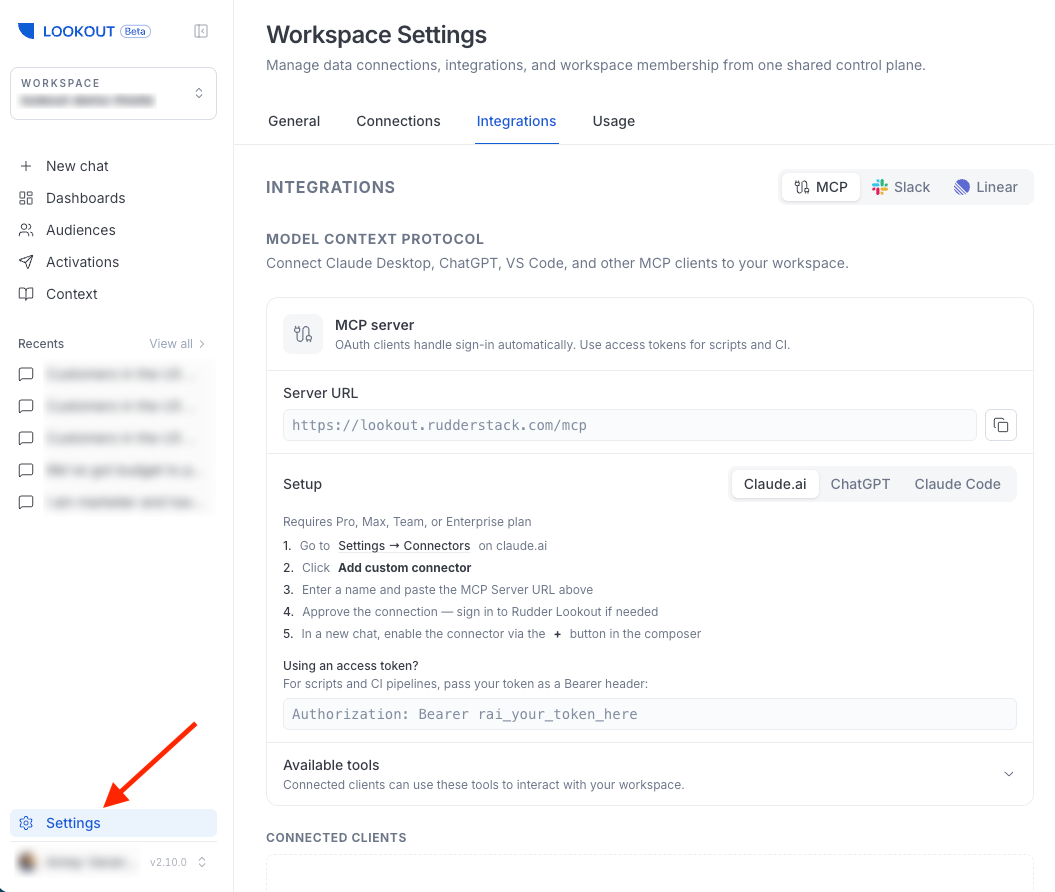
<h2 id="where-to-connect-tools">Where to connect tools</h2><p>You connect most tools from <strong>Settings</strong>, where the integrations are spread across a few tabs. External AI tools are set up from <strong>Settings</strong> &gt; <strong>Integrations</strong>.</p>

<figure class="image--main "  >
    <a 
         href="/docs/images/lookout/lookout-settings.webp"
        
        >
        <img src="/docs/images/lookout/lookout-settings.webp" 
         alt="Lookout workspace settings"  
         
         
        decoding="async" loading="lazy" class="img-shortcode"/>
    </a>
    
</figure>

<!-- end-chunk -->
<!-- begin-chunk -->
<h2 id="what-you-can-connect">What you can connect</h2><table>
<thead>
<tr>
<th>Tool</th>
<th><div>What it unlocks</div></th>
<th>Where to connect</th>
<th>Who can connect?</th>
</tr>
</thead>
<tbody>
<tr>
<td><a href="https://www.rudderstack.com/docs/activate/lookout/integrations/rudderstack/" >RudderStack</a></td>
<td>Activate audiences to your destinations, and read sources, transformations, and Tracking Plans.</td>
<td>Linked when the workspace is created</td>
<td>Workspace creator</td>
</tr>
<tr>
<td><a href="https://www.rudderstack.com/docs/activate/lookout/integrations/warehouses/" >Warehouses</a></td>
<td>Ask questions of your data and build audiences from it (read-only). Link repositories to a warehouse here.</td>
<td><strong>Settings</strong> &gt; <strong>Connections</strong> &gt; <strong>Warehouses</strong></td>
<td>Admin</td>
</tr>
<tr>
<td><a href="https://www.rudderstack.com/docs/activate/lookout/integrations/github/" >GitHub</a></td>
<td>Read repositories for context — files, commits, and pull-request diffs.</td>
<td><strong>Settings</strong> &gt; <strong>Connections</strong> &gt; <strong>Source Control</strong></td>
<td>Admin — any member uses repo tools</td>
</tr>
<tr>
<td><a href="https://www.rudderstack.com/docs/activate/lookout/integrations/slack/" >Slack</a></td>
<td>Chat with the agent from a Slack DM or a bound channel.</td>
<td><strong>Settings</strong> &gt; <strong>Integrations</strong></td>
<td>Admin</td>
</tr>
<tr>
<td><a href="https://www.rudderstack.com/docs/activate/lookout/integrations/external-mcp/" >External AI Tools</a></td>
<td>Let approved external AI tools call a curated set of Lookout&rsquo;s tools.</td>
<td><strong>Settings</strong> &gt; <strong>Integrations</strong></td>
<td>Any member — if enabled for your deployment</td>
</tr>
</tbody>
</table>
<p>See <a href="https://www.rudderstack.com/docs/activate/lookout/integrations/" >Integrations</a> for full capability and setup details.</p>
<!-- end-chunk -->
<!-- begin-chunk -->
<h2 id="where-to-start">Where to start</h2><p>Your <strong>RudderStack workspace</strong> is linked when you create the Lookout workspace, so the first thing to add is a <strong>warehouse</strong> — it is what lets the agent answer questions about your data and build audiences from it.</p>
<p>From there, add integrations as your team needs them:</p>
<ul>
<li>Add <strong>GitHub</strong> under <strong>Connections</strong> &gt; <strong>Source Control</strong> if you want the agent to read code for context, then link repositories to a warehouse so the agent knows which code describes which data</li>
<li>Install <strong>Slack</strong> to bring the agent into the channels where your team already works</li>
</ul>

<html lang="en">
<blockquote class="info">
  <div class="tip-quote">
    
    <div class="tip-text"><p>Most connections are made by a workspace admin. Connecting a system is a workspace-level decision — once connected, the agent can use it on behalf of any member.</p>
<p>See <a href="https://www.rudderstack.com/docs/activate/lookout/workspaces/roles/" >Roles and Permissions</a> for more details.</p>
</div>
  </div>
</blockquote>

</html>

