Access Management Policies Overview
5 minute read
This guide introduces the concept of an access policy in RudderStack’s Access Management system.
Overview
An access policy is a bundle of configured permissions. The process of configuring an access policy is the same for a Baseline Workspace Policy, Group Policies, Member Policies, and Access Tokens.
The permissions within an access policy are organized into two broad categories:
Resource permissions
The Resources section lets you configure permissions for all RudderStack resources. These include:
- Event Stream Sources and Destinations
- Reverse ETL Sources created via tables, SQL models, and Audiences
- Transformations and Transformation Libraries
- Tracking Plans and Data Catalog
- Profiles
- Ability to override Alerts and retry warehouse syncs (for both sources and destinations).
- Bot Management, Event Blocking, and the ability to manage Credentials to securely store sensitive keys and secrets for use in transformations.
For many resources, you can configure permissions at a resource level, meaning you can choose a subset of resources to which the permission applies.
A sample resource permissions policy configuration for a workspace is shown below:

Edit, Connect, and Create & Delete permissions
You can assign Edit, Connect, and Create & Delete permissions to resources.
| Permission | Description |
|---|---|
| Edit | Make changes to the configuration of resources. |
| Connect | Connect two resources. |
| Create & Delete | Create or delete resources for a resource type. |
Permissions dependencies
Depending on the type of resource, some permissions have dependencies across resources. The table below provides details on dependencies.
| Resource | Permission | Dependencies |
|---|---|---|
| Connect | Edit and Connect permissions are required on both resources (source and destination, transformation and destination, source and Tracking Plan, etc.) to make a successful connection |
| Data Catalog | Edit events and properties that are part of a Tracking Plan | Edit permission for that Tracking Plan |
PII permissions
The configurable PII permissions feature is available in the Enterprise plan only.
The PII section lets you configure permissions for viewing parts of the platform where payloads might contain PII. These include:
Live events from Event Stream pipelines (Sources, Destinations, and Transformations)
Live events from Reverse ETL sources (created via tables, SQL models, or Audiences)
Sample events that include:
- Destination delivery failures
- Transformation errors
- Tracking Plan violations
Configurable permissions
The following table lists all the configurable PII permissions:
| PII permission | Description |
|---|---|
| Destination Live Events | View live events for a destination |
| Destination Failure Samples | View failure samples for a destination |
| Destination Data Access | Access data from the Activation API |
| Event Stream Source Live Events | View live events ingested by an Event Stream source |
| Table Live Events | View live events from a Reverse ETL source created via a warehouse table |
| Audience Live Events | View live events from a Reverse ETL source created via an Audience |
| SQL Model Live Events | View live events from a Reverse ETL source created via a SQL Model |
| Reverse ETL Sync Failure Samples | View failure samples for a Reverse ETL sync |
| rETL Data Access | View unmasked PII in Data Graph model previews, and the failed records list and drill-in for a Reverse ETL sync |
| Transformation Live Events | View live events flowing through a transformation |
| Transformation Failure Samples | View failure samples for a transformation |
| Tracking Plan Violations | View Tracking Plan violations |
PII permissions for transformations connected to destinations
If you connect a transformation to a destination, you will see transformation failures (which are a part of that pipeline) along with other event failure metrics in the destination’s Events tab and Health dashboard.
In this case, you need only the Destination Failure Samples PII permission for the specific destination — the Transformation Failure Samples PII permission is not required.
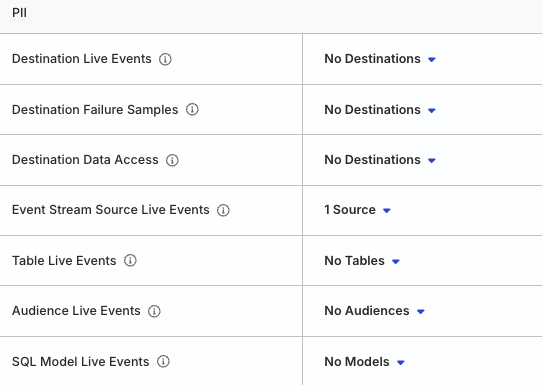
A sample PII policy configuration as a part of the Baseline Workspace Policy is shown below:

Granular resource and PII permissions
The granular resource and PII restrictions apply across both the RudderStack dashboard and API layers, ensuring comprehensive privacy control.
You can configure Edit and PII permissions for specific resources within your workspace. To grant Edit permission for a subset of Event Stream sources, click the dropdown next to Event Streams and select the sources.

Similarly, you can grant PII access to Live Events for a subset of sources:

Example
Suppose a workspace has three Event Stream sources (S1, S2, and S3) and three destinations (D1, D2, and D3). You can configure the Baseline Workspace Policy to grant:
- Edit permission only for sources
S1andS2 - Edit permission only for destinations
D1andD2 - Connect permission for sources
- Connect permission for destinations
- PII permission to view live events only for source
S1
The baseline access policy then looks as follows:

What the member can do
A member inheriting the above baseline policy will be able to:
- Edit only sources
S1andS2 - Edit only destinations
D1andD2 - Connect sources
S1andS2to destinationsD1andD2 - View Live Events for source
S1
What the member cannot do
The member will not be able to:
- Edit source
S3 - Edit destination
D3 - Make any connections to source
S3 - Make any connections to destination
D3 - View Live Events for sources
S2andS3 - View Live Events or failure samples for destinations
D1,D2, andD3
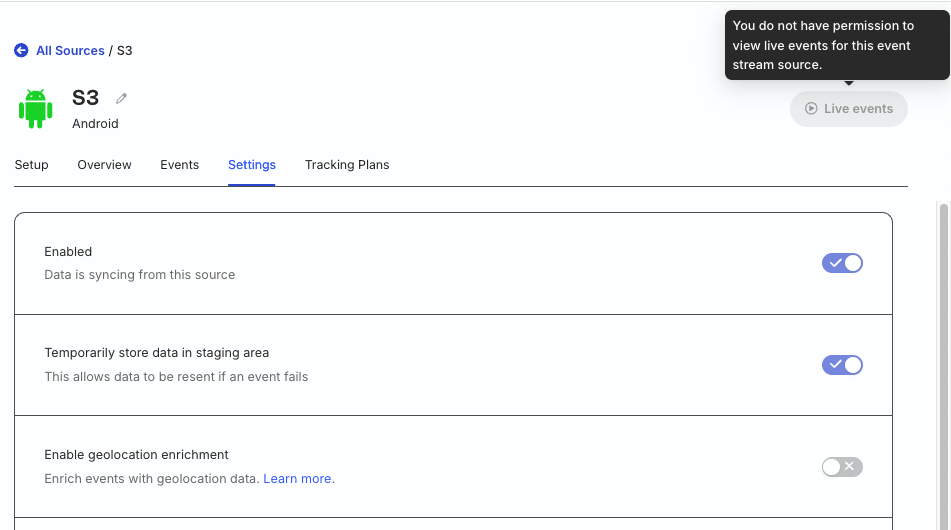
Members without the above granular permissions will see greyed-out UI elements with explanatory tooltips, as shown below:
Without resource permissions

Without PII permissions
Plan-wise limits
See the Plan-wise Features guide for more details on granular resource and PII permission limits across different RudderStack plans.
