Plan-wise Access Management Features
3 minute read
This reference provides a complete breakdown of Access Management feature availability and limits across all RudderStack plans.
Advanced features like customizable baseline workspace policy, unlimited groups, and granular resource and PII permissions are available in the Enterprise plan only.
Overview
| Feature | Free | Growth | Enterprise |
|---|---|---|---|
| Member management | Limited to 10 members per organization | Unlimited members | Unlimited members |
| Configurable Workspace Default Policy | |||
| Groups | Limit of 3 groups per organization | Unlimited groups | |
| Granular resource permissions | |||
| Granular PII access controls |
Member management
All RudderStack plans include member management capabilities with different limits.
Member limits
| Plan | Member limit |
|---|---|
| Free | 10 members per organization |
| Growth | Unlimited |
| Enterprise | Unlimited |
Available roles
All plans include the following organization roles:
| Role | Access |
|---|---|
| Admin | Full organization access. |
| Member | Effective set of permissions within a workspace, computed by aggregating:
|
Groups
Groups enable creation of custom roles and streamline permissions configuration for large teams.
| Plan | Availability | Group limit |
|---|---|---|
| Free | Not available | |
| Growth | 3 groups per organization | |
| Enterprise | No limit |
Baseline Workspace Policy
Admins in the Free and Growth plans will see a greyed out Baseline Workspace Policy tab with the following message:
“Upgrade to access this feature and additional capabilities.”
Baseline Workspace Policy allows Admins to configure the default workspace policy beyond view-only access for all members.
| Plan | Availability | Notes |
|---|---|---|
| Free | Admins cannot configure the Baseline Workspace Policy | |
| Growth | Admins cannot configure the Baseline Workspace Policy | |
| Enterprise | Admins can configure the Baseline Workspace Policy |
Granular resource permissions
Granular permissions let Admins control access to specific resources within your workspace.
| Plan | Availability | Resource selection | Access to future resources |
|---|---|---|---|
| Free | Select all and Include all future resources are selected by default and cannot be toggled off | Automatic inclusion | |
| Growth | Select all and Include all future resources are selected by default and cannot be toggled off | Automatic inclusion | |
| Enterprise | Admins can select specific resources and choose whether to include future resources | Configurable |
Admins in Free and Growth plans will see the individual resources greyed out with only the option to select/deselect all resources, as seen in the below image. The toggle for giving access to any new resources created in the future will be enabled by default and it can’t be toggled off.

Granular PII access controls
The ability to configure PII permissions is available in the Enterprise plan only.
Free and Growth plan users will have all PII permissions by default.
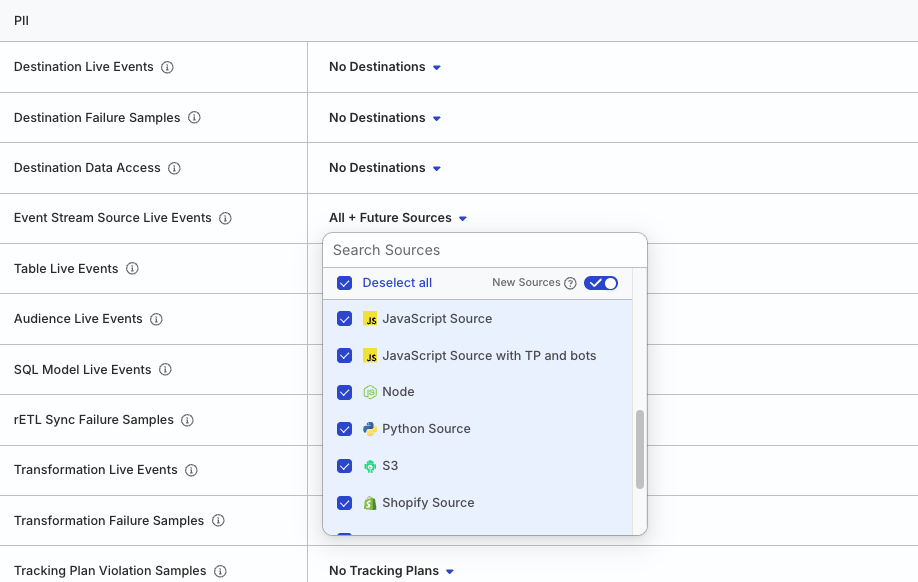
PII (Personally Identifiable Information) access controls let you restrict access to sensitive data features, ensuring compliance with data regulations like SOC2, GDPR, CCPA, and HIPAA.
With granular PII access controls, Admins will see the PII section with the option to configure PII permissions for specific resources, as seen in the below image.
References
- Access Management Overview
- Member Management
- Baseline Workspace Policy
- Group Workspace Policies
- Member Workspace Policy
- RudderStack Pricing
