Groups enable creation of custom roles and streamline permissions configuration for large teams.
Plan
Availability
Group limit
Free
Not available
Starter
Not available
Growth
3
You can create up to 3 groups per organization
Enterprise
No limit
Baseline Workspace Policy
Baseline Workspace Policy allows Admins to configure the default workspace policy beyond view-only access for all members.
Plan
Availability
Notes
Free
Admins cannot configure the Baseline Workspace Policy
Starter
Admins cannot configure the Baseline Workspace Policy
Growth
Admins cannot configure the Baseline Workspace Policy
Enterprise
Admins can configure the Baseline Workspace Policy
Admins in RudderStack Free, Starter, and Growth plans will see a greyed out Baseline Workspace Policy tab with the following message:
“Upgrade to access this feature and additional capabilities.”
Granular resource permissions
Granular permissions let Admins control access to specific resources within your workspace.
Plan
Availability
Resource selection
Access to future resources
Free
Select all and Include all future resources are selected by default and cannot be toggled off
Automatic inclusion
Starter
Select all and Include all future resources are selected by default and cannot be toggled off
Automatic inclusion
Growth
Select all and Include all future resources are selected by default and cannot be toggled off
Automatic inclusion
Enterprise
Admins can select specific resources and choose whether to include future resources
Configurable
Admins in RudderStack Free, Starter, and Growth plans will see the individual resources greyed out with only the option to select/deselect all resources, as seen in the below image. The toggle for giving access to any new resources created in the future will be enabled by default and it cannot be toggled off.
Granular PII access controls
PII (Personally Identifiable Information) access controls let you restrict access to sensitive data features, ensuring compliance with data regulations like SOC2, GDPR, CCPA, and HIPAA.
The ability to configure PII permissions is available in RudderStack’s Enterprise plan only.
All members of an organization in non-Enterprise plans will have all PII permissions by default.
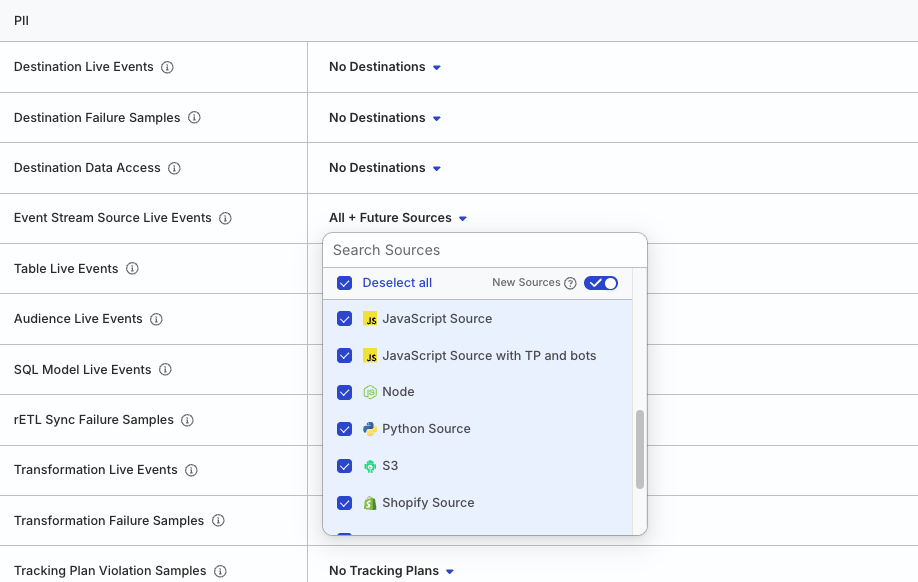
Admins in RudderStack Enterprise plan will see the PII section with the option to configure PII permissions for specific resources, as seen in the below image.
Admins in RudderStack Free, Starter, and Growth plans will not see the PII section as Limited PII Access is available only in RudderStack’s Enterprise plan.
This site uses cookies to improve your experience while you navigate through the website. Out of
these
cookies, the cookies that are categorized as necessary are stored on your browser as they are as
essential
for the working of basic functionalities of the website. We also use third-party cookies that
help
us
analyze and understand how you use this website. These cookies will be stored in your browser
only
with
your
consent. You also have the option to opt-out of these cookies. But opting out of some of these
cookies
may
have an effect on your browsing experience.
Necessary
Always Enabled
Necessary cookies are absolutely essential for the website to function properly. This
category only includes cookies that ensures basic functionalities and security
features of the website. These cookies do not store any personal information.
This site uses cookies to improve your experience. If you want to
learn more about cookies and why we use them, visit our cookie
policy. We'll assume you're ok with this, but you can opt-out if you wish Cookie Settings.