Migration Example: Personal Access Tokens

Example of how migration works when a user creates a Personal Access Token with different scopes.
Available Plans
  • starter
  • growth
  • enterprise

announcement

Self-serve migration availability

The self-serve migration feature for users on the legacy RBAC system is currently gated and will be generally available on March 16, 2026.

Contact RudderStack Support if you’d like to enable it for your organization in the meantime.

The examples in this guide show how Personal Access Tokens with different scopes are migrated.

Scenario 1

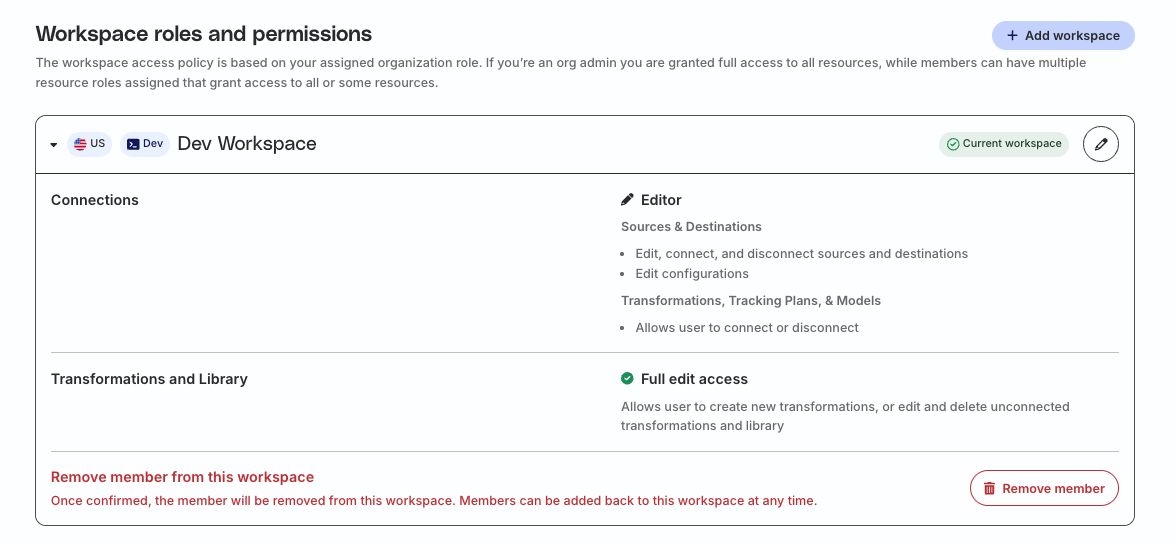
Suppose a user has the following permissions in the legacy Permissions Management (RBAC) system:

  • Connections Editor role with permissions to edit, connect, and disconnect resources (sources, destinations, Tracking Plans, etc.)
  • Full edit access to create, edit, and delete transformations and transformation libraries
Connections Editor role permissions

Read-only scope

If the above user creates a Personal Access Token with the Read-Only scope, the token will have the following permissions after migration:

What they can do

  • View PII data in the workspace

What they cannot do

  • Create and delete resources in the workspace, including transformations and transformation libraries
  • Edit resource configurations, including transformations and transformation libraries
  • Connect and disconnect resources

Read-write scope

If the above user creates a Personal Access Token with the Read-Write scope, the token will have the following permissions after migration:

What they can do

  • Edit resource configurations, including transformations and transformation libraries
  • Connect and disconnect resources, including transformations and transformation libraries
  • Create and delete transformations and transformation libraries
  • View PII data in the workspace

What they cannot do

  • Create and delete other resources in the workspace (sources, destinations, Tracking Plans, etc.)

Scenario 2

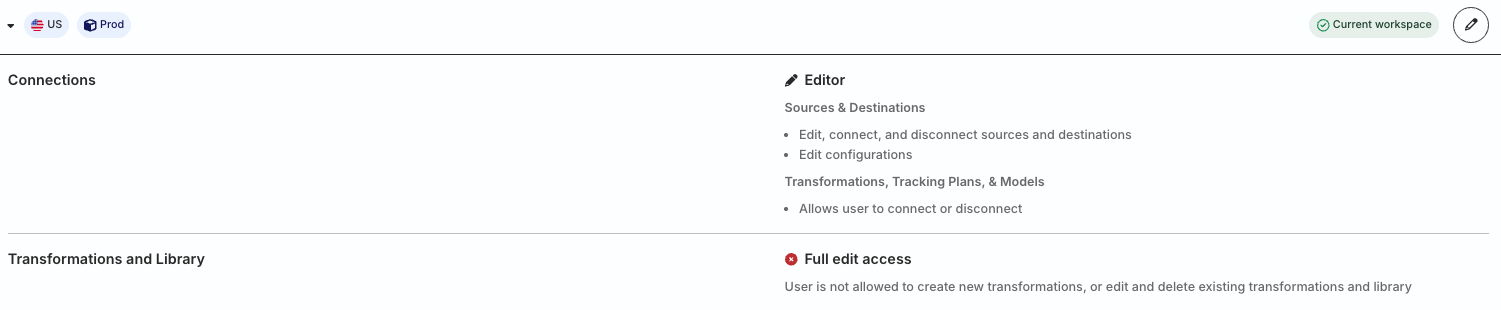
Suppose a user has the following permissions in the legacy RBAC system:

  • Connections Editor role with permissions to edit, connect, and disconnect resources (sources, destinations, Tracking Plans, etc.)
  • No edit access to create, edit, and delete transformations and transformation libraries

Read-only scope

If the above user creates a Personal Access Token with the Read-Only scope, the token will have the following permissions after migration:

What they can do

  • View PII data in the workspace

What they cannot do

  • Create and delete resources in the workspace, including transformations and transformation libraries
  • Edit resource configurations, including transformations and transformation libraries
  • Connect and disconnect resources

Read-write scope

If the above user creates a Personal Access Token with the Read-Write scope, the token will have the following permissions after migration:

What they can do

  • Edit resource configurations, except transformations and transformation libraries
  • Connect and disconnect resources, including transformations and transformation libraries
  • View PII data in the workspace

What they cannot do

  • Create and delete resources in the workspace, including transformations and transformation libraries

Questions? We're here to help.

Join the RudderStack Slack community or email us for support